

GitOps for Anaconda Platform
The following diagram illustrates a typical CI/CD pattern: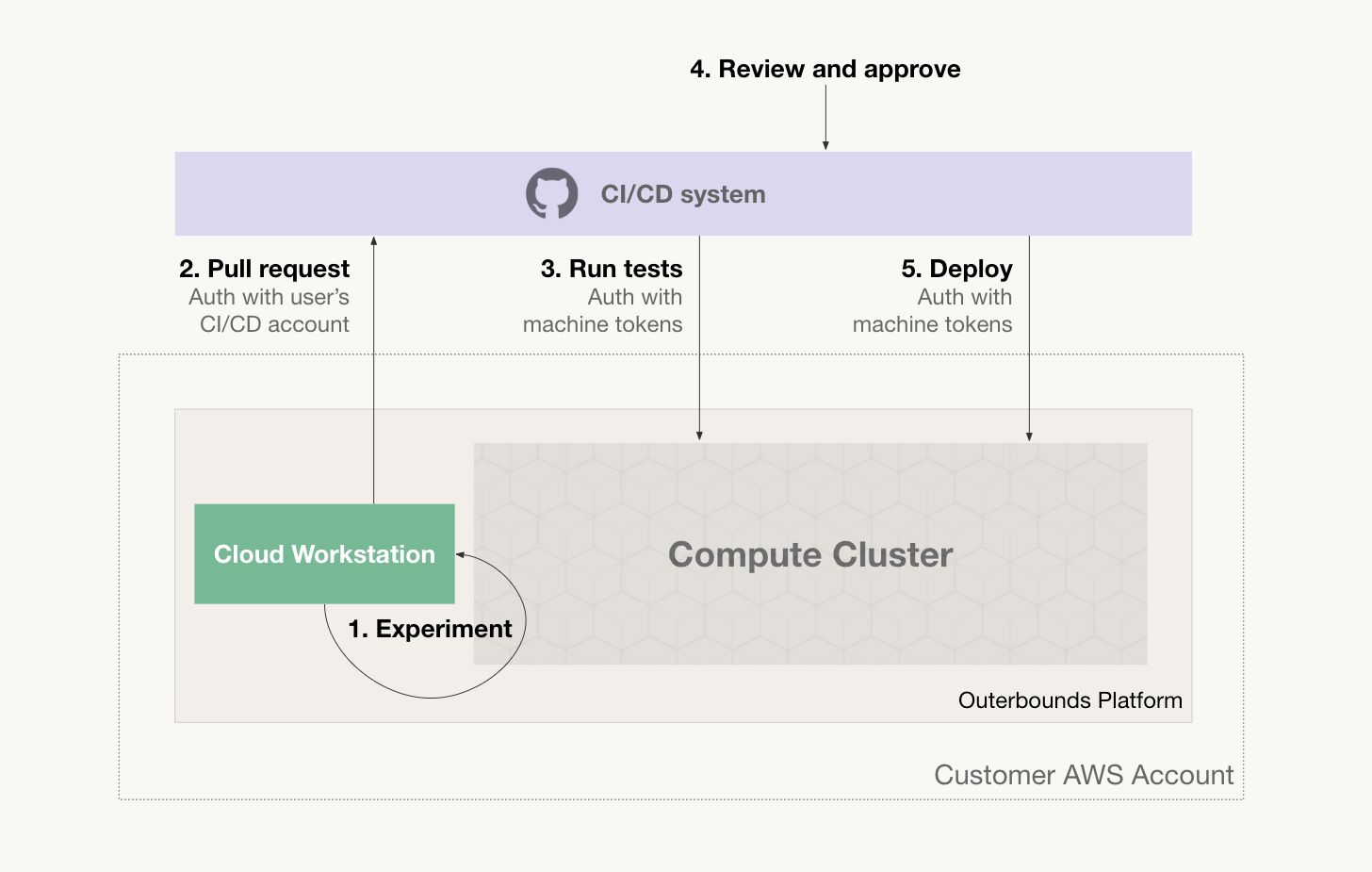
1
Experiment
The user experiments and prototypes code on a cloud workstation or locally on a laptop. The user can test their code at scale quickly and autonomously on the platform’s cluster.
2
Pull request
When the code works adequately, the user commits it and opens a pull request. They authenticate with the CI/CD system using their personal credentials.
3
Run tests
The CI/CD system, such as GitHub Actions or CircleCI, launches a test suite automatically when a pull request is opened. The CI/CD system submits workloads to the platform, authenticating as a machine user.
4
Review and approve
After tests pass, a human reviewer reviews the pull request. The reviewer can tag the pull request as approved, and a corresponding Metaflow tag can be applied to test runs as well, signaling a successful PR.
5
Deploy
After the PR is approved, the CI/CD system deploys the flow either as a new production version or as a new
@project variant, running concurrently with the production version so its performance can be evaluated live.Supported CI/CD platforms
Anaconda Platform supports all major CI/CD platforms through OIDC-based authentication:- GitHub Actions: Native OIDC support
- GitLab CI/CD: Native OIDC support via
id_tokens - Azure DevOps: Azure AD federation
- CircleCI: OIDC token support
- Configure a machine user on the platform. See Programmatic access via machine users for per-provider claim fields.
- Set up OIDC authentication in your CI/CD config (YAML examples below).
- Use
obproject-deployto deploy your project.
Verifying your deploy
obproject-deploy tags each workflow it deploys with lineage metadata: the commit hash being deployed, and an identifier for the CI run that triggered the deploy when running in CI. To confirm a deployment succeeded, open the workflow in the UI: select the project, then Workflows, and then select the workflow. The workflow details show the tags applied to its runs:
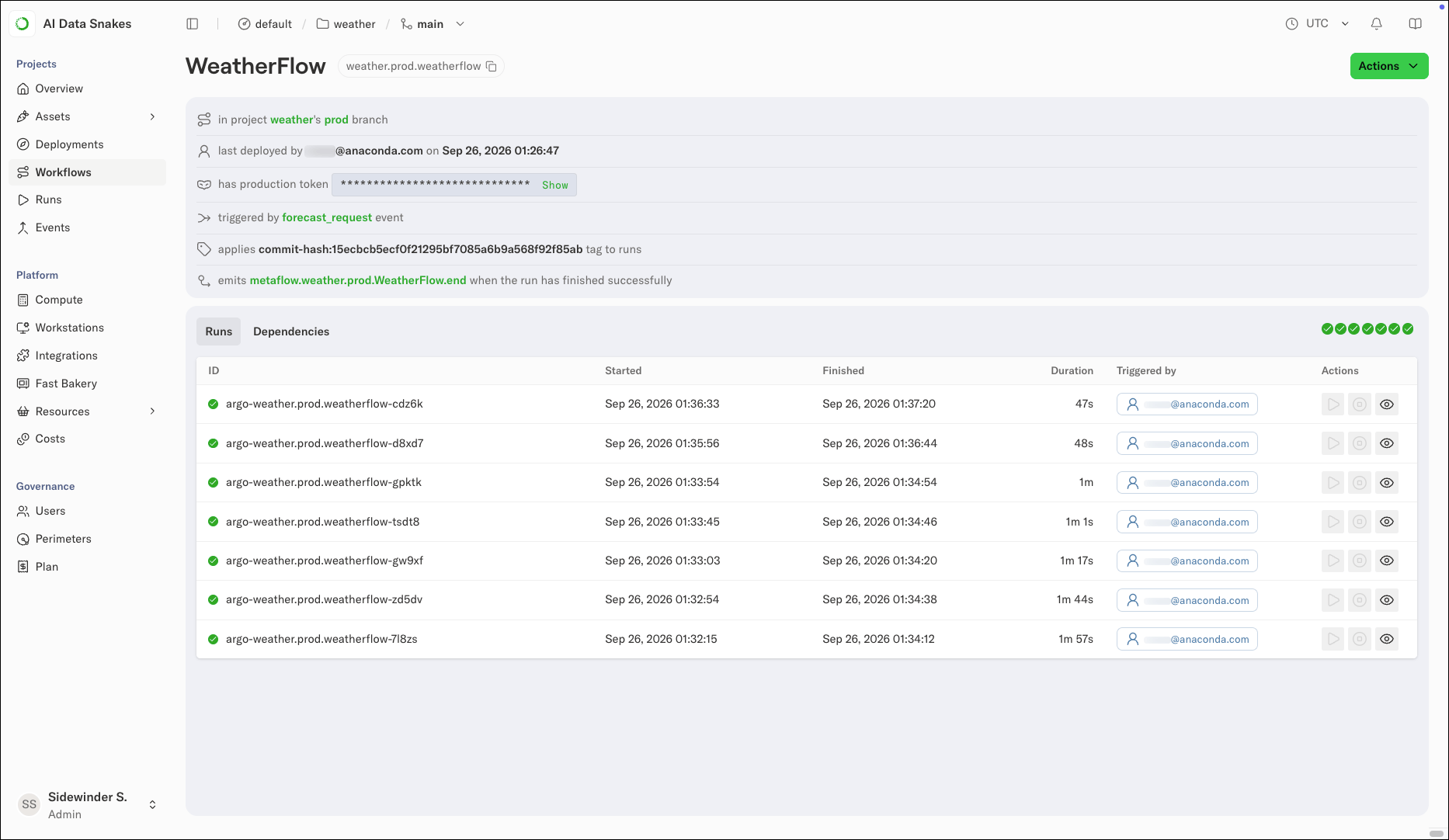
Tagging deployments with: commit-hash:15ecbcb5ecf0f21295bf7085a6b9a568f92f85ab.
If you do not see the tags, the deploy did not complete. Check the CI job’s logs for the obproject-deploy step and verify the machine user authenticated successfully against auth.<YOUR_DEPLOYMENT_URL>.
Machine user naming convention
The YAML examples below derive the machine user name from your project name:- The machine user must be named with hyphens rather than underscores. For example,
my-project-cicd, notmy_project-cicd. The underscore-to-hyphen normalization in the YAML exists so a project namedmy_projectresolves to a machine user namedmy-project-cicd. - To use a different name, such as a team-shared machine user across multiple projects, set
cicd_userinobproject.toml:
yq ".cicd_user // \"$DEFAULT\"", so an explicit value takes precedence over the derived default.
The outerbounds service-principal-configure flag reference
The auth command takes a different flag per provider:
In all cases, the command also takes --name <SERVICE_PRINCIPAL_NAME>, --deployment-domain <DEPLOYMENT_DOMAIN>, and --perimeter <PERIMETER>. To read these values from obproject.toml instead of passing them explicitly, use --from-obproject-toml.
Using Anaconda Platform with GitHub Actions
The GitHub Actions on OBP demo repository walks through the key workflows in practice.Example GitHub Actions workflow
Using Anaconda Platform with GitLab CI/CD
GitLab CI/CD supports OIDC authentication via theid_tokens keyword. Use the example below as a starting template.