- Packages
- Environments (Beta)
- Models
1
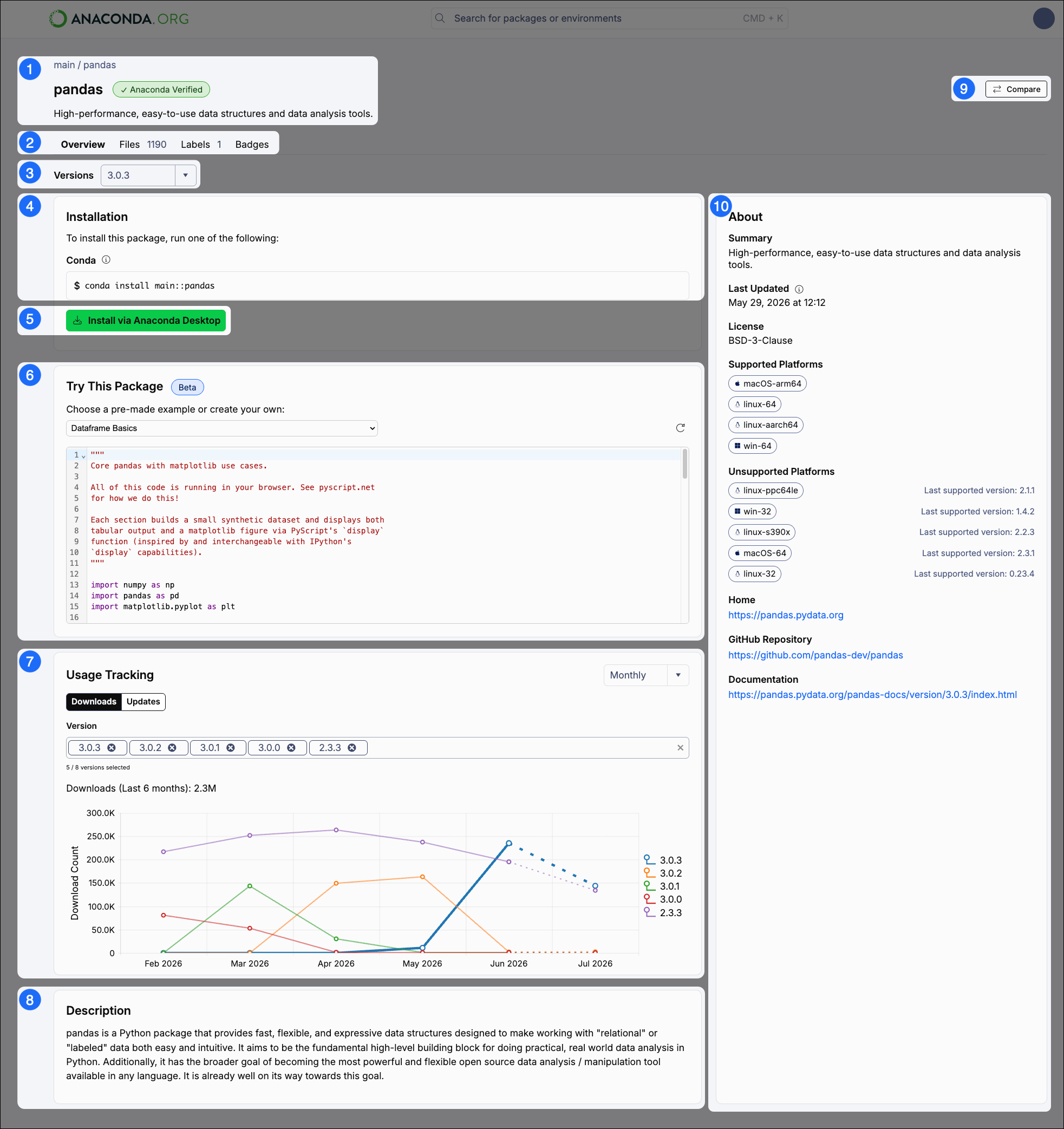
Package introduction
This section contains:
- Breadcrumbs linking back to the package’s channel (channel / package). Select the channel to view its homepage.
- The name of the package.
- A badge describing whether the package is or built.
- A short package description.
2
Tabs
A set of tabs giving you access to more package information:
3
Version
Use the dropdown to select the package version you want to download. The information on the Overview tab changes when the version changes. The latest version is selected by default.
4
Installation
Installation commands for the package version selected. Select the command to copy it for use in your command line interface (CLI).
5
Install via Anaconda Desktop
Click Install via Anaconda Desktop to install this package into your environment using Anaconda Desktop. For more information, see Packages.
6
Try This Package
This feature is in beta and is only available for certain packages.
7
Usage Tracking
Use the Downloads and Updates tables to view the usage statistics for your selected package.
8
Description
A description of the selected package.
9
Compare button
An Compare button for comparing this package to others. For more information, see Comparing packages.
10
About
General information about the selected package, including the date and time when the package was last updated, the package’s license, supported (and unsupported) platforms and architectures, and relevant links for more information about the package.