Mirroring is the process of copying data from a source and then storing it in a new location, often on a scheduled basis. When the mirror’s source updates its contents, the mirror’s contents update to match the next time it runs. It is possible to mirror just a subset of the source’s contents as well, if the source contains more data than you need or can store. Mirroring ensures your channels are always up to date with the latest from the source.
Anaconda recommends that channels contain only one mirror each to prevent conflicts between package sources.
Mirroring is restricted to users whose role provides write or manage permissions for Channel Mirrors and/or Subchannel Mirrors categories.
When creating a mirror, the recommended workflow is:
Select a channel you want to contain your mirror.
Freeze your channel.
Open the Manage dropdown and select Create Mirror.
Complete the Create mirror form. Configuration options differ based on the type of mirror you are creating:
Conda
Std Python
Std R
1
Mirror Name
Enter a name for your mirror. Anaconda recommends you name your mirror something descriptive for your end users.
2
Mirroring Mode
Choose whether you want your mirror to be active or passive.Active Mirroring: Downloads packages from the source channel immediately to your local server.
Some repository channels require a large amount of storage (for example, Anaconda’s public repository is 700GB, conda-forge is 3TB, and PyPI is 10TB), and as a rule, the larger the mirror, the longer the wait time for it to complete.
Passive Mirroring: Creates a metadata file listing all packages on the mirrored server. Packages are downloaded when users request them via conda install <PKG_NAME>.
Anaconda recommends establishing your mirrors as passive. Active mirrors take longer to complete than passive mirrors, but regardless of which mirroring mode you choose, the available packages are the same.
3
External Source URL
Enter the URL of the conda channel to mirror.
Anaconda recommends creating mirrors for the following channels:
https://repo.anaconda.cloud/pkgs/main
https://repo.anaconda.cloud/pkgs/r (End of Support as of November 2025)
https://repo.anaconda.cloud/pkgs/msys2 (End of Support as of September 2026)
https://repo.anaconda.cloud/repo/main-x
If your external source channel is another Package Security Manager channel, you must use the format https://<URL>/api/repo/<CHANNEL_NAME>.If your external source channel is another Package Security Manager channel that contains CRAN R packages, you must use the format https://<URL>/api/repo/<CHANNEL_NAME>/cran.If your external source channel is a virtual channel from Package Security Manager (Cloud), you must use the format https://repo.anaconda.cloud/repo/t/<TOKEN>/<ORG_ID>/<CHANNEL_NAME>.If your external source channel is one of the Anaconda Channels or Community Package Channels (Anaconda Extended and Anaconda Community Channel are End of Support as of September 2026) from Package Security Manager (Cloud), you must use the format https://repo.anaconda.cloud/t/<TOKEN>/repo/<CHANNEL_NAME>.When creating mirrors that use Package Security Manager (Cloud) channels as the external source, replace <TOKEN> with your organization access token, and <ORG_ID> with your organization ID.
4
Mirror Type
Select Conda as the mirror type. This ensures that only conda packages (.conda, .tar.bz2) will be mirrored from the external source channel. Packages in the source channel that are not conda packages are not mirrored.
5
Mirroring Frequency
Set the frequency you want your mirror to run and update your packages. The default value instructs the mirror to update at midnight on the first day of every month.Custom frequencies use cron expressions to determine when they run.
Mirroring large repositories can take several hours. Anaconda recommends against setting a frequency greater than Daily to avoid collisions between currently running and updating mirrors.
6
Run Now
Select this checkbox to start your mirror when you click Save & Run. If the Run Now checkbox is not selected, your changes are saved, and the mirror runs the next time its frequency configuration instructs it to do so.
7
Assign Mirror Policy
Toggle between using the policy that is applied to the channel or selecting a policy to apply to the mirror. For more information about policies, see Policies.
You cannot apply a policy to a mirror if it is already applied to the channel.Mirror policies override channel policies.
8
View Applied Policy
View details of the policy applied to the mirror.
9
Cancel/Save & Run
Click Cancel at any time to quit your mirror form completion and discard any set parameters. Click Save & Run to start your mirror.
1
Mirror Name
Enter a name for your mirror. Anaconda recommends you name your mirror something descriptive for your end users.
2
Mirroring Mode
Choose whether you want your mirror to be active or passive.Active Mirroring: Downloads packages from the source channel immediately to your local server.
Some repository channels require a large amount of storage (for example, Anaconda’s public repository is 700GB, conda-forge is 3TB, and PyPI is 10TB), and as a rule, the larger the mirror, the longer the wait time for it to complete.
Passive Mirroring: Creates a metadata file listing all packages on the mirrored server. Packages are downloaded when users request them via conda install <PKG_NAME>.
Anaconda recommends establishing your mirrors as passive. Active mirrors take longer to complete than passive mirrors, but regardless of which mirroring mode you choose, the available packages are the same.
3
External Source URL
Enter the URL of the Python package to mirror.
4
Mirror Type
Select Std Python as the mirror type. This ensures that only Python packages (.py, .pyc, .pyd, .whl, .egg, .tar.gz, for example) are mirrored from the source repository. Packages in the source channel that are not Python packages are not mirrored.
5
Mirroring Frequency
Set the frequency you want your mirror to run and update your packages. The default value instructs the mirror to update at midnight on the first day of every month.Custom frequencies use cron expressions to determine when they run.
Mirroring large repositories can take several hours. Anaconda recommends against setting a frequency greater than Daily to avoid collisions between currently running and updating mirrors.
6
Run Now
Select this checkbox to start your mirror when you click Save & Run. If the Run Now checkbox is not selected, your changes are saved, and the mirror runs the next time its frequency configuration instructs it to do so.
7
Mirroring Filters
Because policy filters only work for conda mirrors, Standard Python mirrors must use the Mirroring Filters section to specify which packages should be mirrored from the source channel.
8
Exclude
List packages to exclude from the mirror by name here. You can also exclude packages by using wildcards. For example, p* excludes all packages that start with the letter p.
9
Include
List exceptions to the exclusion list here. For example, if you want to include Python in your mirror, but you have used the exclusion filter p* to exclude all packages that start with the letter p, you can include Python by adding python here.
10
View Channel Filters
View details of the Mirroring Filters applied to the channel.
11
Cancel/Save & Run
Click Cancel at any time to quit your mirror form completion and discard any set parameters. Click Save & Run to start your mirror.
1
Mirror Name
Enter a name for your mirror. Anaconda recommends you name your mirror something descriptive for your end users.
2
Mirroring Mode
Choose whether you want your mirror to be active or passive.Active Mirroring: Downloads packages from the source channel immediately to your local server.
Some repository channels require a large amount of storage (for example, Anaconda’s public repository is 700GB, conda-forge is 3TB, and PyPI is 10TB), and as a rule, the larger the mirror, the longer the wait time for it to complete.
Passive Mirroring: Creates a metadata file listing all packages on the mirrored server. Packages are downloaded when users request them via conda install <PKG_NAME>.
Anaconda recommends establishing your mirrors as passive. Active mirrors take longer to complete than passive mirrors, but regardless of which mirroring mode you choose, the available packages are the same.
3
External Source URL
Enter the URL of the R package repository to mirror.
4
Mirror Type
Select “Std R” as the mirror type. This ensures that only R packages (.R, .RData, .rda, .RDS, .Rd, .Rproj, for example) are mirrored from the source repository. Packages in the source channel that are not R packages are not mirrored.
5
Mirroring Frequency
Set the frequency you want your mirror to run and update your packages. The default value instructs the mirror to update at midnight on the first day of every month.Custom frequencies use cron expressions to determine when mirrors run.
Mirroring large repositories can take several hours. Anaconda recommends against setting a frequency greater than Daily to avoid collisions between currently running and updating mirrors.
6
Run Now
Select this checkbox to start your mirror when you click Save & Run. If the Run Now checkbox is not selected, your changes are saved, and the mirror runs the next time its frequency configuration instructs it to do so.
7
Mirroring Filters
Because policy filters only work for conda mirrors, Standard R mirrors must use the Mirroring Filters to specify which packages should be mirrored from the source channel.
8
Exclude
List packages to exclude from the mirror by name here. You can also exclude packages by using wildcards. For example, p* excludes all packages that start with the characters p.
R packages can also be excluded by License type.
9
Include
List exceptions to the exclusion list here. For example, if you want to include the plumber package in your mirror, but you have used the exclusion filter p* to exclude all packages that start with the characters p, you can include plumber by adding plumber here.
10
View Channel Filters
View details of the Mirroring Filters applied to the channel.
11
Cancel/Save & Run
Click Cancel at any time to quit your mirror form completion and discard any set parameters. Click Save & Run to start your mirror.
Allow the mirror time to complete.
How do I know when my mirror is complete?
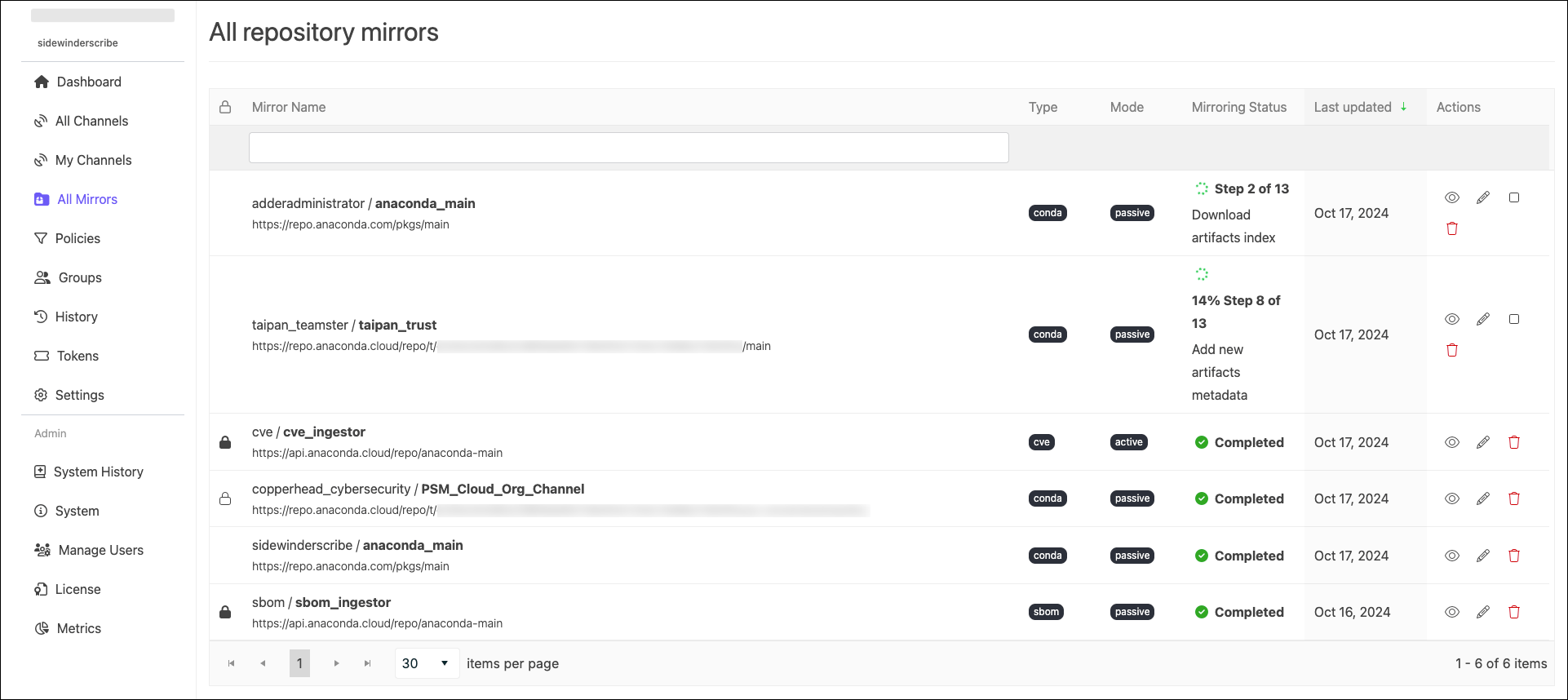
You can view the status of in-progress mirrors from the from the channel’s Mirrors tab. In-progress mirrors display which step is currently being performed with a brief description of the operation. When a mirror completes, the status updates to Completed and the date and time of completion is displayed.
Administrators can view the status of all mirrors from the Mirrors page.
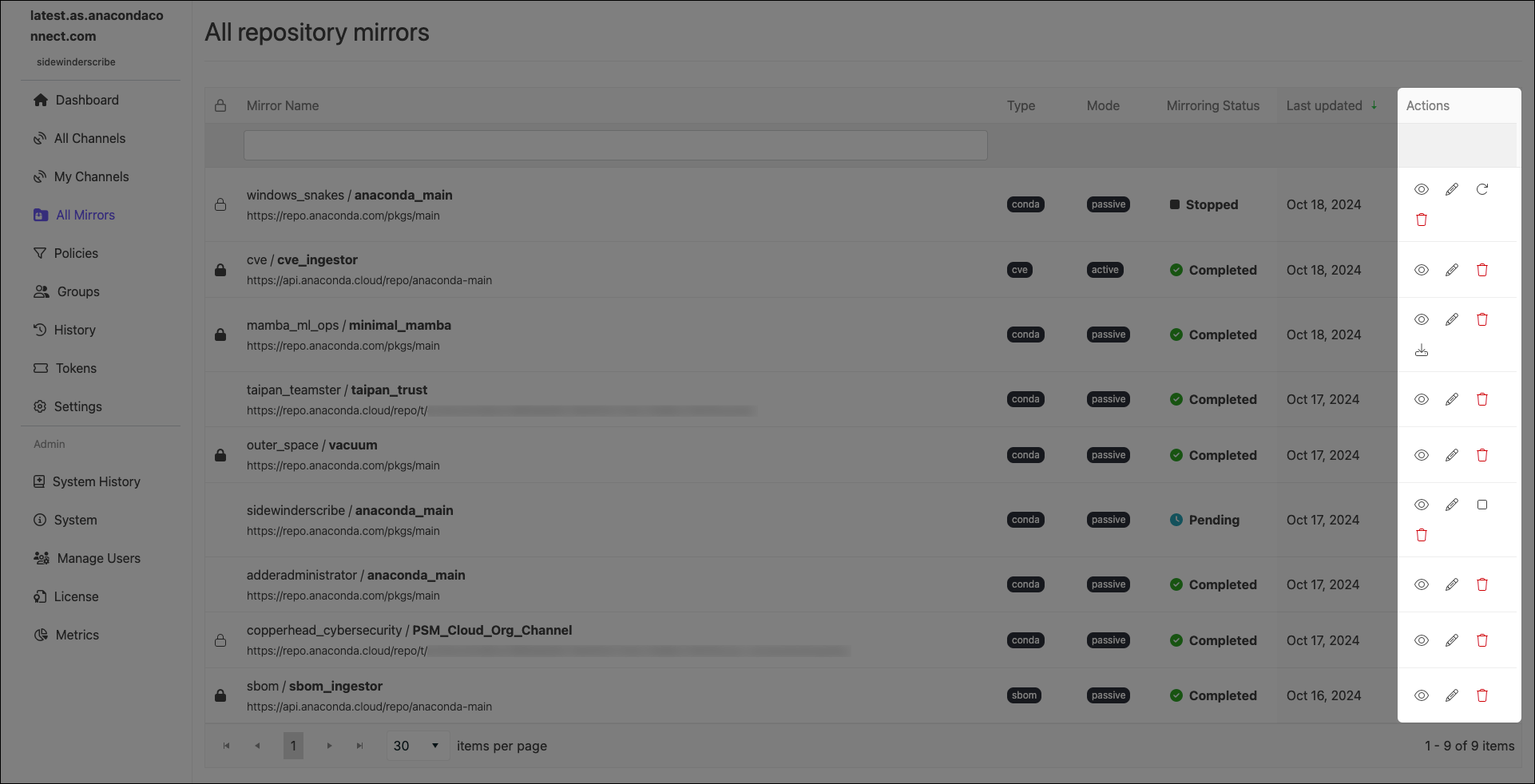
Use the icons in the Actions column to manage your mirrors:
Mirror actions can also be performed from a channel’s Mirrors tab.
Edit mirror
Edit a mirror’s configurations.
You cannot edit the mode of an established mirror.
Stop running mirror
Stop an in-progress mirror.
It can take up to 10 minutes for a mirror to fully stop. A mirror in the process of stopping will display Stopping as its mirroring status. Once it is complete, it will display Stopped as its status. Stopping a mirror does not discard the progress the mirror has made, and some packages may appear in your channel’s Packages tab.
Restart Mirror
Restart a stopped mirror.
Restarted mirrors run from the beginning of the mirroring process, not from where you stopped the run.
See details
View information about how many packages were filtered from the source, reasons for their exclusion, and whether packages were mirrored passively or actively.
Delete mirror
Delete a mirror.
Download Dependency Report
Download a dependency report (if available).A dependency report is a detailed list of all the software packages required for your specified packages to function correctly. It includes both direct dependencies (packages your specified packages require to run) and indirect dependencies (packages the dependencies require to run). A package dependency report can help you identify exactly which packages are necessary for your channel to be able to create a working environment using conda.
Dependency reports are only available for mirrors that have policies with specific configurations applied:
You must set package rules to allow packages by their names using MatchSpec protocol—a syntax for specifying package names and versions in conda
You must select the Include dependencies checkbox.
Was this page helpful?
{"docsConfig":{"theme":"mint","$schema":"https://mintlify.com/docs.json","name":"Anaconda","description":"Guides, tutorials, and reference material for Anaconda's Python, data science, and AI tools","colors":{"primary":"#1d6cf7","light":"#1d6cf7","dark":"#96f778"},"logo":{"light":"https://mintcdn.com/anaconda-29683c67/s-9WR15r5rZoaPqb/logo/light.svg?fit=max\u0026auto=format\u0026n=s-9WR15r5rZoaPqb\u0026q=85\u0026s=5996719b8530aaf065dc1ee1f39b2e67","dark":"https://mintcdn.com/anaconda-29683c67/s-9WR15r5rZoaPqb/logo/dark.svg?fit=max\u0026auto=format\u0026n=s-9WR15r5rZoaPqb\u0026q=85\u0026s=db482b1eac6af589d234160a76de3400","href":"https://www.anaconda.com/docs/main"},"favicon":"https://mintcdn.com/anaconda-29683c67/p8JNFuYYvTL8gfpM/favicon.png?fit=max\u0026auto=format\u0026n=p8JNFuYYvTL8gfpM\u0026q=85\u0026s=51a585758330bbe8f1ea032113854252","api":{"playground":{"display":"simple"}},"background":{"color":{"light":"#f4f5f8","dark":"#10121a"}},"navbar":{},"footer":{"socials":{"linkedin":"https://www.linkedin.com/company/anacondainc","github":"https://github.com/ContinuumIO","youtube":"https://www.youtube.com/c/ContinuumIo"},"links":[{"header":"Company","items":[{"label":"Anaconda Newsletter","href":"https://www.anaconda.com/newsletter"}]}]},"seo":{"metatags":{"canonical":"https://www.anaconda.com/docs"}},"styling":{"eyebrows":"breadcrumbs","latex":false},"integrations":{"ga4":{"measurementId":"G-VQTY6YKM6J"},"heap":{"appId":"758475466"}},"contextual":{"options":["claude","chatgpt","perplexity","cursor","vscode","add-mcp","copy"],"display":"header"},"navigation":{"pages":[]}},"deployment":{"deploymentMetadataValue":{"subdomain":"anaconda-29683c67","hasAudioNarration":false,"actualSubdomain":"anaconda-29683c67","customDomains":["anaconda.com"],"gitSource":{"type":"github","owner":"anaconda","repo":"documentation","deployBranch":"main","contentDirectory":"","isPrivate":true,"mountPath":"","label":""},"chroma":{"liveDeploymentHistoryId":"6ae37eb460e9fd0fd6107f10","collectionId":"3c351cc6-3f4a-42c2-9f0a-a165da51af03","schemaVersion":"v3","latestBuiltDeploymentHistoryId":"6ae37eb460e9fd0fd6107f10"},"feedback":{"thumbs":true,"contextualFeedback":{"allowEmail":true,"emailDisclaimer":"Your email will only be used to follow up on this feedback."}},"entitlements":{"AI_CHAT":{"status":"ENABLED"},"REMOVE_BRANDING":{"status":"ENABLED"},"CONTEXTUAL_FEEDBACK":{"status":"ENABLED"},"CODE_SNIPPET_FEEDBACK":{"status":"ENABLED"},"WEB_MCP":{"status":"ENABLED"},"NARRATION":{"status":"ENABLED"}},"buildId":"6ae37eb460e9fd0fd6107f10","clientVersion":"0.0.4006","searchFilterCounts":[{"language":"default","tag":"Data Science \u0026 AI Workbench","count":240},{"language":"default","tag":"Anaconda Platform","count":150},{"language":"default","tag":"Package Security Manager","count":128},{"language":"default","tag":"Anaconda CLI","count":112},{"language":"default","tag":"Guides","count":105},{"language":"default","tag":"Anaconda CLI \u0026 MCP","count":104},{"language":"default","tag":"Plugins","count":93},{"language":"default","tag":"Commands","count":91},{"language":"default","tag":"Anaconda Desktop","count":86},{"language":"default","tag":"Platform Guides","count":86}],"searchSettings":{"isFiltersEnabled":true}},"assistantConfig":{"enableAskAiButton":false,"enableStarterQuestions":true,"enableContextualStarterQuestions":true,"deflection":{"enabled":true,"email":"support@anaconda.com"}},"basePath":"/docs","hasChatPermissions":true,"hasWebMcpPermissions":true,"toggles":[{"name":"kill-isr","enabled":true,"variant":{"name":"disabled","enabled":false,"feature_enabled":true},"impressionData":false},{"name":"agent-mintlify-slack","enabled":true,"variant":{"name":"disabled","enabled":false,"feature_enabled":true},"impressionData":false},{"name":"agent-integrations-settings","enabled":true,"variant":{"name":"disabled","enabled":false,"feature_enabled":true},"impressionData":false},{"name":"automations-pr-grouping","enabled":true,"variant":{"name":"disabled","enabled":false,"feature_enabled":true},"impressionData":false},{"name":"custom-prefix","enabled":true,"variant":{"name":"disabled","enabled":false,"feature_enabled":true},"impressionData":false},{"name":"analytics-v7","enabled":true,"variant":{"name":"disabled","enabled":false,"feature_enabled":true},"impressionData":false},{"name":"user-flows-analytics","enabled":true,"variant":{"name":"disabled","enabled":false,"feature_enabled":true},"impressionData":false},{"name":"no-publish-flow","enabled":true,"variant":{"name":"disabled","enabled":false,"feature_enabled":true},"impressionData":false},{"name":"workos-onboarding","enabled":true,"variant":{"name":"disabled","enabled":false,"feature_enabled":true},"impressionData":false},{"name":"llms-txt-v2","enabled":true,"variant":{"name":"disabled","enabled":false,"feature_enabled":true},"impressionData":false},{"name":"pause-universal-search-reconcile","enabled":true,"variant":{"name":"disabled","enabled":false,"feature_enabled":true},"impressionData":false},{"name":"snapshot-serving-live","enabled":true,"variant":{"name":"disabled","enabled":false,"feature_enabled":true},"impressionData":false},{"name":"stripTemperatureMiddleware","enabled":true,"variant":{"name":"disabled","enabled":false,"feature_enabled":true},"impressionData":false},{"name":"per-site-search-delta","enabled":true,"variant":{"name":"disabled","enabled":false,"feature_enabled":true},"impressionData":false},{"name":"support-platform-pylon-zendesk","enabled":true,"variant":{"name":"disabled","enabled":false,"feature_enabled":true},"impressionData":false},{"name":"snapshot-serving","enabled":true,"variant":{"name":"disabled","enabled":false,"feature_enabled":true},"impressionData":false},{"name":"instant-rollback","enabled":true,"variant":{"name":"disabled","enabled":false,"feature_enabled":true},"impressionData":false},{"name":"granular-notifications-server","enabled":true,"variant":{"name":"disabled","enabled":false,"feature_enabled":true},"impressionData":false},{"name":"granular-notifications","enabled":true,"variant":{"name":"disabled","enabled":false,"feature_enabled":true},"impressionData":false},{"name":"editor-private-page-search","enabled":true,"variant":{"name":"disabled","enabled":false,"feature_enabled":true},"impressionData":false},{"name":"automations-fable","enabled":true,"variant":{"name":"disabled","enabled":false,"feature_enabled":true},"impressionData":false},{"name":"fixed-ai-action-pricing","enabled":true,"variant":{"name":"disabled","enabled":false,"feature_enabled":true},"impressionData":false},{"name":"automation-resolve-merge-conflict","enabled":true,"variant":{"name":"disabled","enabled":false,"feature_enabled":true},"impressionData":false},{"name":"scoped-publishing","enabled":true,"variant":{"name":"disabled","enabled":false,"feature_enabled":true},"impressionData":false},{"name":"mintql","enabled":true,"variant":{"name":"disabled","enabled":false,"feature_enabled":true},"impressionData":false},{"name":"page-level-analytics","enabled":true,"variant":{"name":"disabled","enabled":false,"feature_enabled":true},"impressionData":false},{"name":"editor-version-history-v2","enabled":true,"variant":{"name":"disabled","enabled":false,"feature_enabled":true},"impressionData":false},{"name":"billing-page-v2","enabled":true,"variant":{"name":"disabled","enabled":false,"feature_enabled":true},"impressionData":false},{"name":"workspace-projects","enabled":true,"variant":{"name":"disabled","enabled":false,"feature_enabled":true},"impressionData":false},{"name":"assistant-v5","enabled":true,"variant":{"name":"disabled","enabled":false,"feature_enabled":true},"impressionData":false},{"name":"byok-sep-25","enabled":true,"variant":{"name":"disabled","enabled":false,"feature_enabled":true},"impressionData":false},{"name":"fork-pr-previews","enabled":true,"variant":{"name":"disabled","enabled":false,"feature_enabled":true},"impressionData":false},{"name":"revalidation-jwt","enabled":true,"variant":{"name":"disabled","enabled":false,"feature_enabled":true},"impressionData":false},{"name":"vite-origin","enabled":true,"variant":{"name":"disabled","enabled":false,"feature_enabled":true},"impressionData":false},{"name":"billing-updated-9-15","enabled":true,"variant":{"name":"disabled","enabled":false,"feature_enabled":true},"impressionData":false},{"name":"workos-sso-scim","enabled":true,"variant":{"name":"disabled","enabled":false,"feature_enabled":true},"impressionData":false},{"name":"hobby-abuse-scan","enabled":true,"variant":{"name":"disabled","enabled":false,"feature_enabled":true},"impressionData":false},{"name":"dashboard-inbox","enabled":true,"variant":{"name":"disabled","enabled":false,"feature_enabled":true},"impressionData":false},{"name":"workos-signup","enabled":true,"variant":{"name":"disabled","enabled":false,"feature_enabled":true},"impressionData":false},{"name":"workos-enabled","enabled":true,"variant":{"name":"disabled","enabled":false,"feature_enabled":true},"impressionData":false}],"googleFontsInlined":false},"customCss":[{"filePath":"custom.css","href":"/docs/_mintlify/custom/anaconda-29683c67/8e7e337189353d6a/custom.css"}],"page":{"pagePath":"psm-on-prem/6.8.0/admin/mirrors","slug":"/psm-on-prem/6.8.0/admin/mirrors","pageMetadata":{"title":"Mirrors","searchDescription":"Copy and synchronize packages from source repositories to Package Security Manager channels with filtering and allowlisting capabilities.","keywords":["mirror","mirrors","mirroring","channel","channels","allowlist","urls","conda","python","r"],"description":null,"href":"/psm-on-prem/6.8.0/admin/mirrors"},"pageType":"default","mdx":{"mdxSource":{"compiledSource":"\"use strict\";const{Fragment:_Fragment,jsx:_jsx,jsxs:_jsxs}=arguments[0];const{useMDXComponents:_provideComponents}=arguments[0];const Danger=({children})=>{return _jsxs(`div`,{class:`callout mint-my-4 mint-px-5 mint-py-4 mint-overflow-hidden mint-rounded-2xl mint-flex mint-gap-3 mint-border danger-admonition dark:danger-admonition`,\"data-callout-type\":`danger`,children:[_jsx(`div`,{class:`mint-mt-0.5 mint-w-4`,children:_jsx(`svg`,{width:`14`,height:`14`,viewBox:`0 0 14 14`,fill:`rgb(239, 68, 68)`,xmlns:`http://www.w3.org/2000/svg`,class:`mint-w-4 mint-h-4 mint-text-sky-500`,\"aria-label\":`Danger`,children:_jsx(`path`,{\"fill-rule\":`evenodd`,\"clip-rule\":`evenodd`,d:`M7 1.3C10.14 1.3 12.7 3.86 12.7 7C12.7 10.14 10.14 12.7 7 12.7C5.48908 12.6974 4.0408 12.096 2.97241 11.0276C1.90403 9.9592 1.30264 8.51092 1.3 7C1.3 3.86 3.86 1.3 7 1.3ZM7 0C3.14 0 0 3.14 0 7C0 10.86 3.14 14 7 14C10.86 14 14 10.86 14 7C14 3.14 10.86 0 7 0ZM8 3H6V8H8V3ZM8 9H6V11H8V9Z`})})}),_jsx(`div`,{class:`mint-text-sm prose mint-min-w-0 mint-w-full`,children})]})};const MirrorFolder=()=>{return _jsx(`span`,{className:`inline_icon`,children:_jsx(`svg`,{class:`mint-inline`,width:`1.2em`,height:`1em`,xmlns:`http://www.w3.org/2000/svg`,viewBox:`0 0 589 512`,children:_jsx(`path`,{fill:`currentColor`,d:`M517 73.9H314L261.7 21.6A74.1 74.1 0 0 0 209.5 0H74A73.9 73.9 0 0 0 .1 73.9V443A73.9 73.9 0 0 0 74 516.9H517a73.9 73.9 0 0 0 73.9-73.9V147.7A73.9 73.9 0 0 0 517 73.9zM109.9 192a18.6 18.6 0 0 1 18.2-12.8h61.1l-18.7 74.5H76.9zM337.6 412.2a27.9 27.9 0 0 1 -28 27.9H104.8A27.9 27.9 0 0 1 76.9 412.2V272.5H170v46.6a9.3 9.3 0 0 0 9.3 9.3h55.8a9.3 9.3 0 0 0 9.3-9.3V272.5h93.2zM244.5 254 225.9 179.2h61.1a18.6 18.6 0 0 1 17.7 12.8l33 61.8z`})})})};function _createMdxContent(props){const _components={a:`a`,code:`code`,em:`em`,hr:`hr`,li:`li`,ol:`ol`,p:`p`,strong:`strong`,ul:`ul`,..._provideComponents(),...props.components},{Accordion,Frame,Heading,Icon,Note,OptimizedImage,Step,Steps,Tab,Tabs,Tip,Tooltip,Warning,_MdxComponentBoundary}=_components;if(!Accordion)_missingMdxReference(`Accordion`,true);if(!Frame)_missingMdxReference(`Frame`,true);if(!Heading)_missingMdxReference(`Heading`,true);if(!Icon)_missingMdxReference(`Icon`,true);if(!Note)_missingMdxReference(`Note`,true);if(!OptimizedImage)_missingMdxReference(`OptimizedImage`,true);if(!Step)_missingMdxReference(`Step`,true);if(!Steps)_missingMdxReference(`Steps`,true);if(!Tab)_missingMdxReference(`Tab`,true);if(!Tabs)_missingMdxReference(`Tabs`,true);if(!Tip)_missingMdxReference(`Tip`,true);if(!Tooltip)_missingMdxReference(`Tooltip`,true);if(!Warning)_missingMdxReference(`Warning`,true);if(!_MdxComponentBoundary)_missingMdxReference(`_MdxComponentBoundary`,true);return _jsxs(_Fragment,{children:[_jsxs(_components.p,{children:[`Mirroring is the process of copying data from a source and then storing it in a new location, often on a scheduled basis. When the mirror’s source updates its contents, the mirror’s contents update to match the next time it runs. It is possible to mirror just a subset of the source’s contents as well, if the source contains more data than you need or can store. Mirroring ensures your channels are always up to date with the latest `,_jsx(Tooltip,{tip:`Software files and information about the software, such as its name, version, and description, bundled into a file that can be installed and managed by a package manager.`,children:`packages`}),` from the source.`]}),`\n`,_jsx(Warning,{children:_jsxs(_components.p,{children:[`Anaconda recommends that channels contain `,_jsx(_components.em,{children:`only one mirror each`}),` to prevent conflicts between package sources.`]})}),`\n`,_jsx(Note,{children:_jsxs(_components.p,{children:[`Mirroring is restricted to users whose `,_jsx(_components.a,{href:`/psm-on-prem/6.8.0/admin/user_config/permissions#permission-levels`,children:`role`}),` provides `,_jsx(_components.code,{children:`write`}),` or `,_jsx(_components.code,{children:`manage`}),` permissions for `,_jsx(_components.strong,{children:`Channel Mirrors`}),` and/or `,_jsx(_components.strong,{children:`Subchannel Mirrors`}),` categories.`]})}),`\n`,_jsx(Heading,{level:`2`,id:`creating-a-mirror`,children:`Creating a mirror`}),`\n`,_jsx(_components.p,{children:`When creating a mirror, the recommended workflow is:`}),`\n`,_jsxs(_components.ol,{children:[`\n`,_jsxs(_components.li,{children:[`\n`,_jsx(_components.p,{children:`Select a channel you want to contain your mirror.`}),`\n`]}),`\n`,_jsxs(_components.li,{children:[`\n`,_jsx(_components.p,{children:`Freeze your channel.`}),`\n`]}),`\n`,_jsxs(_components.li,{children:[`\n`,_jsxs(_components.p,{children:[`Open the `,_jsx(Icon,{icon:`gear`,iconType:`light`}),` `,_jsx(_components.strong,{children:`Manage`}),` dropdown and select `,_jsx(_components.em,{children:`Create Mirror`}),`.`]}),`\n`]}),`\n`,_jsxs(_components.li,{children:[`\n`,_jsxs(_components.p,{children:[`Complete the `,_jsx(_components.strong,{children:`Create mirror`}),` form. Configuration options differ based on the type of mirror you are creating:`]}),`\n`,_jsxs(Tabs,{children:[_jsxs(Tab,{title:`Conda`,id:`conda`,children:[_jsx(Frame,{children:_jsx(OptimizedImage,{src:`https://mintcdn.com/anaconda-29683c67/4YgHE0z28xHZ8yr8/images/psm-on-prem/psm_create_conda_mirror_ui_6.8.0.png?fit=max\u0026auto=format\u0026n=4YgHE0z28xHZ8yr8\u0026q=85\u0026s=df81dcfc09e9677f90f547a69dcacfc6`,alt:`conda mirror configurations`,\"data-og-width\":`1652`,width:`1652`,\"data-og-height\":`800`,height:`800`,\"data-path\":`images/psm-on-prem/psm_create_conda_mirror_ui_6.8.0.png`,\"data-optimize\":`true`,\"data-opv\":`3`,srcset:`https://mintcdn.com/anaconda-29683c67/4YgHE0z28xHZ8yr8/images/psm-on-prem/psm_create_conda_mirror_ui_6.8.0.png?w=280\u0026fit=max\u0026auto=format\u0026n=4YgHE0z28xHZ8yr8\u0026q=85\u0026s=0d8cc0f8e15b5dec3271ac9485f3508f 280w, https://mintcdn.com/anaconda-29683c67/4YgHE0z28xHZ8yr8/images/psm-on-prem/psm_create_conda_mirror_ui_6.8.0.png?w=560\u0026fit=max\u0026auto=format\u0026n=4YgHE0z28xHZ8yr8\u0026q=85\u0026s=fb07f691899255361be5aaa1a4d74a24 560w, https://mintcdn.com/anaconda-29683c67/4YgHE0z28xHZ8yr8/images/psm-on-prem/psm_create_conda_mirror_ui_6.8.0.png?w=840\u0026fit=max\u0026auto=format\u0026n=4YgHE0z28xHZ8yr8\u0026q=85\u0026s=850825f7268d5c305b1ee0ac95531a67 840w, https://mintcdn.com/anaconda-29683c67/4YgHE0z28xHZ8yr8/images/psm-on-prem/psm_create_conda_mirror_ui_6.8.0.png?w=1100\u0026fit=max\u0026auto=format\u0026n=4YgHE0z28xHZ8yr8\u0026q=85\u0026s=eeec1dfc9599383d4cd38aebccbf422c 1100w, https://mintcdn.com/anaconda-29683c67/4YgHE0z28xHZ8yr8/images/psm-on-prem/psm_create_conda_mirror_ui_6.8.0.png?w=1650\u0026fit=max\u0026auto=format\u0026n=4YgHE0z28xHZ8yr8\u0026q=85\u0026s=13b5e5e07c49647567b2e19c8659d738 1650w, https://mintcdn.com/anaconda-29683c67/4YgHE0z28xHZ8yr8/images/psm-on-prem/psm_create_conda_mirror_ui_6.8.0.png?w=2500\u0026fit=max\u0026auto=format\u0026n=4YgHE0z28xHZ8yr8\u0026q=85\u0026s=77d485b5955e70bec39a78c2c8016324 2500w`})}),_jsxs(Steps,{children:[_jsx(Step,{title:`Mirror Name`,children:_jsx(_components.p,{children:`Enter a name for your mirror. Anaconda recommends you name your mirror something descriptive for your end users.`})}),_jsxs(Step,{title:`Mirroring Mode`,children:[_jsx(_components.p,{children:`Choose whether you want your mirror to be active or passive.`}),_jsxs(_components.p,{children:[_jsx(_components.strong,{children:`Active Mirroring`}),`: Downloads packages from the source channel immediately to your local server.`]}),_jsx(Warning,{children:_jsx(_components.p,{children:`Some repository channels require a large amount of storage (for example, Anaconda’s public repository is 700GB, conda-forge is 3TB, and PyPI is 10TB), and as a rule, the larger the mirror, the longer the wait time for it to complete.`})}),_jsxs(_components.p,{children:[_jsx(_components.strong,{children:`Passive Mirroring`}),`: Creates a metadata file listing all packages on the mirrored server. Packages are downloaded when users request them via `,_jsx(_components.code,{children:`conda install \u003cPKG_NAME>`}),`.`]}),_jsx(Note,{children:_jsx(_components.p,{children:`Anaconda recommends establishing your mirrors as passive. Active mirrors take longer to complete than passive mirrors, but regardless of which mirroring mode you choose, the available packages are the same.`})})]}),_jsxs(Step,{title:`External Source URL`,id:`conda-external-source-url`,children:[_jsx(_components.p,{children:`Enter the URL of the conda channel to mirror.`}),_jsxs(Tip,{children:[_jsx(_components.p,{children:_jsx(_components.strong,{children:`Anaconda recommends creating mirrors for the following channels:`})}),_jsxs(_components.ul,{children:[`\n`,_jsx(_components.li,{children:_jsx(_components.code,{children:`https://repo.anaconda.cloud/pkgs/main`})}),`\n`,_jsxs(_components.li,{children:[_jsx(_components.code,{children:`https://repo.anaconda.cloud/pkgs/r`}),` (`,_jsx(_components.a,{href:`/reference/policies-practices/software-version-support#end-of-support-eos`,children:`End of Support`}),` as of November 2025)`]}),`\n`,_jsxs(_components.li,{children:[_jsx(_components.code,{children:`https://repo.anaconda.cloud/pkgs/msys2`}),` (`,_jsx(_components.a,{href:`/reference/policies-practices/software-version-support#end-of-support-eos`,children:`End of Support`}),` as of September 2026)`]}),`\n`,_jsx(_components.li,{children:_jsx(_components.code,{children:`https://repo.anaconda.cloud/repo/main-x`})}),`\n`]})]}),_jsxs(Note,{children:[_jsxs(_components.p,{children:[`If your external source channel is another Package Security Manager channel, you `,_jsx(_components.em,{children:`must`}),` use the format `,_jsx(_components.code,{children:`https://\u003cURL>/api/repo/\u003cCHANNEL_NAME>`}),`.`]}),_jsx(_components.hr,{}),_jsxs(_components.p,{children:[`If your external source channel is another Package Security Manager channel `,_jsx(_components.em,{children:`that contains CRAN R packages`}),`, you `,_jsx(_components.em,{children:`must`}),` use the format `,_jsx(_components.code,{children:`https://\u003cURL>/api/repo/\u003cCHANNEL_NAME>/cran`}),`.`]}),_jsx(_components.hr,{}),_jsxs(_components.p,{children:[`If your external source channel is a `,_jsx(_components.em,{children:`virtual`}),` channel from Package Security Manager (Cloud), you `,_jsx(_components.em,{children:`must`}),` use the format `,_jsx(_components.code,{children:`https://repo.anaconda.cloud/repo/t/\u003cTOKEN>/\u003cORG_ID>/\u003cCHANNEL_NAME>`}),`.`]}),_jsx(_components.hr,{}),_jsxs(_components.p,{children:[`If your external source channel is one of the `,_jsx(_components.strong,{children:`Anaconda Channels`}),` or `,_jsx(_components.strong,{children:`Community Package Channels`}),` (Anaconda Extended and Anaconda Community Channel are `,_jsx(_components.a,{href:`/anaconda-platform/admin/channels#community-channels`,children:`End of Support`}),` as of September 2026) from Package Security Manager (Cloud), you `,_jsx(_components.em,{children:`must`}),` use the format `,_jsx(_components.code,{children:`https://repo.anaconda.cloud/t/\u003cTOKEN>/repo/\u003cCHANNEL_NAME>`}),`.`]}),_jsx(_components.hr,{}),_jsxs(_components.p,{children:[`When creating mirrors that use Package Security Manager (Cloud) channels as the external source, replace `,_jsx(_components.code,{children:`\u003cTOKEN>`}),` with your `,_jsx(_components.a,{href:`/anaconda-platform/user/tokens`,children:`organization access token`}),`, and `,_jsx(_components.code,{children:`\u003cORG_ID>`}),` with your `,_jsx(_components.a,{href:`/anaconda-platform/admin/organizations#creating-an-organization`,children:`organization ID`}),`.`]})]})]}),_jsx(Step,{title:`Mirror Type`,children:_jsxs(_components.p,{children:[`Select `,_jsx(_components.strong,{children:`Conda`}),` as the mirror type. This ensures that only conda packages (`,_jsx(_components.code,{children:`.conda`}),`, `,_jsx(_components.code,{children:`.tar.bz2`}),`) will be mirrored from the external source channel. Packages in the source channel that are not conda packages are not mirrored.`]})}),_jsxs(Step,{title:`Mirroring Frequency`,children:[_jsx(_components.p,{children:`Set the frequency you want your mirror to run and update your packages. The default value instructs the mirror to update at midnight on the first day of every month.`}),_jsxs(_components.p,{children:[`Custom frequencies use `,_jsx(_components.a,{href:`https://crontab.cronhub.io/`,children:`cron expressions`}),` to determine when they run.`]}),_jsx(Warning,{children:_jsxs(_components.p,{children:[`Mirroring large repositories can take several hours. Anaconda recommends against setting a frequency greater than `,_jsx(_components.em,{children:`Daily`}),` to avoid collisions between currently running and updating mirrors.`]})})]}),_jsx(Step,{title:`Run Now`,children:_jsxs(_components.p,{children:[`Select this checkbox to start your mirror when you click `,_jsx(_components.strong,{children:`Save \u0026 Run`}),`. If the `,_jsx(_components.strong,{children:`Run Now`}),` checkbox is not selected, your changes are saved, and the mirror runs the next time its frequency configuration instructs it to do so.`]})}),_jsxs(Step,{title:`Assign Mirror Policy`,children:[_jsxs(_components.p,{children:[`Toggle between using the policy that is applied to the channel or selecting a policy to apply to the mirror. For more information about policies, see `,_jsx(_components.a,{href:`/psm-on-prem/6.8.0/admin/policies`,children:`Policies`}),`.`]}),_jsxs(Note,{children:[_jsx(_components.p,{children:`You cannot apply a policy to a mirror if it is already applied to the channel.`}),_jsx(_components.hr,{}),_jsx(_components.p,{children:`Mirror policies override channel policies.`})]})]}),_jsx(Step,{title:`View Applied Policy`,children:_jsx(_components.p,{children:`View details of the policy applied to the mirror.`})}),_jsx(Step,{title:`Cancel/Save \u0026 Run`,children:_jsxs(_components.p,{children:[`Click `,_jsx(_components.strong,{children:`Cancel`}),` at any time to quit your mirror form completion and discard any set parameters. Click `,_jsx(_components.strong,{children:`Save \u0026 Run`}),` to start your mirror.`]})})]})]}),_jsxs(Tab,{title:`Std Python`,id:`std-python`,children:[_jsx(Frame,{children:_jsx(OptimizedImage,{src:`https://mintcdn.com/anaconda-29683c67/4YgHE0z28xHZ8yr8/images/psm-on-prem/psm_create_python_mirror_ui_6.8.0.png?fit=max\u0026auto=format\u0026n=4YgHE0z28xHZ8yr8\u0026q=85\u0026s=5709615baceba2ec69579771d5be8c7a`,alt:`standard python mirror configurations`,\"data-og-width\":`1650`,width:`1650`,\"data-og-height\":`875`,height:`875`,\"data-path\":`images/psm-on-prem/psm_create_python_mirror_ui_6.8.0.png`,\"data-optimize\":`true`,\"data-opv\":`3`,srcset:`https://mintcdn.com/anaconda-29683c67/4YgHE0z28xHZ8yr8/images/psm-on-prem/psm_create_python_mirror_ui_6.8.0.png?w=280\u0026fit=max\u0026auto=format\u0026n=4YgHE0z28xHZ8yr8\u0026q=85\u0026s=94bcb86435c9ed523cdef4fd1f4bf05c 280w, https://mintcdn.com/anaconda-29683c67/4YgHE0z28xHZ8yr8/images/psm-on-prem/psm_create_python_mirror_ui_6.8.0.png?w=560\u0026fit=max\u0026auto=format\u0026n=4YgHE0z28xHZ8yr8\u0026q=85\u0026s=7718d93436dc1300a93653b7e5ff5704 560w, https://mintcdn.com/anaconda-29683c67/4YgHE0z28xHZ8yr8/images/psm-on-prem/psm_create_python_mirror_ui_6.8.0.png?w=840\u0026fit=max\u0026auto=format\u0026n=4YgHE0z28xHZ8yr8\u0026q=85\u0026s=6c9da0ad7d1a3610707038e64db1b3a4 840w, https://mintcdn.com/anaconda-29683c67/4YgHE0z28xHZ8yr8/images/psm-on-prem/psm_create_python_mirror_ui_6.8.0.png?w=1100\u0026fit=max\u0026auto=format\u0026n=4YgHE0z28xHZ8yr8\u0026q=85\u0026s=578fc7061a525cc414972c1696ea6ed9 1100w, https://mintcdn.com/anaconda-29683c67/4YgHE0z28xHZ8yr8/images/psm-on-prem/psm_create_python_mirror_ui_6.8.0.png?w=1650\u0026fit=max\u0026auto=format\u0026n=4YgHE0z28xHZ8yr8\u0026q=85\u0026s=ed106227f2e1e78a42afac2253f58fc0 1650w, https://mintcdn.com/anaconda-29683c67/4YgHE0z28xHZ8yr8/images/psm-on-prem/psm_create_python_mirror_ui_6.8.0.png?w=2500\u0026fit=max\u0026auto=format\u0026n=4YgHE0z28xHZ8yr8\u0026q=85\u0026s=79813fb3f9862a7219035e47a50f7b48 2500w`})}),_jsxs(Steps,{children:[_jsx(Step,{title:`Mirror Name`,children:_jsx(_components.p,{children:`Enter a name for your mirror. Anaconda recommends you name your mirror something descriptive for your end users.`})}),_jsxs(Step,{title:`Mirroring Mode`,children:[_jsx(_components.p,{children:`Choose whether you want your mirror to be active or passive.`}),_jsxs(_components.p,{children:[_jsx(_components.strong,{children:`Active Mirroring`}),`: Downloads packages from the source channel immediately to your local server.`]}),_jsx(Warning,{children:_jsx(_components.p,{children:`Some repository channels require a large amount of storage (for example, Anaconda’s public repository is 700GB, conda-forge is 3TB, and PyPI is 10TB), and as a rule, the larger the mirror, the longer the wait time for it to complete.`})}),_jsxs(_components.p,{children:[_jsx(_components.strong,{children:`Passive Mirroring`}),`: Creates a metadata file listing all packages on the mirrored server. Packages are downloaded when users request them via `,_jsx(_components.code,{children:`conda install \u003cPKG_NAME>`}),`.`]}),_jsx(Note,{children:_jsx(_components.p,{children:`Anaconda recommends establishing your mirrors as passive. Active mirrors take longer to complete than passive mirrors, but regardless of which mirroring mode you choose, the available packages are the same.`})})]}),_jsx(Step,{title:`External Source URL`,children:_jsxs(_components.p,{children:[`Enter the URL of the Python package `,_jsx(Tooltip,{tip:`Any storage location from which software or software assets, like packages, can be retrieved and installed on a local computer.`,children:`repository`}),` to mirror.`]})}),_jsx(Step,{title:`Mirror Type`,children:_jsxs(_components.p,{children:[`Select `,_jsx(_components.strong,{children:`Std Python`}),` as the mirror type. This ensures that only Python packages (`,_jsx(_components.code,{children:`.py`}),`, `,_jsx(_components.code,{children:`.pyc`}),`, `,_jsx(_components.code,{children:`.pyd`}),`, `,_jsx(_components.code,{children:`.whl`}),`, `,_jsx(_components.code,{children:`.egg`}),`, `,_jsx(_components.code,{children:`.tar.gz`}),`, for example) are mirrored from the source repository. Packages in the source channel that are not Python packages are not mirrored.`]})}),_jsxs(Step,{title:`Mirroring Frequency`,children:[_jsx(_components.p,{children:`Set the frequency you want your mirror to run and update your packages. The default value instructs the mirror to update at midnight on the first day of every month.`}),_jsxs(_components.p,{children:[`Custom frequencies use `,_jsx(_components.a,{href:`https://crontab.cronhub.io/`,children:`cron expressions`}),` to determine when they run.`]}),_jsx(Warning,{children:_jsxs(_components.p,{children:[`Mirroring large repositories can take several hours. Anaconda recommends against setting a frequency greater than `,_jsx(_components.em,{children:`Daily`}),` to avoid collisions between currently running and updating mirrors.`]})}),_jsx(_MdxComponentBoundary,{name:`Danger`,children:_jsx(Danger,{children:_jsx(_components.p,{children:`If you are mirroring the full PyPI repository, set your frequency to run once yearly. Once the PyPI mirror is complete, any attempts to re-run the mirror will cause issues. Consider using selective mirroring for specific packages instead of the full PyPI repository.`})})})]}),_jsx(Step,{title:`Run Now`,children:_jsxs(_components.p,{children:[`Select this checkbox to start your mirror when you click `,_jsx(_components.strong,{children:`Save \u0026 Run`}),`. If the `,_jsx(_components.strong,{children:`Run Now`}),` checkbox is not selected, your changes are saved, and the mirror runs the next time its frequency configuration instructs it to do so.`]})}),_jsx(Step,{title:`Mirroring Filters`,children:_jsxs(_components.p,{children:[`Because policy filters only work for conda mirrors, Standard Python mirrors must use the `,_jsx(_components.strong,{children:`Mirroring Filters`}),` section to specify which packages should be mirrored from the source channel.`]})}),_jsx(Step,{title:`Exclude`,children:_jsxs(_components.p,{children:[`List packages to exclude from the mirror by name here. You can also exclude packages by using wildcards. For example, `,_jsx(_components.code,{children:`p*`}),` excludes all packages that start with the letter `,_jsx(_components.code,{children:`p`}),`.`]})}),_jsx(Step,{title:`Include`,children:_jsxs(_components.p,{children:[`List exceptions to the exclusion list here. For example, if you want to include Python in your mirror, but you have used the exclusion filter `,_jsx(_components.code,{children:`p*`}),` to exclude all packages that start with the letter `,_jsx(_components.code,{children:`p`}),`, you can include Python by adding `,_jsx(_components.code,{children:`python`}),` here.`]})}),_jsx(Step,{title:`View Channel Filters`,children:_jsxs(_components.p,{children:[`View details of the `,_jsx(_components.strong,{children:`Mirroring Filters`}),` applied to the channel.`]})}),_jsx(Step,{title:`Cancel/Save \u0026 Run`,children:_jsxs(_components.p,{children:[`Click `,_jsx(_components.strong,{children:`Cancel`}),` at any time to quit your mirror form completion and discard any set parameters. Click `,_jsx(_components.strong,{children:`Save \u0026 Run`}),` to start your mirror.`]})})]})]}),_jsxs(Tab,{title:`Std R`,id:`std-r`,children:[_jsx(Frame,{children:_jsx(OptimizedImage,{src:`https://mintcdn.com/anaconda-29683c67/4YgHE0z28xHZ8yr8/images/psm-on-prem/psm_create_r_mirror_ui_6.8.0.png?fit=max\u0026auto=format\u0026n=4YgHE0z28xHZ8yr8\u0026q=85\u0026s=c669abf20b75170edf2e1846ff4bf539`,alt:`standard r mirror configurations`,\"data-og-width\":`1652`,width:`1652`,\"data-og-height\":`939`,height:`939`,\"data-path\":`images/psm-on-prem/psm_create_r_mirror_ui_6.8.0.png`,\"data-optimize\":`true`,\"data-opv\":`3`,srcset:`https://mintcdn.com/anaconda-29683c67/4YgHE0z28xHZ8yr8/images/psm-on-prem/psm_create_r_mirror_ui_6.8.0.png?w=280\u0026fit=max\u0026auto=format\u0026n=4YgHE0z28xHZ8yr8\u0026q=85\u0026s=88b2dab57d247c74ce86bf178e602fab 280w, https://mintcdn.com/anaconda-29683c67/4YgHE0z28xHZ8yr8/images/psm-on-prem/psm_create_r_mirror_ui_6.8.0.png?w=560\u0026fit=max\u0026auto=format\u0026n=4YgHE0z28xHZ8yr8\u0026q=85\u0026s=da7d49956d318f35920ae9048eece8f9 560w, https://mintcdn.com/anaconda-29683c67/4YgHE0z28xHZ8yr8/images/psm-on-prem/psm_create_r_mirror_ui_6.8.0.png?w=840\u0026fit=max\u0026auto=format\u0026n=4YgHE0z28xHZ8yr8\u0026q=85\u0026s=d9c0a8cb547d9ca5f3bb1433f92141f7 840w, https://mintcdn.com/anaconda-29683c67/4YgHE0z28xHZ8yr8/images/psm-on-prem/psm_create_r_mirror_ui_6.8.0.png?w=1100\u0026fit=max\u0026auto=format\u0026n=4YgHE0z28xHZ8yr8\u0026q=85\u0026s=a35dece1f71bbb655ea70f72eea2723e 1100w, https://mintcdn.com/anaconda-29683c67/4YgHE0z28xHZ8yr8/images/psm-on-prem/psm_create_r_mirror_ui_6.8.0.png?w=1650\u0026fit=max\u0026auto=format\u0026n=4YgHE0z28xHZ8yr8\u0026q=85\u0026s=1c041348cb6d5c16ab5f36ffdc1a8eb4 1650w, https://mintcdn.com/anaconda-29683c67/4YgHE0z28xHZ8yr8/images/psm-on-prem/psm_create_r_mirror_ui_6.8.0.png?w=2500\u0026fit=max\u0026auto=format\u0026n=4YgHE0z28xHZ8yr8\u0026q=85\u0026s=e588801d56025946b62316b36412f8b3 2500w`})}),_jsxs(Steps,{children:[_jsx(Step,{title:`Mirror Name`,children:_jsx(_components.p,{children:`Enter a name for your mirror. Anaconda recommends you name your mirror something descriptive for your end users.`})}),_jsxs(Step,{title:`Mirroring Mode`,children:[_jsx(_components.p,{children:`Choose whether you want your mirror to be active or passive.`}),_jsxs(_components.p,{children:[_jsx(_components.strong,{children:`Active Mirroring`}),`: Downloads packages from the source channel immediately to your local server.`]}),_jsx(Warning,{children:_jsx(_components.p,{children:`Some repository channels require a large amount of storage (for example, Anaconda’s public repository is 700GB, conda-forge is 3TB, and PyPI is 10TB), and as a rule, the larger the mirror, the longer the wait time for it to complete.`})}),_jsxs(_components.p,{children:[_jsx(_components.strong,{children:`Passive Mirroring`}),`: Creates a metadata file listing all packages on the mirrored server. Packages are downloaded when users request them via `,_jsx(_components.code,{children:`conda install \u003cPKG_NAME>`}),`.`]}),_jsx(Note,{children:_jsx(_components.p,{children:`Anaconda recommends establishing your mirrors as passive. Active mirrors take longer to complete than passive mirrors, but regardless of which mirroring mode you choose, the available packages are the same.`})})]}),_jsx(Step,{title:`External Source URL`,children:_jsx(_components.p,{children:`Enter the URL of the R package repository to mirror.`})}),_jsx(Step,{title:`Mirror Type`,children:_jsxs(_components.p,{children:[`Select “Std R” as the mirror type. This ensures that only R packages (`,_jsx(_components.code,{children:`.R`}),`, `,_jsx(_components.code,{children:`.RData`}),`, `,_jsx(_components.code,{children:`.rda`}),`, `,_jsx(_components.code,{children:`.RDS`}),`, `,_jsx(_components.code,{children:`.Rd`}),`, `,_jsx(_components.code,{children:`.Rproj`}),`, for example) are mirrored from the source repository. Packages in the source channel that are not R packages are not mirrored.`]})}),_jsxs(Step,{title:`Mirroring Frequency`,children:[_jsx(_components.p,{children:`Set the frequency you want your mirror to run and update your packages. The default value instructs the mirror to update at midnight on the first day of every month.`}),_jsxs(_components.p,{children:[`Custom frequencies use `,_jsx(_components.a,{href:`https://crontab.cronhub.io/`,children:`cron expressions`}),` to determine when mirrors run.`]}),_jsx(Warning,{children:_jsxs(_components.p,{children:[`Mirroring large repositories can take several hours. Anaconda recommends against setting a frequency greater than `,_jsx(_components.em,{children:`Daily`}),` to avoid collisions between currently running and updating mirrors.`]})})]}),_jsx(Step,{title:`Run Now`,children:_jsxs(_components.p,{children:[`Select this checkbox to start your mirror when you click `,_jsx(_components.strong,{children:`Save \u0026 Run`}),`. If the `,_jsx(_components.strong,{children:`Run Now`}),` checkbox is not selected, your changes are saved, and the mirror runs the next time its frequency configuration instructs it to do so.`]})}),_jsx(Step,{title:`Mirroring Filters`,children:_jsxs(_components.p,{children:[`Because policy filters only work for conda mirrors, Standard R mirrors must use the `,_jsx(_components.strong,{children:`Mirroring Filters`}),` to specify which packages should be mirrored from the source channel.`]})}),_jsxs(Step,{title:`Exclude`,children:[_jsxs(_components.p,{children:[`List packages to exclude from the mirror by name here. You can also exclude packages by using wildcards. For example, `,_jsx(_components.code,{children:`p*`}),` excludes all packages that start with the characters `,_jsx(_components.code,{children:`p`}),`.`]}),_jsx(Note,{children:_jsx(_components.p,{children:`R packages can also be excluded by License type.`})})]}),_jsx(Step,{title:`Include`,children:_jsxs(_components.p,{children:[`List exceptions to the exclusion list here. For example, if you want to include the `,_jsx(_components.code,{children:`plumber`}),` package in your mirror, but you have used the exclusion filter `,_jsx(_components.code,{children:`p*`}),` to exclude all packages that start with the characters `,_jsx(_components.code,{children:`p`}),`, you can include plumber by adding `,_jsx(_components.code,{children:`plumber`}),` here.`]})}),_jsx(Step,{title:`View Channel Filters`,children:_jsxs(_components.p,{children:[`View details of the `,_jsx(_components.strong,{children:`Mirroring Filters`}),` applied to the channel.`]})}),_jsx(Step,{title:`Cancel/Save \u0026 Run`,children:_jsxs(_components.p,{children:[`Click `,_jsx(_components.strong,{children:`Cancel`}),` at any time to quit your mirror form completion and discard any set parameters. Click `,_jsx(_components.strong,{children:`Save \u0026 Run`}),` to start your mirror.`]})})]})]})]}),`\n`]}),`\n`,_jsxs(_components.li,{children:[`\n`,_jsx(_components.p,{children:`Allow the mirror time to complete.`}),`\n`,_jsxs(Accordion,{title:`How do I know when my mirror is complete?`,id:`how-do-i-know-when-my-mirror-is-complete`,children:[_jsxs(_components.p,{children:[`You can view the status of in-progress mirrors from the from the channel’s `,_jsx(_components.strong,{children:`Mirrors`}),` tab. In-progress mirrors display which step is currently being performed with a brief description of the operation. When a mirror completes, the status updates to `,_jsx(_components.strong,{children:`Completed`}),` and the date and time of completion is displayed.`]}),_jsx(Frame,{children:_jsx(OptimizedImage,{src:`https://mintcdn.com/anaconda-29683c67/EzP2zCM6A9Fxpzmy/images/psm-on-prem/ap_mirror_status.png?fit=max\u0026auto=format\u0026n=EzP2zCM6A9Fxpzmy\u0026q=85\u0026s=a4ea18591d4fdc4e4729e465a966c511`,alt:`The channel's Mirror tab spotlighting the status of an in-progress mirror`,\"data-og-width\":`1922`,width:`1922`,\"data-og-height\":`634`,height:`634`,\"data-path\":`images/psm-on-prem/ap_mirror_status.png`,\"data-optimize\":`true`,\"data-opv\":`3`,srcset:`https://mintcdn.com/anaconda-29683c67/EzP2zCM6A9Fxpzmy/images/psm-on-prem/ap_mirror_status.png?w=280\u0026fit=max\u0026auto=format\u0026n=EzP2zCM6A9Fxpzmy\u0026q=85\u0026s=c33e5a95cc65f6bfce0f4faa2a2d6be3 280w, https://mintcdn.com/anaconda-29683c67/EzP2zCM6A9Fxpzmy/images/psm-on-prem/ap_mirror_status.png?w=560\u0026fit=max\u0026auto=format\u0026n=EzP2zCM6A9Fxpzmy\u0026q=85\u0026s=d8f46d3728c568cca564ab98b67903f8 560w, https://mintcdn.com/anaconda-29683c67/EzP2zCM6A9Fxpzmy/images/psm-on-prem/ap_mirror_status.png?w=840\u0026fit=max\u0026auto=format\u0026n=EzP2zCM6A9Fxpzmy\u0026q=85\u0026s=eac7d88e482f167e3711f887769dd63c 840w, https://mintcdn.com/anaconda-29683c67/EzP2zCM6A9Fxpzmy/images/psm-on-prem/ap_mirror_status.png?w=1100\u0026fit=max\u0026auto=format\u0026n=EzP2zCM6A9Fxpzmy\u0026q=85\u0026s=966de07b1de01b4a765ab5c34b24addd 1100w, https://mintcdn.com/anaconda-29683c67/EzP2zCM6A9Fxpzmy/images/psm-on-prem/ap_mirror_status.png?w=1650\u0026fit=max\u0026auto=format\u0026n=EzP2zCM6A9Fxpzmy\u0026q=85\u0026s=8b3e0db6f500d1c7742b6203ab8b7c37 1650w, https://mintcdn.com/anaconda-29683c67/EzP2zCM6A9Fxpzmy/images/psm-on-prem/ap_mirror_status.png?w=2500\u0026fit=max\u0026auto=format\u0026n=EzP2zCM6A9Fxpzmy\u0026q=85\u0026s=7ba49cf111816158f64868c994acfbe4 2500w`})})]}),`\n`,_jsx(Note,{children:_jsxs(_components.p,{children:[`Administrators can view the status of all mirrors from the `,_jsx(Icon,{icon:`reflect-horizontal`,iconType:`light`}),` `,_jsx(_components.strong,{children:`Mirrors`}),` page.`]})}),`\n`]}),`\n`,_jsxs(_components.li,{children:[`\n`,_jsx(_components.p,{children:`Unfreeze your channel.`}),`\n`,_jsx(Note,{children:_jsxs(_components.p,{children:[`For more information on freezing and unfreezing a channel, see `,_jsx(_components.a,{href:`/psm-on-prem/6.8.0/user/channel#freezing-and-unfreezing-channels`,children:`Freezing/Unfreezing Channels`}),`.`]})}),`\n`]}),`\n`]}),`\n`,_jsx(Heading,{level:`2`,id:`managing-mirrors`,children:`Managing mirrors`}),`\n`,_jsxs(_components.p,{children:[`Select `,_jsx(_MdxComponentBoundary,{name:`MirrorFolder`,children:_jsx(MirrorFolder,{})}),` `,_jsx(_components.strong,{children:`All Mirrors`}),` from the left-hand navigation to view mirrors globally for all users.`]}),`\n`,_jsx(Note,{children:_jsxs(_components.p,{children:[`This view is only available to users whose role provides `,_jsx(_components.code,{children:`Manage`}),` permissions for the `,_jsx(_components.strong,{children:`mirror`}),` attribute. This value must be assigned in Keycloak.`]})}),`\n`,_jsx(Frame,{children:_jsx(OptimizedImage,{src:`https://mintcdn.com/anaconda-29683c67/EzP2zCM6A9Fxpzmy/images/psm-on-prem/as_all_repository_mirrors_3.png?fit=max\u0026auto=format\u0026n=EzP2zCM6A9Fxpzmy\u0026q=85\u0026s=390decd9585136ca87d33b8129c04455`,alt:``,\"data-og-width\":`1922`,width:`1922`,\"data-og-height\":`858`,height:`858`,\"data-path\":`images/psm-on-prem/as_all_repository_mirrors_3.png`,\"data-optimize\":`true`,\"data-opv\":`3`,srcset:`https://mintcdn.com/anaconda-29683c67/EzP2zCM6A9Fxpzmy/images/psm-on-prem/as_all_repository_mirrors_3.png?w=280\u0026fit=max\u0026auto=format\u0026n=EzP2zCM6A9Fxpzmy\u0026q=85\u0026s=00349455a6a460ca043156baf3d82fdc 280w, https://mintcdn.com/anaconda-29683c67/EzP2zCM6A9Fxpzmy/images/psm-on-prem/as_all_repository_mirrors_3.png?w=560\u0026fit=max\u0026auto=format\u0026n=EzP2zCM6A9Fxpzmy\u0026q=85\u0026s=b8458ff8a5c1835d376c3a6c369d6324 560w, https://mintcdn.com/anaconda-29683c67/EzP2zCM6A9Fxpzmy/images/psm-on-prem/as_all_repository_mirrors_3.png?w=840\u0026fit=max\u0026auto=format\u0026n=EzP2zCM6A9Fxpzmy\u0026q=85\u0026s=eb095014e75dd0a35e97c147de2e7df5 840w, https://mintcdn.com/anaconda-29683c67/EzP2zCM6A9Fxpzmy/images/psm-on-prem/as_all_repository_mirrors_3.png?w=1100\u0026fit=max\u0026auto=format\u0026n=EzP2zCM6A9Fxpzmy\u0026q=85\u0026s=61a1ad79498c15ed4e21b62665e1d303 1100w, https://mintcdn.com/anaconda-29683c67/EzP2zCM6A9Fxpzmy/images/psm-on-prem/as_all_repository_mirrors_3.png?w=1650\u0026fit=max\u0026auto=format\u0026n=EzP2zCM6A9Fxpzmy\u0026q=85\u0026s=a34d21c9a724ac81e880dd4e5b6a2bfe 1650w, https://mintcdn.com/anaconda-29683c67/EzP2zCM6A9Fxpzmy/images/psm-on-prem/as_all_repository_mirrors_3.png?w=2500\u0026fit=max\u0026auto=format\u0026n=EzP2zCM6A9Fxpzmy\u0026q=85\u0026s=863293afb14a30b2d7c3b94db95664c3 2500w`})}),`\n`,_jsx(Tip,{children:_jsxs(_components.p,{children:[`Use the search box to locate a mirror by name. Click a column header to sort mirrors by `,_jsx(_components.strong,{children:`Type`}),`, `,_jsx(_components.strong,{children:`Mode`}),`, `,_jsx(_components.strong,{children:`Mirroring Status`}),`, or `,_jsx(_components.strong,{children:`Last Updated`}),`.`]})}),`\n`,_jsx(Heading,{level:`3`,id:`mirror-actions`,children:`Mirror actions`}),`\n`,_jsxs(_components.p,{children:[`Use the icons in the `,_jsx(_components.strong,{children:`Actions`}),` column to manage your mirrors:`]}),`\n`,_jsx(Frame,{children:_jsx(OptimizedImage,{src:`https://mintcdn.com/anaconda-29683c67/4YgHE0z28xHZ8yr8/images/psm-on-prem/mirror_actions.png?fit=max\u0026auto=format\u0026n=4YgHE0z28xHZ8yr8\u0026q=85\u0026s=4039e86ef3c6caa24e25bf9986c92be5`,alt:``,\"data-og-width\":`1922`,width:`1922`,\"data-og-height\":`982`,height:`982`,\"data-path\":`images/psm-on-prem/mirror_actions.png`,\"data-optimize\":`true`,\"data-opv\":`3`,srcset:`https://mintcdn.com/anaconda-29683c67/4YgHE0z28xHZ8yr8/images/psm-on-prem/mirror_actions.png?w=280\u0026fit=max\u0026auto=format\u0026n=4YgHE0z28xHZ8yr8\u0026q=85\u0026s=ca938e0c876226b0897cc76e093bd3ba 280w, https://mintcdn.com/anaconda-29683c67/4YgHE0z28xHZ8yr8/images/psm-on-prem/mirror_actions.png?w=560\u0026fit=max\u0026auto=format\u0026n=4YgHE0z28xHZ8yr8\u0026q=85\u0026s=2b36ff7e610fd07fb52f52b79647234b 560w, https://mintcdn.com/anaconda-29683c67/4YgHE0z28xHZ8yr8/images/psm-on-prem/mirror_actions.png?w=840\u0026fit=max\u0026auto=format\u0026n=4YgHE0z28xHZ8yr8\u0026q=85\u0026s=e3c244d0c268637bc6f7f0541ef00ecb 840w, https://mintcdn.com/anaconda-29683c67/4YgHE0z28xHZ8yr8/images/psm-on-prem/mirror_actions.png?w=1100\u0026fit=max\u0026auto=format\u0026n=4YgHE0z28xHZ8yr8\u0026q=85\u0026s=0e1136f04c78bf82fed8df457518f95b 1100w, https://mintcdn.com/anaconda-29683c67/4YgHE0z28xHZ8yr8/images/psm-on-prem/mirror_actions.png?w=1650\u0026fit=max\u0026auto=format\u0026n=4YgHE0z28xHZ8yr8\u0026q=85\u0026s=ef0786a81d25e0c3ba610f73f2f77422 1650w, https://mintcdn.com/anaconda-29683c67/4YgHE0z28xHZ8yr8/images/psm-on-prem/mirror_actions.png?w=2500\u0026fit=max\u0026auto=format\u0026n=4YgHE0z28xHZ8yr8\u0026q=85\u0026s=6ed082f061be083ea79900c9e7ca03cc 2500w`})}),`\n`,_jsx(Tip,{children:_jsxs(_components.p,{children:[`Mirror actions can also be performed from a channel’s `,_jsx(_components.strong,{children:`Mirrors`}),` tab.`]})}),`\n`,_jsxs(Steps,{children:[_jsxs(Step,{title:`Edit mirror`,icon:_jsx(Icon,{icon:`pencil`,iconType:`light`}),children:[_jsx(_components.p,{children:`Edit a mirror’s configurations.`}),_jsx(Note,{children:_jsx(_components.p,{children:`You cannot edit the mode of an established mirror.`})})]}),_jsxs(Step,{title:`Stop running mirror`,icon:_jsx(Icon,{icon:`hand`,iconType:`regular`}),children:[_jsx(_components.p,{children:`Stop an in-progress mirror.`}),_jsx(Note,{children:_jsxs(_components.p,{children:[`It can take up to 10 minutes for a mirror to fully stop. A mirror in the process of stopping will display `,_jsx(_components.strong,{children:`Stopping`}),` as its mirroring status. Once it is complete, it will display `,_jsx(_components.strong,{children:`Stopped`}),` as its status. Stopping a mirror does not discard the progress the mirror has made, and some packages may appear in your channel’s `,_jsx(_components.strong,{children:`Packages`}),` tab.`]})})]}),_jsxs(Step,{title:`Restart Mirror`,icon:_jsx(Icon,{icon:`arrow-rotate-right`,iconType:`light`}),children:[_jsx(_components.p,{children:`Restart a stopped mirror.`}),_jsx(Note,{children:_jsx(_components.p,{children:`Restarted mirrors run from the beginning of the mirroring process, not from where you stopped the run.`})})]}),_jsx(Step,{title:`See details`,icon:_jsx(Icon,{icon:`eye`,iconType:`light`}),children:_jsx(_components.p,{children:`View information about how many packages were filtered from the source, reasons for their exclusion, and whether packages were mirrored passively or actively.`})}),_jsx(Step,{title:`Delete mirror`,icon:_jsx(Icon,{icon:`trash`,iconType:`light`}),children:_jsx(_components.p,{children:`Delete a mirror.`})}),_jsxs(Step,{title:`Download Dependency Report`,icon:_jsx(Icon,{icon:`download`,iconType:`light`}),children:[_jsx(_components.p,{children:`Download a dependency report (if available).`}),_jsx(_components.p,{children:`A dependency report is a detailed list of all the software packages required for your specified packages to function correctly. It includes both direct dependencies (packages your specified packages require to run) and indirect dependencies (packages the dependencies require to run). A package dependency report can help you identify exactly which packages are necessary for your channel to be able to create a working environment using conda.`}),_jsxs(Warning,{children:[_jsx(_components.p,{children:`Dependency reports are only available for mirrors that have policies with specific configurations applied:`}),_jsxs(_components.ul,{children:[`\n`,_jsxs(_components.li,{children:[`You must set package rules to allow packages by their names using `,_jsx(_components.a,{href:`https://docs.conda.io/projects/conda/en/stable/dev-guide/api/conda/models/match_spec/index.html`,children:`MatchSpec protocol`}),`—a syntax for specifying package names and versions in conda`]}),`\n`,_jsxs(_components.li,{children:[`You must select the `,_jsx(_components.strong,{children:`Include dependencies`}),` checkbox.`]}),`\n`]})]})]})]})]})}function MDXContent(props={}){const{wrapper:MDXLayout}={..._provideComponents(),...props.components};return MDXLayout?_jsx(MDXLayout,{...props,children:_jsx(_createMdxContent,{...props})}):_createMdxContent(props)}return{Danger,MirrorFolder,default:MDXContent};function _missingMdxReference(id,component){throw new Error(`Expected `+(component?`component`:`object`)+\" `\"+id+\"` to be defined: you likely forgot to import, pass, or provide it.\")}","frontmatter":{},"scope":{"config":{},"pageMetadata":{"title":"Mirrors","searchDescription":"Copy and synchronize packages from source repositories to Package Security Manager channels with filtering and allowlisting capabilities.","keywords":["mirror","mirrors","mirroring","channel","channels","allowlist","urls","conda","python","r"],"description":null,"href":"/psm-on-prem/6.8.0/admin/mirrors"}}},"mdxSourceWithNoJs":null,"noJsSplices":[[142,1726,")=>null;const MirrorFolder=()=>null;func"]]},"mdxExtracts":{"tableOfContents":[{"title":"Creating a mirror","slug":"creating-a-mirror","depth":2,"children":[]},{"title":"Managing mirrors","slug":"managing-mirrors","depth":2,"children":[{"title":"Mirror actions","slug":"mirror-actions","depth":3,"children":[]}]}],"codeExamples":{}},"jsLinks":["/docs/_mintlify/custom/anaconda-29683c67/b738e1eb47e9934c/_transcend.js","/docs/_mintlify/custom/anaconda-29683c67/3ca111da84ffed5d/docs-dropdown-tooltip.js","/docs/_mintlify/custom/anaconda-29683c67/a3d1c2dd97aa6593/toc-indicator.js"],"dynamicCss":".mint-my-4 {\n margin-top: 1rem;\n margin-bottom: 1rem\n}\n.mint-mt-0\\.5 {\n margin-top: 0.125rem\n}\n.mint-inline {\n display: inline\n}\n.mint-flex {\n display: flex\n}\n.mint-h-4 {\n height: 1rem\n}\n.mint-w-4 {\n width: 1rem\n}\n.mint-w-full {\n width: 100%\n}\n.mint-min-w-0 {\n min-width: 0px\n}\n.mint-gap-3 {\n gap: 0.75rem\n}\n.mint-overflow-hidden {\n overflow: hidden\n}\n.mint-rounded-2xl {\n border-radius: 1rem\n}\n.mint-border {\n border-width: 1px\n}\n.mint-px-5 {\n padding-left: 1.25rem;\n padding-right: 1.25rem\n}\n.mint-py-4 {\n padding-top: 1rem;\n padding-bottom: 1rem\n}\n.mint-text-sm {\n font-size: 0.875rem;\n line-height: 1.25rem\n}\n.mint-text-sky-500 {\n --tw-text-opacity: 1;\n color: rgb(14 165 233 / var(--tw-text-opacity, 1))\n}","subdomain":"anaconda-29683c67","siteName":"Anaconda","title":"Mirrors - Anaconda","contextualStarterQuestions":[{"_id":"6ada7a091864d9f201471233","deploymentId":"6781700c5f1e7d2ac00fcc4a","questionText":"What is data mirroring?","status":"active","generatedBy":"contextual","path":"psm-on-prem/6.8.0/admin/mirrors","createdAt":"2026-10-22T21:03:05.645Z","updatedAt":"2026-10-22T21:03:05.645Z","__v":0},{"_id":"6ada7a091864d9f201471235","deploymentId":"6781700c5f1e7d2ac00fcc4a","questionText":"Can I mirror partial data?","status":"active","generatedBy":"contextual","path":"psm-on-prem/6.8.0/admin/mirrors","createdAt":"2026-10-22T21:03:05.645Z","updatedAt":"2026-10-22T21:03:05.645Z","__v":0},{"_id":"6ada7a091864d9f201471234","deploymentId":"6781700c5f1e7d2ac00fcc4a","questionText":"How does mirroring stay updated?","status":"active","generatedBy":"contextual","path":"psm-on-prem/6.8.0/admin/mirrors","createdAt":"2026-10-22T21:03:05.645Z","updatedAt":"2026-10-22T21:03:05.645Z","__v":0}],"navMaps":{"firstHrefInVersion":{"6.8.0":{"href":"/psm-on-prem/6.8.0/admin/mirrors","matchLevel":0},"6.7.2":{"href":"/psm-on-prem/6.7.2/admin/mirrors","matchLevel":1,"noindex":true},"6.7.1":{"href":"/psm-on-prem/6.7.1/admin/mirrors","matchLevel":1,"noindex":true},"6.7.0":{"href":"/psm-on-prem/6.7.0/admin/mirrors","matchLevel":1,"noindex":true},"6.6.5":{"href":"/psm-on-prem/6.6.5/admin/mirrors","matchLevel":1,"noindex":true},"6.6.4":{"href":"/psm-on-prem/6.6.4/admin/mirrors","matchLevel":1,"noindex":true},"6.6.3":{"href":"/psm-on-prem/6.6.3/admin/mirrors","matchLevel":1,"noindex":true},"6.6.2":{"href":"/psm-on-prem/6.6.2/admin/mirrors","matchLevel":1,"noindex":true},"6.6.1":{"href":"/psm-on-prem/6.6.1/admin/mirrors","matchLevel":1,"noindex":true},"6.6.0":{"href":"/psm-on-prem/6.6.0/admin/mirrors","matchLevel":1,"noindex":true},"6.5.3":{"href":"/psm-on-prem/6.5.3/admin/mirrors","matchLevel":1,"noindex":true},"6.5.2":{"href":"/psm-on-prem/6.5.2/admin/mirrors","matchLevel":1,"noindex":true},"6.5.1":{"href":"/psm-on-prem/6.5.1/admin/mirrors","matchLevel":1,"noindex":true},"6.4.0":{"href":"/psm-on-prem/6.4.0/admin/mirrors","matchLevel":1,"noindex":true},"6.3.1":{"href":"/psm-on-prem/6.3.1/admin/mirrors","matchLevel":1,"noindex":true},"6.3.0":{"href":"/psm-on-prem/6.3.0/admin/mirrors","matchLevel":1,"noindex":true},"6.2.0":{"href":"/psm-on-prem/6.2.0/admin/mirrors","matchLevel":1,"noindex":true},"6.1.9":{"href":"/psm-on-prem/6.1.9/admin/mirrors","matchLevel":1,"noindex":true},"6.1.8":{"href":"/psm-on-prem/6.1.8/admin/mirrors","matchLevel":1,"noindex":true},"6.1.7":{"href":"/psm-on-prem/6.1.7/admin/mirrors","matchLevel":1,"noindex":true},"6.1.6":{"href":"/psm-on-prem/6.1.6/admin/mirrors","matchLevel":1,"noindex":true},"6.1.4":{"href":"/psm-on-prem/6.1.4/admin/mirrors","matchLevel":1,"noindex":true},"5.9.0":{"href":"/data-science/latest/main","matchLevel":4},"5.8.1":{"href":"/data-science/5.8.1/main","matchLevel":4},"5.8.0":{"href":"/data-science/5.8.0/main","matchLevel":4},"5.7.1":{"href":"/data-science/5.7.1/main","matchLevel":4},"5.7.0":{"href":"/data-science/5.7.0/main","matchLevel":4},"5.6.2":{"href":"/data-science/5.6.2/main","matchLevel":4},"5.6.1":{"href":"/data-science/5.6.1/main","matchLevel":4},"5.6.0":{"href":"/data-science/5.6.0/main","matchLevel":4},"5.5.2":{"href":"/data-science/5.5.2/main","matchLevel":4},"5.5.1":{"href":"/data-science/5.5.1/main","matchLevel":4}},"firstHrefInLanguage":{}},"lastModified":"2026-10-22T21:02:32.114Z","originalFileLocation":"psm-on-prem/6.8.0/admin/mirrors.mdx"},"headHtml":"\u003cscript data-mint-head>(function(){var d=document.documentElement,p=null;if(!p){try{p=localStorage.getItem(\"isDarkMode\")}catch(e){}if(p==='true')p='dark';else if(p==='false')p='light';if(p!=='light'\u0026\u0026p!=='dark'\u0026\u0026p!=='system')p=\"system\"}var r=p==='system'?(matchMedia(\"(prefers-color-scheme: dark)\").matches?'dark':'light'):p;d.classList.remove(r==='dark'?'light':'dark');d.classList.add(r);d.setAttribute(\"data-theme-preference\",p)})();\u003c/script>\u003cmeta data-mint-head name=\"application-name\" content=\"Anaconda\">\u003cmeta data-mint-head name=\"generator\" content=\"Mintlify\">\u003clink data-mint-head rel=\"icon\" type=\"image/png\" sizes=\"192x192\" href=\"/docs/mintlify-assets/_mintlify/favicons/anaconda-29683c67/Q6mS5k5M0lNdBscF/_generated/favicon/android-chrome-192x192.png\" media=\"(prefers-color-scheme: light)\">\u003clink data-mint-head rel=\"apple-touch-icon\" type=\"image/png\" sizes=\"180x180\" href=\"/docs/mintlify-assets/_mintlify/favicons/anaconda-29683c67/Q6mS5k5M0lNdBscF/_generated/favicon/apple-touch-icon.png\">\u003clink data-mint-head rel=\"icon\" type=\"image/png\" sizes=\"16x16\" href=\"/docs/mintlify-assets/_mintlify/favicons/anaconda-29683c67/Q6mS5k5M0lNdBscF/_generated/favicon/favicon-16x16.png\" media=\"(prefers-color-scheme: light)\">\u003clink data-mint-head rel=\"icon\" type=\"image/png\" sizes=\"32x32\" href=\"/docs/mintlify-assets/_mintlify/favicons/anaconda-29683c67/Q6mS5k5M0lNdBscF/_generated/favicon/favicon-32x32.png\" media=\"(prefers-color-scheme: light)\">\u003clink data-mint-head rel=\"shortcut icon\" type=\"image/x-icon\" href=\"/docs/mintlify-assets/_mintlify/favicons/anaconda-29683c67/Q6mS5k5M0lNdBscF/_generated/favicon/favicon.ico\" media=\"(prefers-color-scheme: light)\">\u003clink data-mint-head rel=\"icon\" type=\"image/png\" sizes=\"192x192\" href=\"/docs/mintlify-assets/_mintlify/favicons/anaconda-29683c67/Q6mS5k5M0lNdBscF/_generated/favicon-dark/android-chrome-192x192.png\" media=\"(prefers-color-scheme: dark)\">\u003clink data-mint-head rel=\"icon\" type=\"image/png\" sizes=\"16x16\" href=\"/docs/mintlify-assets/_mintlify/favicons/anaconda-29683c67/Q6mS5k5M0lNdBscF/_generated/favicon-dark/favicon-16x16.png\" media=\"(prefers-color-scheme: dark)\">\u003clink data-mint-head rel=\"icon\" type=\"image/png\" sizes=\"32x32\" href=\"/docs/mintlify-assets/_mintlify/favicons/anaconda-29683c67/Q6mS5k5M0lNdBscF/_generated/favicon-dark/favicon-32x32.png\" media=\"(prefers-color-scheme: dark)\">\u003clink data-mint-head rel=\"shortcut icon\" type=\"image/x-icon\" href=\"/docs/mintlify-assets/_mintlify/favicons/anaconda-29683c67/Q6mS5k5M0lNdBscF/_generated/favicon-dark/favicon.ico\" media=\"(prefers-color-scheme: dark)\">\u003cmeta data-mint-head property=\"og:title\" content=\"Mirrors - Anaconda\">\u003cmeta data-mint-head property=\"og:site_name\" content=\"Anaconda\">\u003cmeta data-mint-head property=\"og:url\" content=\"https://www.anaconda.com/docs/psm-on-prem/6.8.0/admin/mirrors\">\u003cmeta data-mint-head property=\"og:type\" content=\"website\">\u003cmeta data-mint-head property=\"og:image\" content=\"https://anaconda-29683c67.mintlify.app/_mintlify/api/og/v2?division=Admin+guides\u0026amp;title=Mirrors\u0026amp;theme=a631e829865976b88c6af112\u0026amp;signature=8ab225633eac0409f6d45b8649df95eaf7cd7a41cc1590e6c0f08d1e18942f3c\">\u003cmeta data-mint-head property=\"og:image:width\" content=\"1200\">\u003cmeta data-mint-head property=\"og:image:height\" content=\"630\">\u003cmeta data-mint-head name=\"twitter:card\" content=\"summary_large_image\">\u003cmeta data-mint-head name=\"twitter:title\" content=\"Mirrors - Anaconda\">\u003cmeta data-mint-head name=\"twitter:image\" content=\"https://anaconda-29683c67.mintlify.app/_mintlify/api/og/v2?division=Admin+guides\u0026amp;title=Mirrors\u0026amp;theme=a631e829865976b88c6af112\u0026amp;signature=8ab225633eac0409f6d45b8649df95eaf7cd7a41cc1590e6c0f08d1e18942f3c\">\u003cmeta data-mint-head name=\"twitter:image:width\" content=\"1200\">\u003cmeta data-mint-head name=\"twitter:image:height\" content=\"630\">\u003cmeta data-mint-head name=\"msapplication-config\" content=\"/docs/mintlify-assets/_mintlify/favicons/anaconda-29683c67/Q6mS5k5M0lNdBscF/_generated/favicon/browserconfig.xml\">\u003cmeta data-mint-head name=\"apple-mobile-web-app-title\" content=\"Anaconda\">\u003cmeta data-mint-head name=\"msapplication-TileColor\" content=\"#1d6cf7\">\u003clink data-mint-head rel=\"canonical\" href=\"https://www.anaconda.com/docs/psm-on-prem/6.8.0/admin/mirrors\">\u003clink data-mint-head rel=\"alternate\" type=\"application/xml\" href=\"/docs/sitemap.xml\">\u003clink data-mint-head rel=\"alternate\" type=\"text/markdown\" href=\"/docs/psm-on-prem/6.8.0/admin/mirrors.md\">\u003cscript data-mint-head type=\"application/ld+json\">{\"@context\":\"https://schema.org\",\"@graph\":[{\"@type\":\"Organization\",\"@id\":\"https://www.anaconda.com/#organization\",\"name\":\"Anaconda\",\"url\":\"https://www.anaconda.com\",\"logo\":{\"@type\":\"ImageObject\",\"url\":\"https://mintcdn.com/anaconda-29683c67/s-9WR15r5rZoaPqb/logo/light.svg?fit=max\u0026auto=format\u0026n=s-9WR15r5rZoaPqb\u0026q=85\u0026s=5996719b8530aaf065dc1ee1f39b2e67\"}},{\"@type\":\"WebSite\",\"@id\":\"https://www.anaconda.com/docs#website\",\"name\":\"Anaconda\",\"url\":\"https://www.anaconda.com/docs\",\"publisher\":{\"@id\":\"https://www.anaconda.com/#organization\"}},{\"@type\":\"WebPage\",\"@id\":\"https://www.anaconda.com/docs/psm-on-prem/6.8.0/admin/mirrors#webpage\",\"url\":\"https://www.anaconda.com/docs/psm-on-prem/6.8.0/admin/mirrors\",\"name\":\"Mirrors\",\"dateModified\":\"2026-10-22T21:02:32.114Z\",\"isPartOf\":{\"@id\":\"https://www.anaconda.com/docs#website\"},\"breadcrumb\":{\"@id\":\"https://www.anaconda.com/docs/psm-on-prem/6.8.0/admin/mirrors#breadcrumb\"}},{\"@type\":\"BreadcrumbList\",\"@id\":\"https://www.anaconda.com/docs/psm-on-prem/6.8.0/admin/mirrors#breadcrumb\",\"itemListElement\":[{\"@type\":\"ListItem\",\"position\":1,\"name\":\"Package Security Manager (6.8.0)\",\"item\":\"https://www.anaconda.com/docs/psm-on-prem/6.8.0/main\"},{\"@type\":\"ListItem\",\"position\":2,\"name\":\"Admin guides\",\"item\":\"https://www.anaconda.com/docs/psm-on-prem/6.8.0/admin/user_config/user_roles\"},{\"@type\":\"ListItem\",\"position\":3,\"name\":\"Mirrors\",\"item\":\"https://www.anaconda.com/docs/psm-on-prem/6.8.0/admin/mirrors\"}]},{\"@type\":[\"Article\",\"TechArticle\"],\"@id\":\"https://www.anaconda.com/docs/psm-on-prem/6.8.0/admin/mirrors#article\",\"headline\":\"Mirrors\",\"name\":\"Mirrors\",\"url\":\"https://www.anaconda.com/docs/psm-on-prem/6.8.0/admin/mirrors\",\"mainEntityOfPage\":{\"@id\":\"https://www.anaconda.com/docs/psm-on-prem/6.8.0/admin/mirrors#webpage\"},\"dateModified\":\"2026-10-22T21:02:32.114Z\",\"keywords\":\"mirror, mirrors, mirroring, channel, channels, allowlist, urls, conda, python, r\",\"publisher\":{\"@id\":\"https://www.anaconda.com/#organization\"},\"isPartOf\":{\"@id\":\"https://www.anaconda.com/docs#website\"}}]}\u003c/script>","siteName":"Anaconda","nav":{"global":null,"products":[{"product":"Anaconda Docs","icon":"https://mintlify.s3.us-west-1.amazonaws.com/anaconda-29683c67/images/anaconda-icon.svg","pages":[{"title":"Anaconda Docs","href":"/main"}]},{"product":"Getting Started","icon":"rocket-launch","pages":[{"title":"Getting Started","href":"/getting-started/main"}]},{"product":"Anaconda.org","icon":"globe","pages":[{"title":"Anaconda.org","href":"/anaconda-org/key-features"}]},{"product":"Anaconda Desktop","icon":"desktop","pages":[{"title":"Anaconda Desktop","href":"/anaconda-desktop/key-features"}]},{"product":"Package Security Manager","icon":"shield-check","tabs":[{"tab":"Package Security Manager (Cloud)","pages":[{"title":"Package Security Manager (Cloud)","href":"/anaconda-platform/main"}]},{"tab":"Package Security Manager (On-prem)","versions":[{"version":"6.8.0","groups":[{"group":"Package Security Manager (6.8.0)","boost":0.5,"pages":[{"title":"Package Security Manager (On-prem)","sidebarTitle":"Key Features","href":"/psm-on-prem/6.8.0/main"},{"title":"System requirements and environment preparation","href":"/psm-on-prem/6.8.0/requirements_and_prep"},{"group":"Install guides","pages":[{"title":"Standard installation","href":"/psm-on-prem/6.8.0/install/instructions"},{"title":"Air-gapped installation","href":"/psm-on-prem/6.8.0/install/airgap-install"}]},{"group":"Admin guides","pages":[{"group":"User configuration","pages":[{"title":"User management","href":"/psm-on-prem/6.8.0/admin/user_config/user_roles"},{"title":"User permissions","description":null,"href":"/psm-on-prem/6.8.0/admin/user_config/permissions"}]},{"title":"Mirrors","href":"/psm-on-prem/6.8.0/admin/mirrors"},{"title":"Policies","description":null,"href":"/psm-on-prem/6.8.0/admin/policies"},{"title":"Common Vulnerabilities and Exposures (CVEs)","href":"/psm-on-prem/6.8.0/admin/cve"},{"title":"Licenses","href":"/psm-on-prem/6.8.0/admin/license"},{"group":"Integrations","pages":[{"title":"Databricks integration","href":"/psm-on-prem/6.8.0/admin/integrations/databricks-on-prem"},{"title":"Okta integration using OIDC","href":"/psm-on-prem/6.8.0/admin/integrations/okta"},{"title":"Github login integration","href":"/psm-on-prem/6.8.0/admin/integrations/social"},{"title":"Grafana monitoring","href":"/psm-on-prem/6.8.0/admin/integrations/grafana"},{"group":"JupyterHub","pages":[{"title":"JupyterHub integration for Package Security Manager","sidebarTitle":"Key features","href":"/psm-on-prem/6.8.0/admin/integrations/jupyterhub/main"},{"title":"System requirements and preparation","sidebarTitle":"System requirements","href":"/psm-on-prem/6.8.0/admin/integrations/jupyterhub/sys-reqs-and-env-prep"},{"title":"Installing JupyterHub","sidebarTitle":"Installing JupyterHub","href":"/psm-on-prem/6.8.0/admin/integrations/jupyterhub/install"},{"title":"Getting started with JupyterHub","sidebarTitle":"Getting started","href":"/psm-on-prem/6.8.0/admin/integrations/jupyterhub/jupyterhub-getting-started-on-prem"},{"title":"Using a remote JupyterHub kernel in VSCode","sidebarTitle":"Integrating with VSCode","href":"/psm-on-prem/6.8.0/admin/integrations/jupyterhub/jupyterhub-vscode"},{"title":"Administrating your JupyterHub","sidebarTitle":"Administrating JupyterHub","href":"/psm-on-prem/6.8.0/admin/integrations/jupyterhub/admin"},{"title":"Frequently asked questions","sidebarTitle":"JupyterHub FAQ","href":"/psm-on-prem/6.8.0/admin/integrations/jupyterhub/faq"}]}]},{"group":"Advanced admin guides","pages":[{"title":"Enabling two-factor authentication","href":"/psm-on-prem/6.8.0/admin/advanced/2fa"},{"title":"Artifact download report","href":"/psm-on-prem/6.8.0/admin/advanced/artifact_download"},{"title":"Audit event export","href":"/psm-on-prem/6.8.0/admin/advanced/audit_event_export"},{"title":"Automatically generating service accounts","href":"/psm-on-prem/6.8.0/admin/advanced/channel_service_account"},{"title":"Container logs","href":"/psm-on-prem/6.8.0/admin/advanced/container_logs"},{"title":"Switching from Docker to Podman","href":"/psm-on-prem/6.8.0/admin/advanced/docker_to_podman"},{"title":"Updating your domain","href":"/psm-on-prem/6.8.0/admin/advanced/domain_rename"},{"title":"Establishing an LDAP connection","href":"/psm-on-prem/6.8.0/admin/advanced/ldap_setup"},{"title":"System metrics with Prometheus","href":"/psm-on-prem/6.8.0/admin/advanced/metrics"},{"title":"Upgrading Postgres","href":"/psm-on-prem/6.8.0/admin/advanced/postgres_upgrade"},{"title":"Setting proxy servers","href":"/psm-on-prem/6.8.0/admin/advanced/proxy"},{"title":"Backup and restore","href":"/psm-on-prem/6.8.0/admin/advanced/restore"},{"title":"Configuring a proxy for outgoing Keycloak HTTP requests","href":"/psm-on-prem/6.8.0/admin/advanced/saml_proxy"},{"title":"Updating your SAML username attribute in Keycloak","href":"/psm-on-prem/6.8.0/admin/advanced/saml_username"},{"title":"Configure realm email settings","href":"/psm-on-prem/6.8.0/admin/advanced/smtp"},{"title":"Enable and configure SSL post installation","href":"/psm-on-prem/6.8.0/admin/advanced/ssl"},{"title":"Uninstalling Package Security Manager","href":"/psm-on-prem/6.8.0/admin/advanced/uninstall"},{"title":"Upgrading Package Security Manager","href":"/psm-on-prem/6.8.0/admin/advanced/upgrade"},{"title":"Increasing artifact upload size limit","href":"/psm-on-prem/6.8.0/admin/advanced/upload_limit"},{"title":"Viewing user login activity","href":"/psm-on-prem/6.8.0/admin/advanced/view_user_logins"}]}]},{"group":"User guides","pages":[{"title":"Using Package Security Manager","sidebarTitle":"User guides","href":"/psm-on-prem/6.8.0/user/main"},{"title":"Using conda with Package Security Manager","href":"/psm-on-prem/6.8.0/user/conda"},{"title":"Connecting Package Security Manager to Navigator","href":"/psm-on-prem/6.8.0/user/navigator"},{"title":"Logging in/out of Package Security Manager","href":"/psm-on-prem/6.8.0/user/logging"},{"title":"Package Security Manager CLI","href":"/psm-on-prem/6.8.0/user/cli"},{"title":"Channels","href":"/psm-on-prem/6.8.0/user/channel"},{"title":"Groups","href":"/psm-on-prem/6.8.0/user/groups"},{"title":"Service accounts","href":"/psm-on-prem/6.8.0/user/service-account"},{"title":"Packages","href":"/psm-on-prem/6.8.0/user/package"},{"title":"Environments","href":"/psm-on-prem/6.8.0/user/environment"},{"title":"Jupyter Notebooks","href":"/psm-on-prem/6.8.0/user/notebook"},{"title":"General artifacts","href":"/psm-on-prem/6.8.0/user/general_artifact"},{"title":"Projects","href":"/psm-on-prem/6.8.0/user/project"},{"title":"Tokens","href":"/psm-on-prem/6.8.0/user/auth_token"},{"title":"History","href":"/psm-on-prem/6.8.0/user/history"},{"title":"Software Bill of Materials (SBOM)","href":"/psm-on-prem/6.8.0/user/sbom"},{"title":"Working with private channels using third-party tools","href":"/psm-on-prem/6.8.0/user/3rdParty"}]},{"title":"Troubleshooting","href":"/psm-on-prem/6.8.0/troubleshooting"},{"title":"Frequently asked questions","href":"/psm-on-prem/6.8.0/faq"},{"title":"Release notes","href":"/psm-on-prem/6.8.0/release"}]}]},{"version":"6.7.2","pages":[{"title":"6.7.2","href":"/psm-on-prem/6.7.2/admin/mirrors"}]},{"version":"6.7.1","pages":[{"title":"6.7.1","href":"/psm-on-prem/6.7.1/admin/mirrors"}]},{"version":"6.7.0","pages":[{"title":"6.7.0","href":"/psm-on-prem/6.7.0/admin/mirrors"}]},{"version":"6.6.5","pages":[{"title":"6.6.5","href":"/psm-on-prem/6.6.5/admin/mirrors"}]},{"version":"6.6.4","pages":[{"title":"6.6.4","href":"/psm-on-prem/6.6.4/admin/mirrors"}]},{"version":"6.6.3","pages":[{"title":"6.6.3","href":"/psm-on-prem/6.6.3/admin/mirrors"}]},{"version":"6.6.2","pages":[{"title":"6.6.2","href":"/psm-on-prem/6.6.2/admin/mirrors"}]},{"version":"6.6.1","pages":[{"title":"6.6.1","href":"/psm-on-prem/6.6.1/admin/mirrors"}]},{"version":"6.6.0","pages":[{"title":"6.6.0","href":"/psm-on-prem/6.6.0/admin/mirrors"}]},{"version":"6.5.3","pages":[{"title":"6.5.3","href":"/psm-on-prem/6.5.3/admin/mirrors"}]},{"version":"6.5.2","pages":[{"title":"6.5.2","href":"/psm-on-prem/6.5.2/admin/mirrors"}]},{"version":"6.5.1","pages":[{"title":"6.5.1","href":"/psm-on-prem/6.5.1/admin/mirrors"}]},{"version":"6.4.0","pages":[{"title":"6.4.0","href":"/psm-on-prem/6.4.0/admin/mirrors"}]},{"version":"6.3.1","pages":[{"title":"6.3.1","href":"/psm-on-prem/6.3.1/admin/mirrors"}]},{"version":"6.3.0","pages":[{"title":"6.3.0","href":"/psm-on-prem/6.3.0/admin/mirrors"}]},{"version":"6.2.0","pages":[{"title":"6.2.0","href":"/psm-on-prem/6.2.0/admin/mirrors"}]},{"version":"6.1.9","pages":[{"title":"6.1.9","href":"/psm-on-prem/6.1.9/admin/mirrors"}]},{"version":"6.1.8","pages":[{"title":"6.1.8","href":"/psm-on-prem/6.1.8/admin/mirrors"}]},{"version":"6.1.7","pages":[{"title":"6.1.7","href":"/psm-on-prem/6.1.7/admin/mirrors"}]},{"version":"6.1.6","pages":[{"title":"6.1.6","href":"/psm-on-prem/6.1.6/admin/mirrors"}]},{"version":"6.1.4","pages":[{"title":"6.1.4","href":"/psm-on-prem/6.1.4/admin/mirrors"}]}]}]},{"product":"Anaconda Platform","icon":"layer-group","pages":[{"title":"Anaconda Platform","href":"/platform/main"}]},{"product":"Data Science \u0026 AI Workbench","icon":"chart-network","versions":[{"version":"5.9.0"},{"version":"5.8.1"},{"version":"5.8.0"},{"version":"5.7.1"},{"version":"5.7.0"},{"version":"5.6.2"},{"version":"5.6.1"},{"version":"5.6.0"},{"version":"5.5.2"},{"version":"5.5.1"}],"pages":[{"title":"Data Science \u0026 AI Workbench","href":"/data-science/latest/main"}]},{"product":"Anaconda CLI \u0026 MCP","icon":"terminal","pages":[{"title":"Anaconda CLI \u0026 MCP","href":"/cli-reference/anaconda-cli/getting-started"}]},{"product":"Legacy applications","icon":"window-restore","pages":[{"title":"Legacy applications","href":"/legacy/anaconda-navigator/main"}]},{"product":"Reference","icon":"book","pages":[{"title":"Reference","href":"/reference/release-notes"}]},{"product":"Support \u0026 Troubleshooting","icon":"headset","pages":[{"title":"Support \u0026 Troubleshooting","href":"/reference/help-support"}]},{"product":"Repository Managers","hidden":true,"pages":[{"title":"Repository Managers","href":"/repo-managers/main"}]}]},"title":"Mirrors - Anaconda","buildId":"dpl_AUojGTPodKNPTVaxVPcxnNvkSVqo","deploymentId":"dpl_AUojGTPodKNPTVaxVPcxnNvkSVqo","dynamics":["07c022d89b","a74be98ba7"],"chunks":["Frame-DSDQiHav.js","DynamicMarkdown-BQC1aHST.js","zoom-image-lightbox-DdOI8a7V.js","lightbox-handle-r17bVUz3.js"]}


 1
1 Administrators can view the status of all mirrors from the Mirrors page.