Anaconda Code empowers you to write Python or R code and run it locally, directly within Excel. This gives you flexibility and control over the environment in your workbook, allowing you to add and remove as needed, all while keeping code and data securely within your workbook. Anaconda Code operates independently of Microsoft’s Python in Excel feature.
When you first launch Anaconda Code, you’ll be asked to sign in to your Anaconda account.If you haven’t created an Anaconda Code cell yet, you’ll be asked to create one.
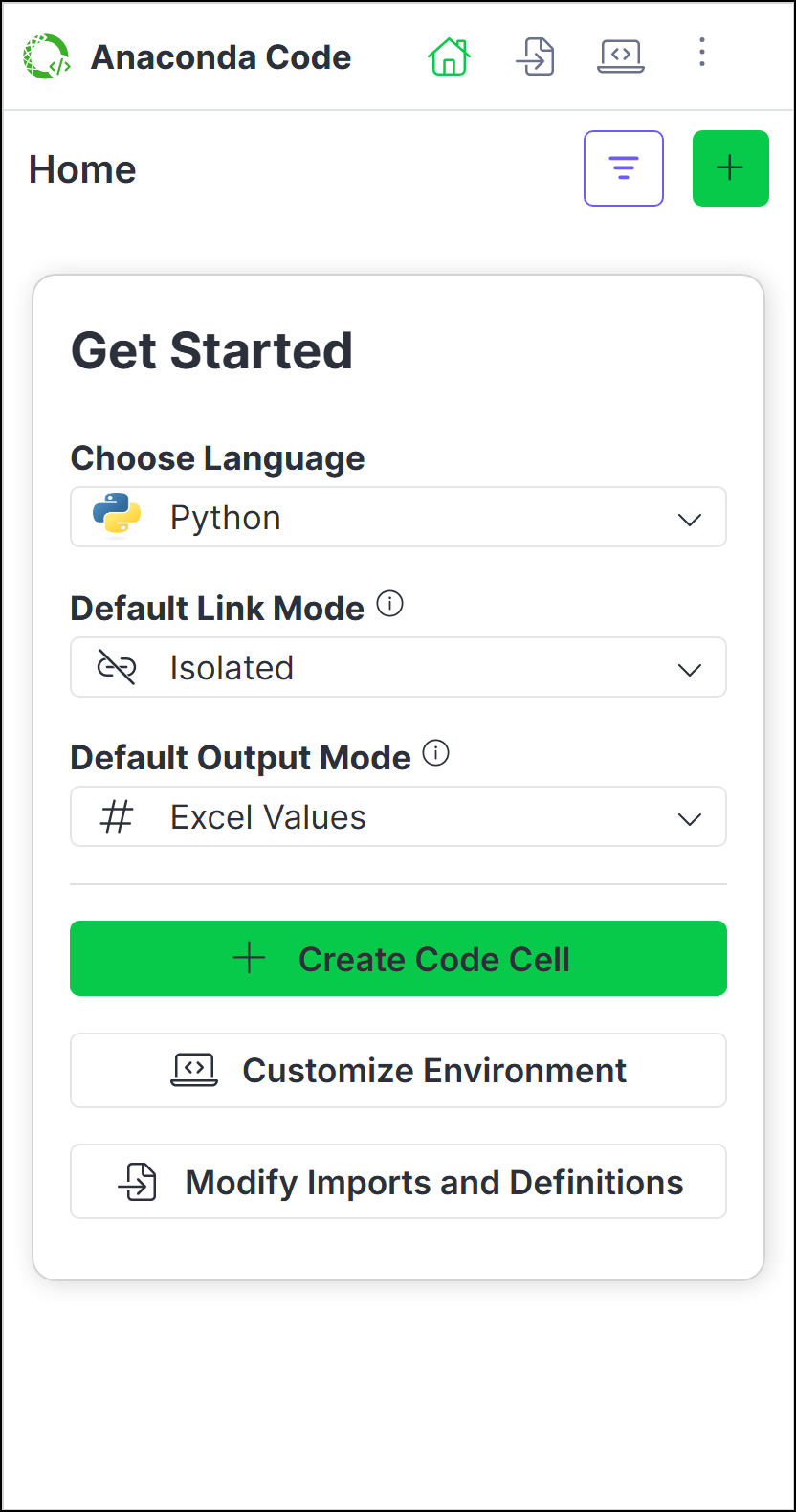
To get started, choose the language for your new Anaconda Code cell, set the default link mode, select the default output mode, and then click Create Code Cell.Once you’ve selected a location for your new Anaconda Code cell, use the editor to start writing and running code.
Create an Anaconda Code cell that can run Python or R code using the following steps:
From Home, click , then select a cell where you want to insert your code.
If you’re already in the code editor, click more next to the active code cell reference, then Add New to create a new code cell.
Subsequent code cells will be in the same language as the previously created one. To change the language, first create a new code cell, then change the code cell’s language selection in the code editor.
Choose Python or R as the code language for the cell.
If you change the language for the cell to a language you haven’t yet used, you might need to click Load Environment to load the new language’s environment for the first time.
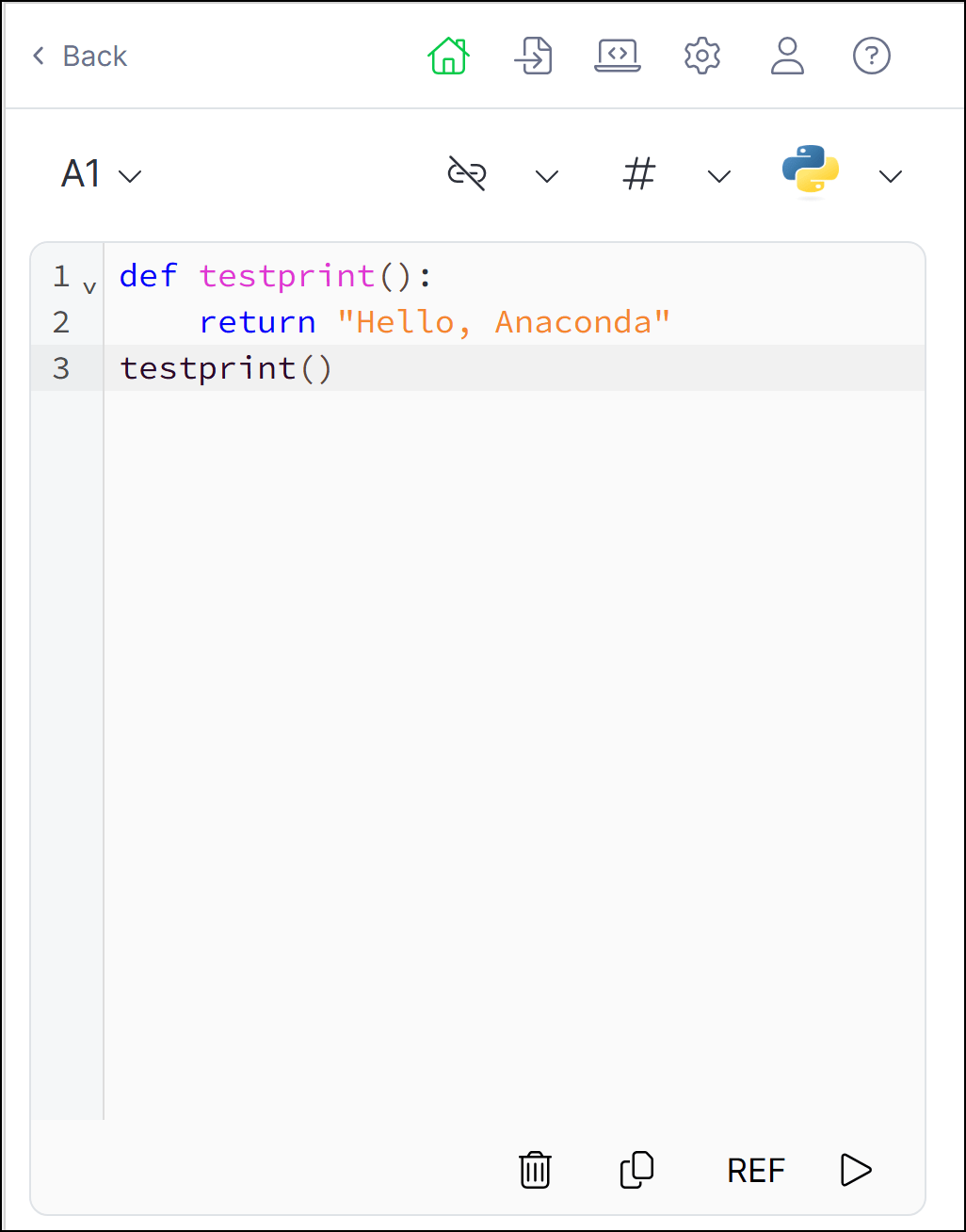
Enter your code in the code editor.
(Optional) If you want to reference a range of data from your spreadsheet or an Anaconda Code object in your code, click REF, then select the range of cells or Anaconda Code cell.
Using the REF function
When you use REF to select data cells or Anaconda Code cells, Anaconda Code creates a REF function in your code that returns a list of lists. The Imports and Definitions tab includes the following pre-defined functions to help convert the returned list of lists to different data structures.
Converts a list of lists to tabular format, using first row as column names, if available
to_matrix()
Convert to matrix
Converts a list of lists to a matrix structure
to_colwise_list()
Convert to column-wise list of vectors
Transforms row-wise data (list of lists) into column-wise format
is_list_of_lists()
Check data structure
Helper function that verifies if input is properly structured as a list of lists
You can change the behavior of to_dataframe, to_matrix(), to_colwise_list(), and is_list_of_lists() from the Imports and Definitions tab.
Click Run. The cell will display the return value of the last evaluated expression. Your changes are automatically saved whenever you re-run the code.
If you write code that doesn’t have a return value (for example, you define a function but don’t call the function) and click Run, the cell will display </>NoneType.
Anaconda Code hosts a single, self-contained environment, which manages the back-end software packages that enable you to run Python or R code within your Excel workbook. You can manage software packages within this environment to extend your code’s processing, visualization, and analytical capabilities, and even select the version of Pyodide (the WASM engine used by PyScript) or WebR (the WASM engine used by WebR) that you want to run.
You can make changes to your environment at any time; however, like with all software projects, altering the environment changes the way the underlying code is interpreted and can cause unintended complications.
The latest version of Pyodide or WebR is used by default for all new spreadsheets. For existing spreadsheets, the Pyodide or WebR versions and packages necessary for your code are pinned to the environment.You can switch versions using the following steps:
From the Environment tab, click Edit.
Select the Pyodide or WebR version.
Click Save Changes.
A warning will appear if changing the version might result in conflicts with the installed packages. Click Confirm Update to proceed or Cancel to revert to the previously selected version.
(Optional for Python) Click the down arrow to add from either PyPI, the PyScript app, or a direct download link to a Python wheel (.whl).
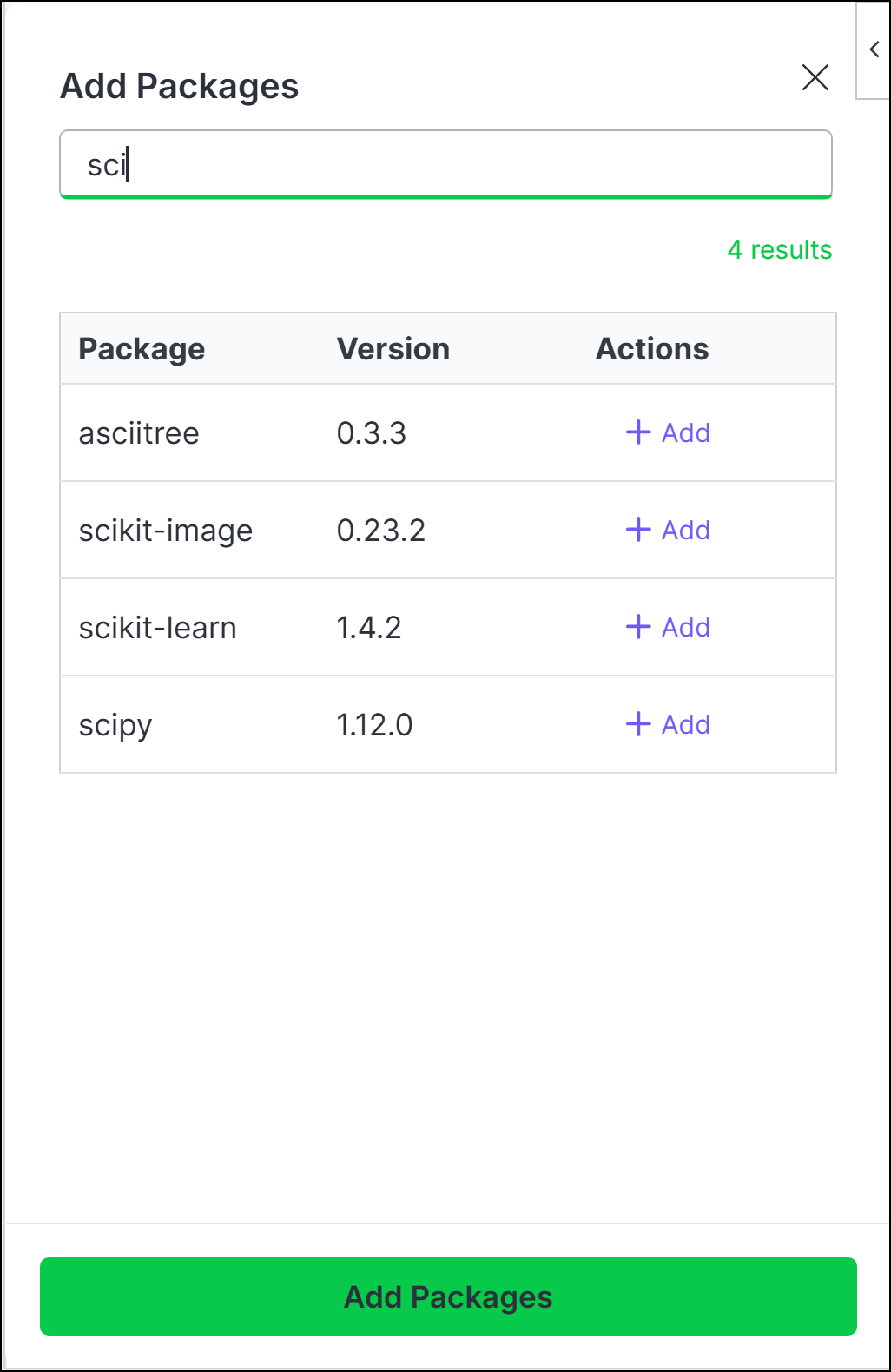
Search for the package name, then click Add beside the package you want to add.
Once you’ve added all the packages you want to include, click Add Packages.
Packages that contain compiled code might not be compatible with the PyScript or R WASM engine. For more information, visit PyScript.net or r-wasm.org.
To remove a package, click Edit, then click Delete beside the package you want to remove.
You can think of Anaconda Code’s Imports and Definitions as an initialization file for your code or like the first cell in a Jupyter Notebook. All code in this section is available to all cells, whether they are run isolated or linked.
Imports
To customize your code’s imports:
On the Imports and Definitions tab, establish the connections to the packages you need to run your code by adding your import statements beneath the # Add imports comment.
You can only import from the packages included in the standard Python or Web R installation and those listed in the Environment tab.
Click Apply.
Definitions
To customize your code’s definitions:
From the Imports and Definitions tab, enter any classes or functions you’d like to define beneath the # Define comment.
Anaconda Code comes with pre-defined functions for both Python and R. See Using the REF function to learn more about using these functions.
Click Apply.
You can now call your definitions in the Anaconda Code editor. To call Python functions directly from a spreadsheet cell, follow the steps in Creating user-defined functions.
User-defined functions (UDFs) allow you to write Python or R functions and call them directly from a spreadsheet cell.
UDFs in Python
Creating and calling a UDF
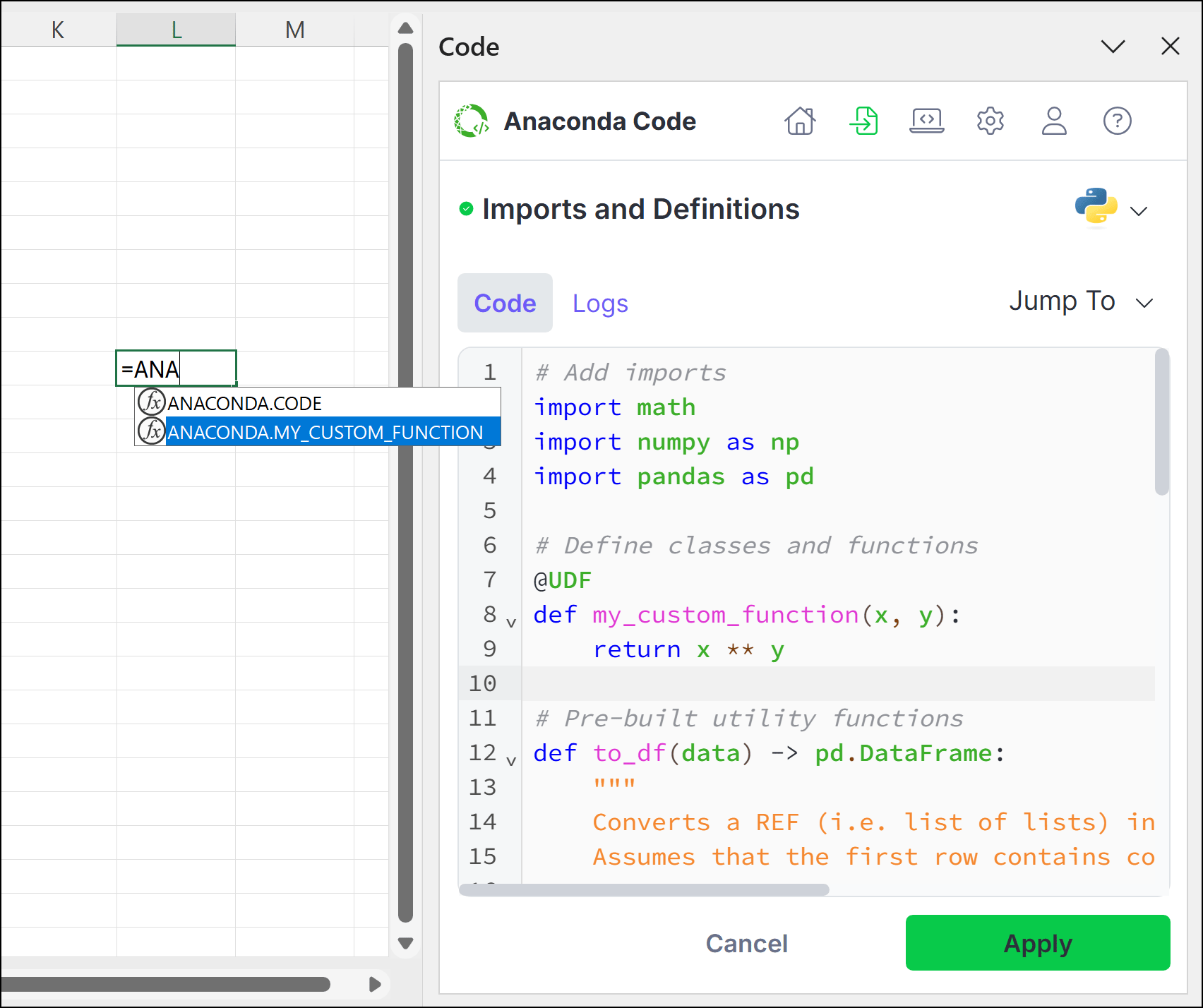
From the Imports and Definitions tab, decorate a function with @UDF, as shown in the following example:
Python UDF Example
@UDFdef my_custom_function(x, y): return x ** y
Click Apply.
In an open cell, enter =ANACONDA. If you added the example above to your definitions list, the option to call ANACONDA.MY_CUSTOM_FUNCTION
appears in the dropdown.
Arrow down to ANACONDA.MY_CUSTOM_FUNCTION, press Tab, and then complete the function.
Use Ctrl+Enter (Windows)/Ctrl+Return (macOS) to run the code.
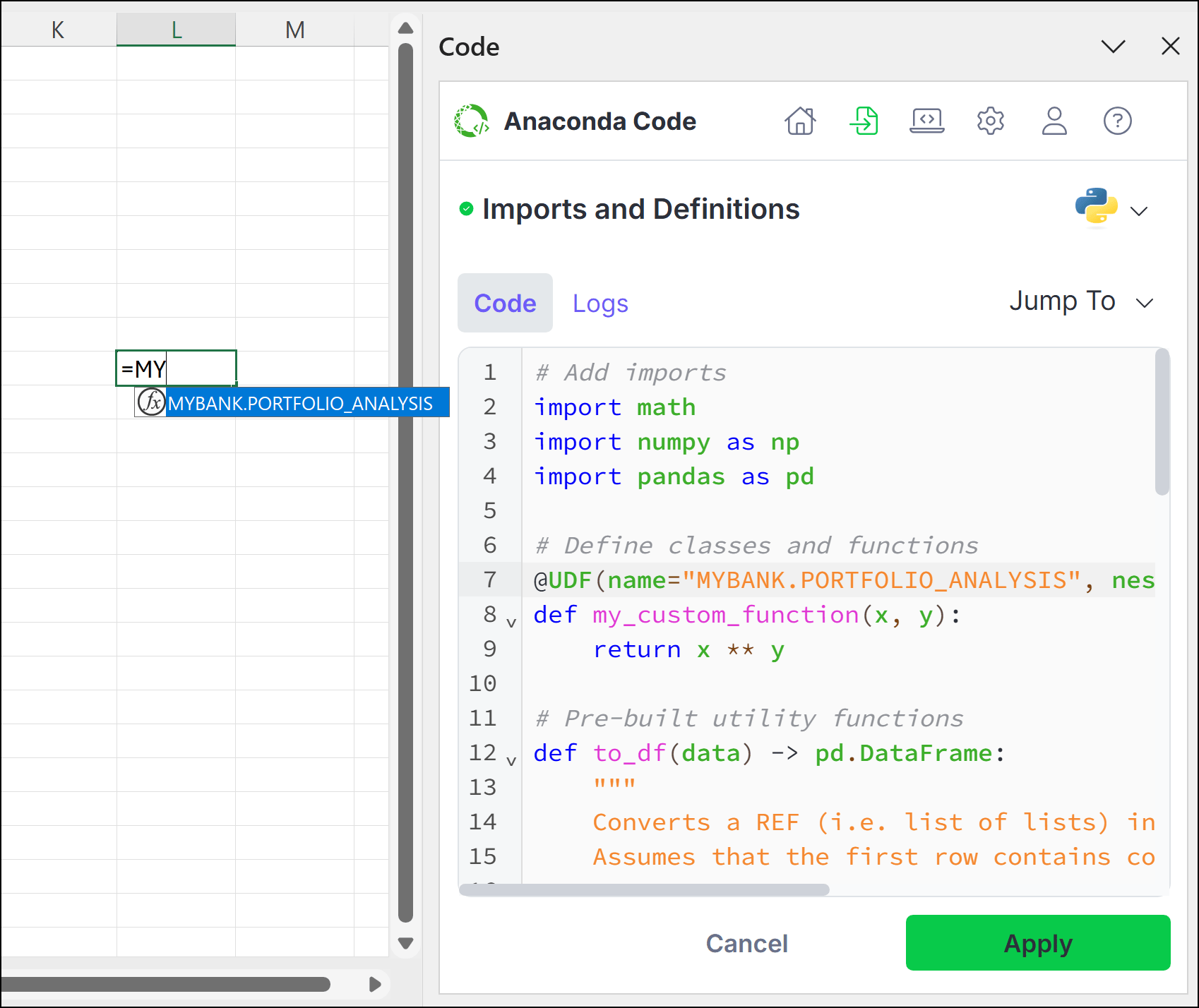
If you’d prefer the UDF uses a name other than the function name, use the name argument to provide a unique name. Set nested to False to remove ANACONDA. from the name.
Renaming Python UDF Example
@UDF(name="MYBANK.PORTFOLIO_ANALYSIS", nested=False)def my_custom_function(x, y): return x ** y
Using range argumentsSpecifying a UDF.Range argument tells Excel that the input of the function is a 2D range. Without specifying this, Excel will show a #CALC! Unliftable Array error if a 2D range is passed into the UDF. Parameters specified as UDF.Range will always be passed as a 2D array to the function, even if a single cell is passed in.Example usage of UDF.Range:
Python Range Example
@UDFdef square_me(data: UDF.Range) -> UDF.Range: return [[val ** 2 for val in row] for row in data]
You can also add type hints for ranges. For example,UDF.Range[str].
UDFs in R
Creating and calling a UDF
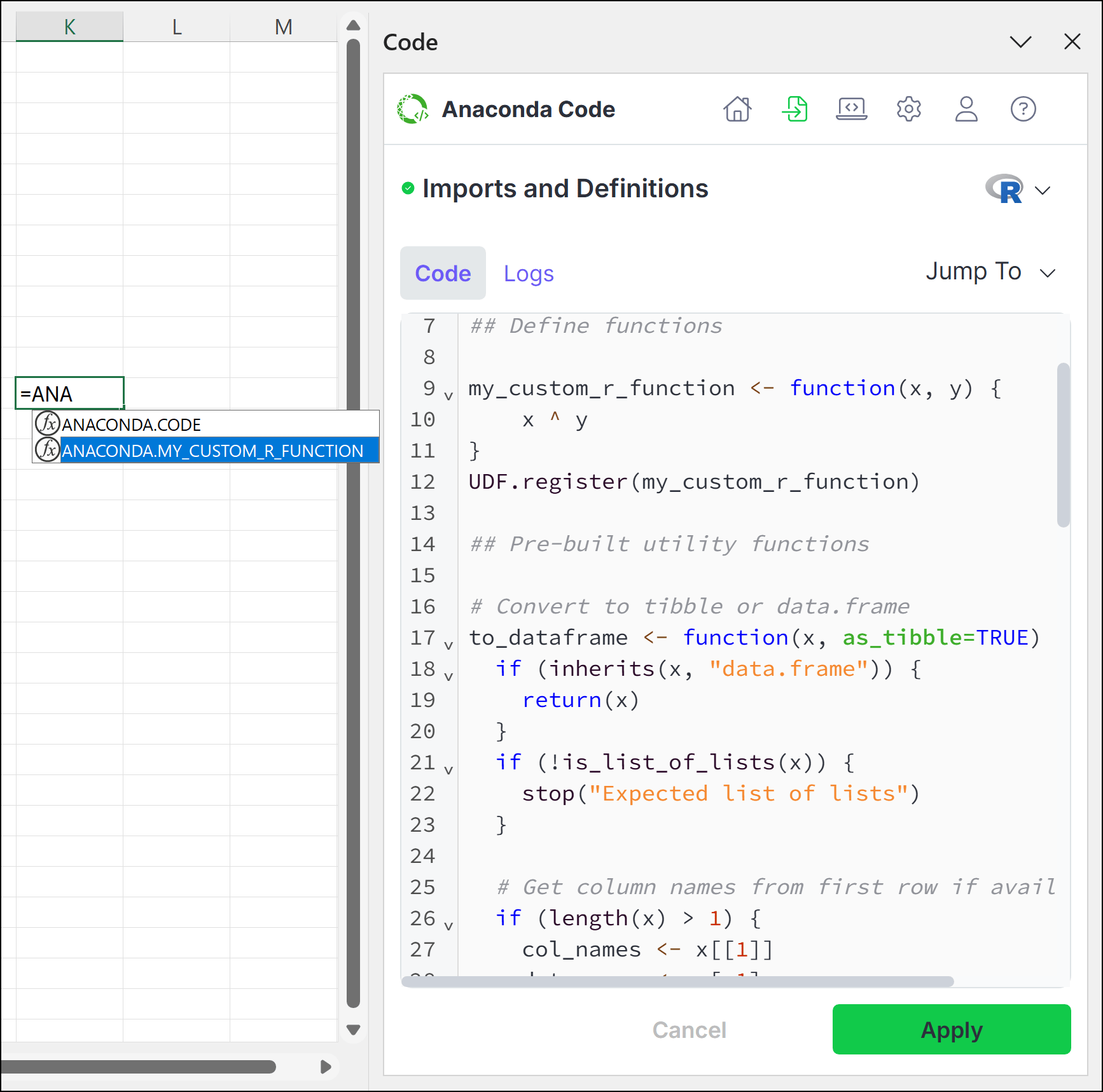
From the Imports and Definitions tab, register the UDF with UDF.register() and pass the function as an argument, as shown in the following example:
The UDF must be registered after the function is defined.
R UDF Example
my_custom_r_function <- function(x, y) { x ^ y}UDF.register(my_custom_r_function)
Click Save and Apply.
In an open cell, enter =ANACONDA. If you added the example above to your definitions list, the option to call ANACONDA.MY_CUSTOM_R_FUNCTION
appears in the dropdown.
Arrow down to ANACONDA.MY_CUSTOM_R_FUNCTION, press Tab, and then complete the function call.
Use Ctrl+Enter (Windows)/Ctrl+Return (macOS) to run the code.
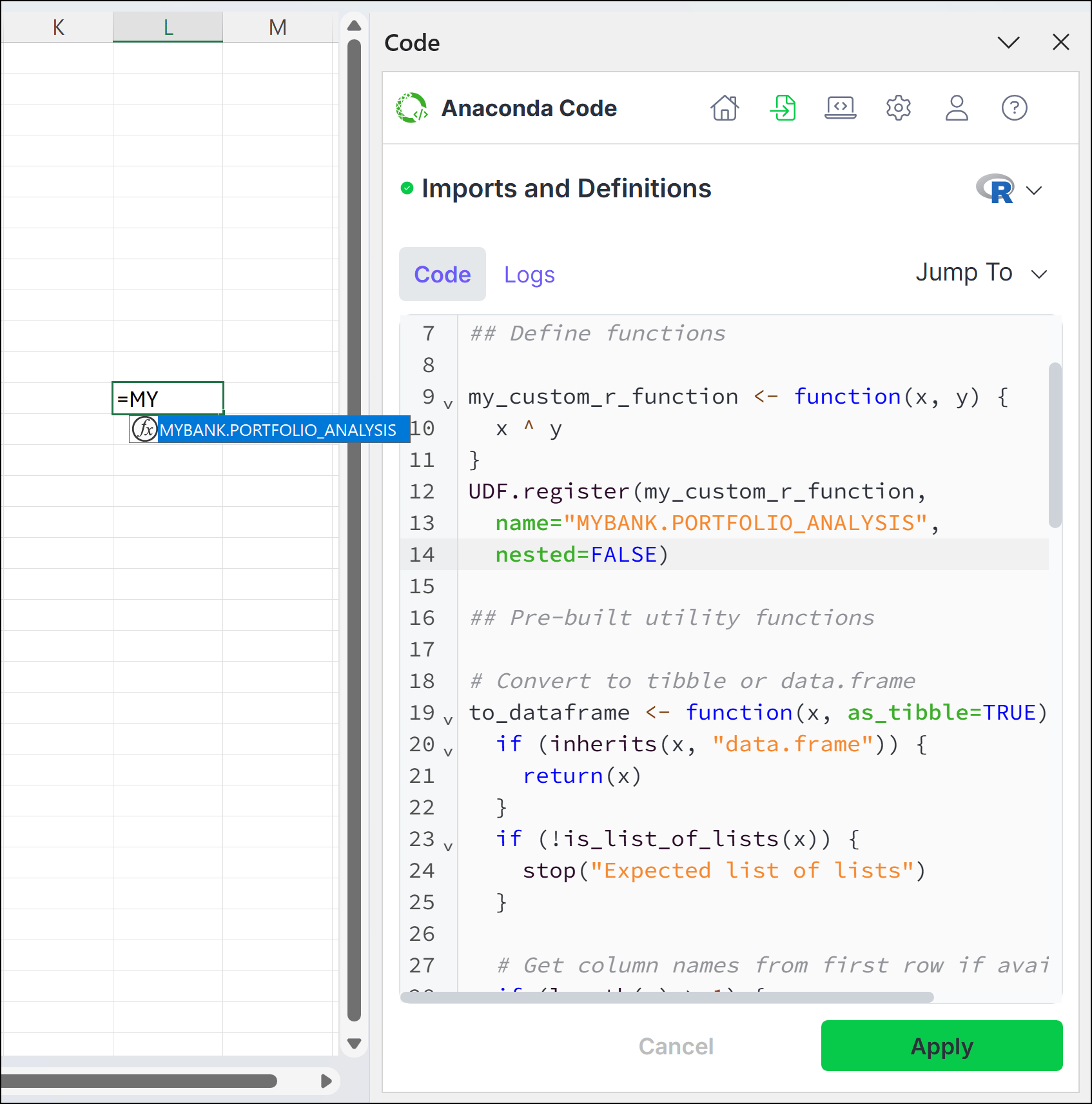
If you’d prefer the UDF uses a name other than the function name, register the function with the UDF, then use the name argument to provide a unique name and set nested to False to remove ANACONDA. from the name.
Renaming R UDF Example
my_custom_r_function <- function(x, y) { x ^ y}UDF.register(my_custom_r_function, name="MYBANK.PORTFOLIO_ANALYSIS", nested=FALSE)
Using range argumentsSetting the range_args parameter tells Excel that the input of the function is a 2D range. Without specifying this, Excel will show a #CALC! Unliftable Array error if a 2D range is passed into the UDF. Parameters specified as range_args will always be passed as a 2D array to the function, even if a single cell is passed in.Example usage of range_args:
While you can adjust the settings for running code in your workbook on a case-by-case basis when creating and editing code, you can also assign default settings from the Settings tab.
When a code cell is run in isolated mode, its code runs independently of other cells. Variables defined within an isolated code cell can’t be referenced by other code cells, and variables in other code cells likewise can’t be referenced by the isolated code cell.
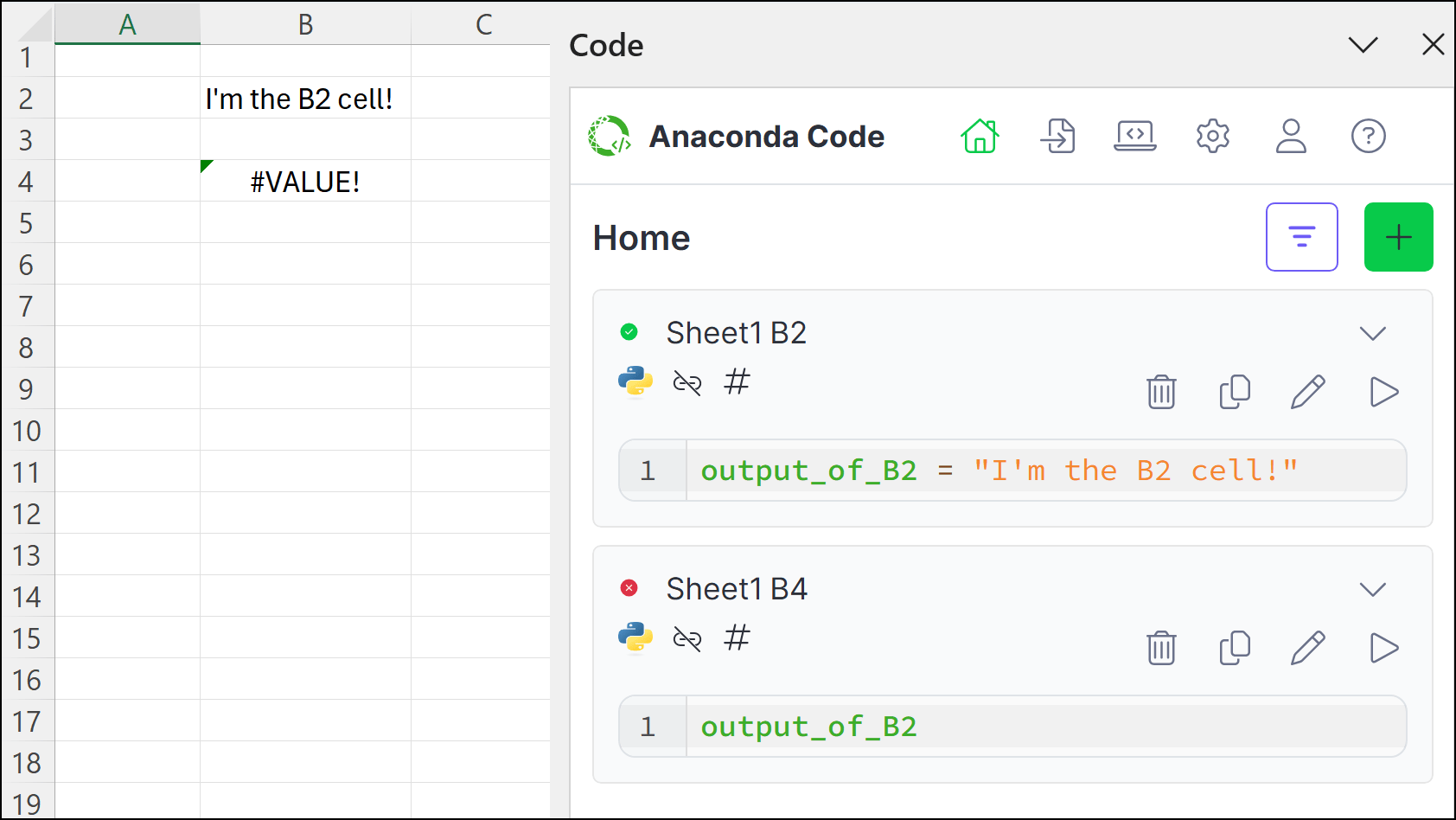
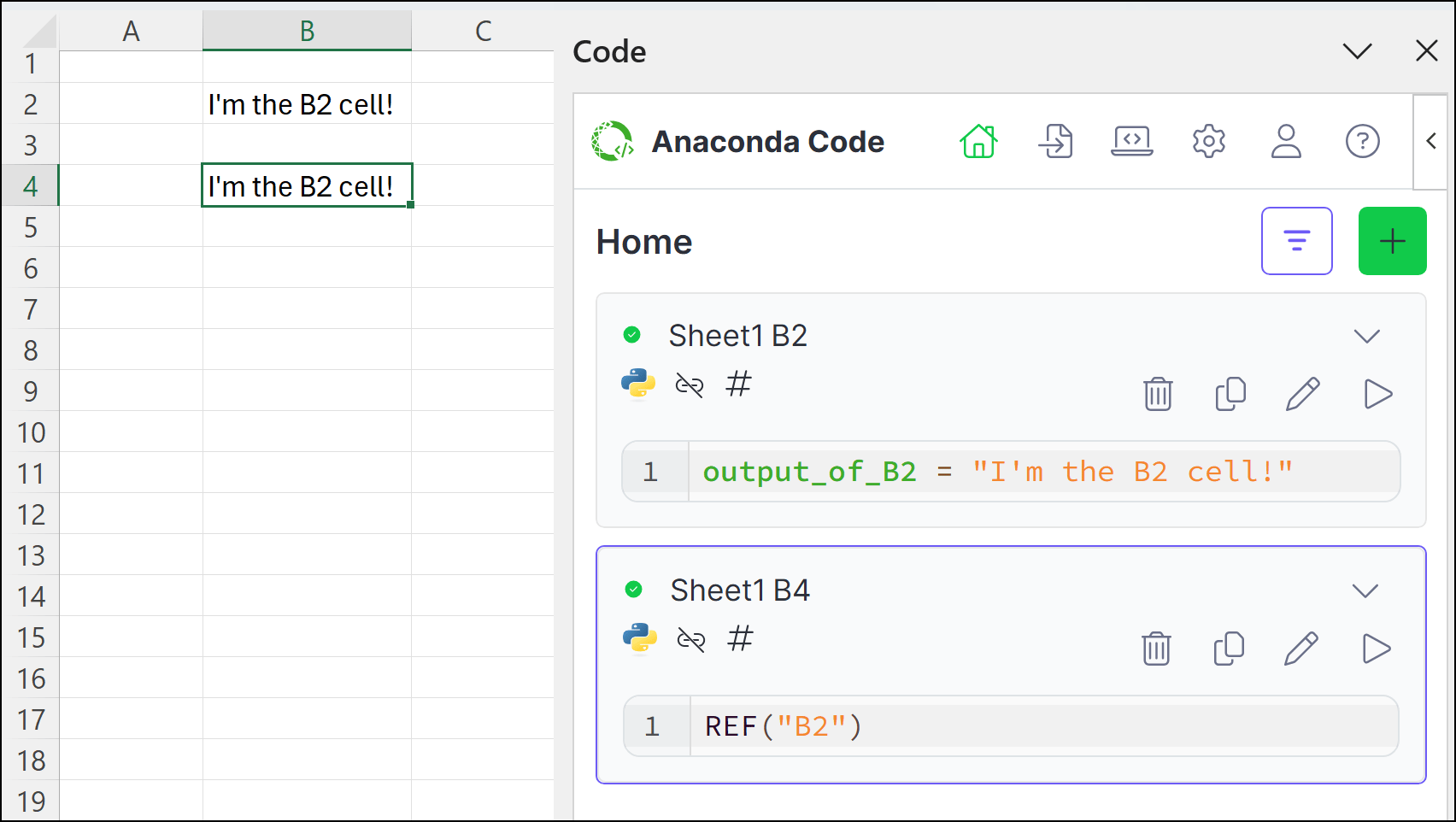
In the above image, the output_of_B2 variable is defined in cell B2 and assigned the string "I'm the B2 cell!". When this code is run in the B2 code cell, the B2 cell displays "I'm the B2 cell!". However, since both cells are running in isolated mode, when output_of_B2 is referenced in the B4 code cell, the B4 cell displays a #VALUE! error because B4 cannot access the variable in B2.Using the REF functionYou can bypass isolation rules as needed using the REF function to create a reference from one isolated code cell to another.
In the above image, the B4 cell now includes a reference to the B2 cell, REF("B2"). When the B4 code cell is run, it returns the value of B2, "I'm the B2 cell!". Changes to the B4 cell don’t cause the B2 cell to recalculate, but changes to the B2 cell will cause the B4 cell to recalculate. Code cells can include multiple REF function references, and changes to any referenced cells (in this example, B2) will cause the referencing cells to recalculate (in this example, B4).Working with code objectsIf you reference a cell that’s set to output a code object, the REF function will return an instance of that object in the referencing cell.
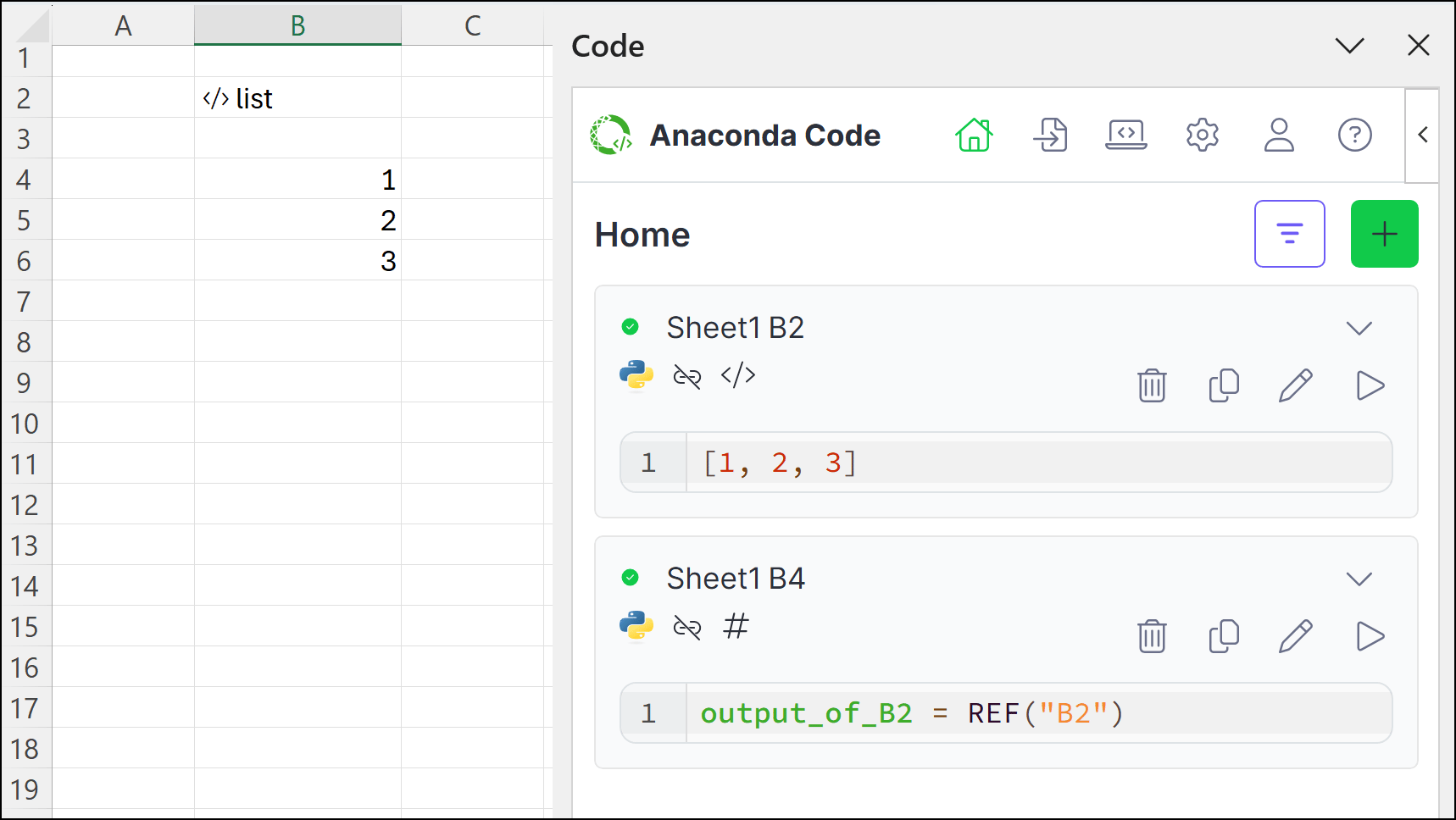
In the above image, the B2 code cell is set to output a code object (in this case, a list). Because the output of B2 is a , we see </> list in B2. In the B4 code cell, we define a variable called output_of_B2 and assign a REF function that references cell B2. The output mode for the B4 code cell is set to “Excel Values”, so the list spills across multiple cells in the spreadsheet.Benefits of isolated modeThe benefit of using the isolated mode is that referenced cells are not recalculated when changes are made to referencing cells. For complex processes, this allows you to:
separate code that doesn’t change frequently from code you modify often.
reduce unnecessary recalculations of computationally intensive operations.
create a more modular approach to your data analysis.
improve performance when working with larger datasets.
Run Linked
When a code cell is run in linked mode, variables defined within it can be accessed by any other code cell also running in linked mode. When any linked mode cell is recalculated, all linked mode cells are recalculated. Linked cells run left-to-right, top-to-bottom, and can access objects defined in previously linked cells.
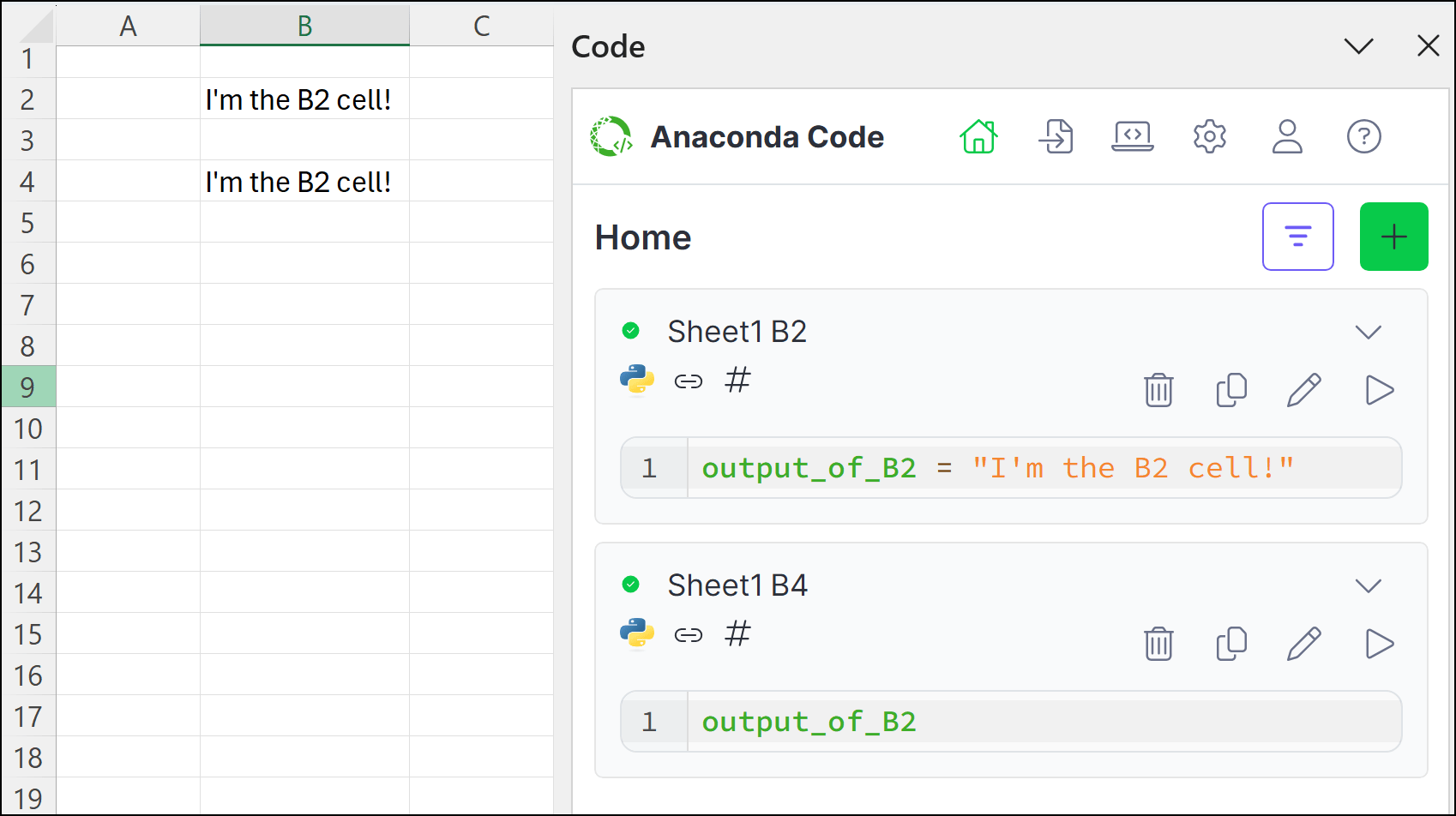
In the above image, both the B2 and B4 cell are running in linked mode. The output_of_B2 variable is defined in cell B2 and assigned the string "I'm the B2 cell!". When this code is run in the B2 code cell, the B2 cell displays "I'm the B2 cell!". The output_of_B2 variable is then referenced in the B4 code cell, causing the B4 cell to also display "I'm the B2 cell!".Benefits of linked modeLinked mode is useful when:
you want to create a continuous workflow across multiple cells.
you need to share variables and objects between different parts of your analysis.
When outputting a DataFrame, array, list, and so on, the values will “spill” to fill the required space. If the spill were to overwrite cells containing data, the cell displays a #SPILL error.
Local Code Object
For certain object types, you can view the contents in a “Card View” by clicking the cell. You can reference this cell and the returned object like you would any other object.
{"docsConfig":{"theme":"mint","$schema":"https://mintlify.com/docs.json","name":"Anaconda","description":"Guides, tutorials, and reference material for Anaconda's Python, data science, and AI tools","colors":{"primary":"#1d6cf7","light":"#1d6cf7","dark":"#96f778"},"logo":{"light":"https://mintcdn.com/anaconda-29683c67/s-9WR15r5rZoaPqb/logo/light.svg?fit=max\u0026auto=format\u0026n=s-9WR15r5rZoaPqb\u0026q=85\u0026s=5996719b8530aaf065dc1ee1f39b2e67","dark":"https://mintcdn.com/anaconda-29683c67/s-9WR15r5rZoaPqb/logo/dark.svg?fit=max\u0026auto=format\u0026n=s-9WR15r5rZoaPqb\u0026q=85\u0026s=db482b1eac6af589d234160a76de3400","href":"https://www.anaconda.com/docs/main"},"favicon":"https://mintcdn.com/anaconda-29683c67/p8JNFuYYvTL8gfpM/favicon.png?fit=max\u0026auto=format\u0026n=p8JNFuYYvTL8gfpM\u0026q=85\u0026s=51a585758330bbe8f1ea032113854252","api":{"playground":{"display":"simple"}},"background":{"color":{"light":"#f4f5f8","dark":"#10121a"}},"navbar":{},"footer":{"socials":{"linkedin":"https://www.linkedin.com/company/anacondainc","github":"https://github.com/ContinuumIO","youtube":"https://www.youtube.com/c/ContinuumIo"},"links":[{"header":"Company","items":[{"label":"Anaconda Newsletter","href":"https://www.anaconda.com/newsletter"}]}]},"seo":{"metatags":{"canonical":"https://www.anaconda.com/docs"}},"styling":{"eyebrows":"breadcrumbs","latex":false},"integrations":{"ga4":{"measurementId":"G-VQTY6YKM6J"},"heap":{"appId":"758475466"}},"contextual":{"options":["claude","chatgpt","perplexity","cursor","vscode","add-mcp","copy"],"display":"header"},"navigation":{"pages":[]}},"deployment":{"deploymentMetadataValue":{"subdomain":"anaconda-29683c67","hasAudioNarration":false,"actualSubdomain":"anaconda-29683c67","customDomains":["anaconda.com"],"gitSource":{"type":"github","owner":"anaconda","repo":"documentation","deployBranch":"main","contentDirectory":"","isPrivate":true,"mountPath":"","label":""},"chroma":{"liveDeploymentHistoryId":"6ae0aea648a2baadae90fe07","collectionId":"3739ae59-a4e4-4d84-9e10-01e8d36e1fa7","schemaVersion":"v3","latestBuiltDeploymentHistoryId":"6ae0aea648a2baadae90fe07"},"feedback":{"thumbs":true,"contextualFeedback":{"allowEmail":true,"emailDisclaimer":"Your email will only be used to follow up on this feedback."}},"entitlements":{"AI_CHAT":{"status":"ENABLED"},"REMOVE_BRANDING":{"status":"ENABLED"},"CONTEXTUAL_FEEDBACK":{"status":"ENABLED"},"CODE_SNIPPET_FEEDBACK":{"status":"ENABLED"},"WEB_MCP":{"status":"ENABLED"},"NARRATION":{"status":"ENABLED"}},"buildId":"6ae0aea648a2baadae90fe07","clientVersion":"0.0.4006","searchFilterCounts":[{"language":"default","tag":"Data Science \u0026 AI Workbench","count":240},{"language":"default","tag":"Anaconda Platform","count":150},{"language":"default","tag":"Package Security Manager","count":128},{"language":"default","tag":"Anaconda CLI","count":112},{"language":"default","tag":"Guides","count":105},{"language":"default","tag":"Anaconda CLI \u0026 MCP","count":104},{"language":"default","tag":"Plugins","count":93},{"language":"default","tag":"Commands","count":91},{"language":"default","tag":"Anaconda Desktop","count":86},{"language":"default","tag":"Platform Guides","count":86}],"searchSettings":{"isFiltersEnabled":true}},"assistantConfig":{"enableAskAiButton":false,"enableStarterQuestions":true,"enableContextualStarterQuestions":true,"deflection":{"enabled":true,"email":"support@anaconda.com"}},"basePath":"/docs","hasChatPermissions":true,"hasWebMcpPermissions":true,"toggles":[{"name":"kill-isr","enabled":true,"variant":{"name":"disabled","enabled":false,"feature_enabled":true},"impressionData":false},{"name":"agent-mintlify-slack","enabled":true,"variant":{"name":"disabled","enabled":false,"feature_enabled":true},"impressionData":false},{"name":"editor-v7-file-tree","enabled":true,"variant":{"name":"disabled","enabled":false,"feature_enabled":true},"impressionData":false},{"name":"agent-integrations-settings","enabled":true,"variant":{"name":"disabled","enabled":false,"feature_enabled":true},"impressionData":false},{"name":"automations-pr-grouping","enabled":true,"variant":{"name":"disabled","enabled":false,"feature_enabled":true},"impressionData":false},{"name":"custom-prefix","enabled":true,"variant":{"name":"disabled","enabled":false,"feature_enabled":true},"impressionData":false},{"name":"analytics-v7","enabled":true,"variant":{"name":"disabled","enabled":false,"feature_enabled":true},"impressionData":false},{"name":"user-flows-analytics","enabled":true,"variant":{"name":"disabled","enabled":false,"feature_enabled":true},"impressionData":false},{"name":"no-publish-flow","enabled":true,"variant":{"name":"disabled","enabled":false,"feature_enabled":true},"impressionData":false},{"name":"workos-onboarding","enabled":true,"variant":{"name":"disabled","enabled":false,"feature_enabled":true},"impressionData":false},{"name":"llms-txt-v2","enabled":true,"variant":{"name":"disabled","enabled":false,"feature_enabled":true},"impressionData":false},{"name":"pause-universal-search-reconcile","enabled":true,"variant":{"name":"disabled","enabled":false,"feature_enabled":true},"impressionData":false},{"name":"snapshot-serving-live","enabled":true,"variant":{"name":"disabled","enabled":false,"feature_enabled":true},"impressionData":false},{"name":"stripTemperatureMiddleware","enabled":true,"variant":{"name":"disabled","enabled":false,"feature_enabled":true},"impressionData":false},{"name":"per-site-search-delta","enabled":true,"variant":{"name":"disabled","enabled":false,"feature_enabled":true},"impressionData":false},{"name":"support-platform-pylon-zendesk","enabled":true,"variant":{"name":"disabled","enabled":false,"feature_enabled":true},"impressionData":false},{"name":"snapshot-serving","enabled":true,"variant":{"name":"disabled","enabled":false,"feature_enabled":true},"impressionData":false},{"name":"instant-rollback","enabled":true,"variant":{"name":"disabled","enabled":false,"feature_enabled":true},"impressionData":false},{"name":"granular-notifications-server","enabled":true,"variant":{"name":"disabled","enabled":false,"feature_enabled":true},"impressionData":false},{"name":"granular-notifications","enabled":true,"variant":{"name":"disabled","enabled":false,"feature_enabled":true},"impressionData":false},{"name":"editor-private-page-search","enabled":true,"variant":{"name":"disabled","enabled":false,"feature_enabled":true},"impressionData":false},{"name":"automations-fable","enabled":true,"variant":{"name":"disabled","enabled":false,"feature_enabled":true},"impressionData":false},{"name":"fixed-ai-action-pricing","enabled":true,"variant":{"name":"disabled","enabled":false,"feature_enabled":true},"impressionData":false},{"name":"automation-resolve-merge-conflict","enabled":true,"variant":{"name":"disabled","enabled":false,"feature_enabled":true},"impressionData":false},{"name":"scoped-publishing","enabled":true,"variant":{"name":"disabled","enabled":false,"feature_enabled":true},"impressionData":false},{"name":"mintql","enabled":true,"variant":{"name":"disabled","enabled":false,"feature_enabled":true},"impressionData":false},{"name":"page-level-analytics","enabled":true,"variant":{"name":"disabled","enabled":false,"feature_enabled":true},"impressionData":false},{"name":"editor-version-history-v2","enabled":true,"variant":{"name":"disabled","enabled":false,"feature_enabled":true},"impressionData":false},{"name":"editor-nav-generations","enabled":true,"variant":{"name":"disabled","enabled":false,"feature_enabled":true},"impressionData":false},{"name":"billing-page-v2","enabled":true,"variant":{"name":"disabled","enabled":false,"feature_enabled":true},"impressionData":false},{"name":"workspace-projects","enabled":true,"variant":{"name":"disabled","enabled":false,"feature_enabled":true},"impressionData":false},{"name":"assistant-v5","enabled":true,"variant":{"name":"disabled","enabled":false,"feature_enabled":true},"impressionData":false},{"name":"byok-sep-25","enabled":true,"variant":{"name":"disabled","enabled":false,"feature_enabled":true},"impressionData":false},{"name":"fork-pr-previews","enabled":true,"variant":{"name":"disabled","enabled":false,"feature_enabled":true},"impressionData":false},{"name":"revalidation-jwt","enabled":true,"variant":{"name":"disabled","enabled":false,"feature_enabled":true},"impressionData":false},{"name":"vite-origin","enabled":true,"variant":{"name":"disabled","enabled":false,"feature_enabled":true},"impressionData":false},{"name":"editor-agent-model-picker","enabled":true,"variant":{"name":"disabled","enabled":false,"feature_enabled":true},"impressionData":false},{"name":"billing-updated-9-15","enabled":true,"variant":{"name":"disabled","enabled":false,"feature_enabled":true},"impressionData":false},{"name":"workos-sso-scim","enabled":true,"variant":{"name":"disabled","enabled":false,"feature_enabled":true},"impressionData":false},{"name":"hobby-abuse-scan","enabled":true,"variant":{"name":"disabled","enabled":false,"feature_enabled":true},"impressionData":false},{"name":"dashboard-inbox","enabled":true,"variant":{"name":"disabled","enabled":false,"feature_enabled":true},"impressionData":false},{"name":"workos-signup","enabled":true,"variant":{"name":"disabled","enabled":false,"feature_enabled":true},"impressionData":false},{"name":"workos-enabled","enabled":true,"variant":{"name":"disabled","enabled":false,"feature_enabled":true},"impressionData":false}],"googleFontsInlined":false},"customCss":[{"filePath":"custom.css","href":"/docs/_mintlify/custom/anaconda-29683c67/8e7e337189353d6a/custom.css"}],"page":{"pagePath":"legacy/excel/code","slug":"/legacy/excel/code","pageMetadata":{"title":"Anaconda Code","searchDescription":"Guide to using Anaconda Code feature in the Anaconda Toolbox Excel Add-in.","keywords":["anaconda","code","excel","add","in","toolbox","python","environments","installing","packages","r","cells","cell","linking","user","defined","functions","udf","inline","coding","workbook","integration"],"tag":"Beta","description":null,"href":"/legacy/excel/code"},"pageType":"default","mdx":{"mdxSource":{"compiledSource":"\"use strict\";const{Fragment:_Fragment,jsx:_jsx,jsxs:_jsxs}=arguments[0];const{useMDXComponents:_provideComponents}=arguments[0];const TroubleshootSolution=({children})=>_jsxs(_Fragment,{children:[_jsx(`hr`,{className:`mint-my-3 mint-w-full`}),_jsxs(`details`,{className:`mint-mt-3`,children:[_jsx(`summary`,{className:`mint-cursor-pointer mint-font-semibold mint-text-base mint-mb-1`,children:`Solution`}),_jsx(`div`,{className:`mint-mt-2 mint-ml-4`,\"data-component-part\":`step-content`,children})]})]});const TroubleshootCause=({children})=>_jsxs(`details`,{className:`mint-mt-3 mint-mb-2`,children:[_jsx(`summary`,{className:`mint-cursor-pointer mint-font-semibold mint-text-base mint-mb-1`,children:`Cause`}),_jsx(`div`,{className:`mint-mt-2 mint-ml-4`,\"data-component-part\":`step-content`,children})]});const TroubleshootTitle=({children})=>_jsxs(_Fragment,{children:[_jsx(`p`,{className:`mint-m-0 mint-font-semibold mint-text-xl mint-leading-tight mint-mb-2`,role:`heading`,\"aria-level\":3,children}),_jsx(`hr`,{className:`mint-my-3 mint-w-full`})]});const Troubleshoot=({children})=>_jsxs(`div`,{className:`callout mint-my-4 mint-px-5 mint-py-4 mint-overflow-hidden mint-rounded-2xl mint-flex mint-gap-3 mint-border troubleshoot-admonition dark:troubleshoot-admonition`,\"data-callout-type\":`troubleshoot`,children:[_jsx(`div`,{className:`mint-mt-0.5 mint-w-4`,children:_jsx(`svg`,{width:`14`,height:`14`,viewBox:`0 0 640 640`,fill:`currentColor`,className:`mint-w-4 mint-h-4`,\"aria-label\":`Troubleshoot`,children:_jsx(`path`,{d:`M541.4 162.6C549 155 561.7 156.9 565.5 166.9C572.3 184.6 576 203.9 576 224C576 312.4 504.4 384 416 384C398.5 384 381.6 381.2 365.8 376L178.9 562.9C150.8 591 105.2 591 77.1 562.9C49 534.8 49 489.2 77.1 461.1L264 274.2C258.8 258.4 256 241.6 256 224C256 135.6 327.6 64 416 64C436.1 64 455.4 67.7 473.1 74.5C483.1 78.3 484.9 91 477.4 98.6L388.7 187.3C385.7 190.3 384 194.4 384 198.6L384 240C384 248.8 391.2 256 400 256L441.4 256C445.6 256 449.7 254.3 452.7 251.3L541.4 162.6z`})})}),_jsx(`div`,{className:`prose mint-min-w-0 mint-w-full`,children})]});const ExcelRefIcon=()=>{return _jsx(`span`,{className:`inline_icon`,children:_jsxs(`svg`,{xmlns:`http://www.w3.org/2000/svg`,width:`16`,height:`16`,viewBox:`0 0 60.51 26.3`,children:[_jsx(`path`,{fill:`currentColor`,d:`M0,26.3V0H8.89c2.05,0,3.74,.35,5.06,1.05,1.32,.7,2.29,1.65,2.93,2.87,.63,1.22,.95,2.6,.95,4.15s-.32,2.92-.95,4.12c-.63,1.2-1.61,2.14-2.92,2.82-1.31,.68-2.98,1.02-5.02,1.02H1.75v-2.88h7.09c1.4,0,2.54-.21,3.4-.62s1.49-1,1.88-1.75,.58-1.66,.58-2.72-.2-1.97-.59-2.76c-.39-.79-1.02-1.4-1.89-1.83-.87-.43-2.01-.65-3.43-.65H3.19V26.3H0ZM12.38,14.49l6.47,11.82h-3.7l-6.37-11.82h3.6Z`}),_jsx(`path`,{fill:`currentColor`,d:`M23.12,26.3V0h15.87V2.83h-12.69V11.71h11.87v2.83h-11.87v8.94h12.89v2.83H23.12Z`}),_jsx(`path`,{fill:`currentColor`,d:`M44.74,26.3V0h15.77V2.83h-12.59V11.71h11.4v2.83h-11.4v11.76h-3.19Z`})]})})};const ExcelCellAddressIcon=()=>{return _jsx(`span`,{className:`inline_icon`,children:_jsxs(`svg`,{xmlns:`http://www.w3.org/2000/svg`,width:`16`,height:`16`,viewBox:`0 0 37.91 29.1`,children:[_jsx(`path`,{fill:`currentColor`,d:`M3.69,29.1H0L10.68,0h3.64l10.68,29.1h-3.69L12.62,4.6h-.23L3.69,29.1Zm1.36-11.37h14.89v3.13H5.06v-3.13Z`}),_jsx(`path`,{fill:`currentColor`,d:`M37.91,0V29.1h-3.52V3.69h-.17l-7.1,4.72v-3.58L34.38,0h3.52Z`})]})})};function _createMdxContent(props){const _components={a:`a`,code:`code`,em:`em`,li:`li`,ol:`ol`,p:`p`,pre:`pre`,span:`span`,strong:`strong`,tbody:`tbody`,td:`td`,th:`th`,thead:`thead`,tr:`tr`,ul:`ul`,..._provideComponents(),...props.components},{Accordion,AccordionGroup,CodeBlock,Frame,Heading,Icon,Note,OptimizedImage,Step,Steps,Tab,Table,Tabs,Tip,Tooltip,Warning,_MdxComponentBoundary}=_components;if(!Accordion)_missingMdxReference(`Accordion`,true);if(!AccordionGroup)_missingMdxReference(`AccordionGroup`,true);if(!CodeBlock)_missingMdxReference(`CodeBlock`,true);if(!Frame)_missingMdxReference(`Frame`,true);if(!Heading)_missingMdxReference(`Heading`,true);if(!Icon)_missingMdxReference(`Icon`,true);if(!Note)_missingMdxReference(`Note`,true);if(!OptimizedImage)_missingMdxReference(`OptimizedImage`,true);if(!Step)_missingMdxReference(`Step`,true);if(!Steps)_missingMdxReference(`Steps`,true);if(!Tab)_missingMdxReference(`Tab`,true);if(!Table)_missingMdxReference(`Table`,true);if(!Tabs)_missingMdxReference(`Tabs`,true);if(!Tip)_missingMdxReference(`Tip`,true);if(!Tooltip)_missingMdxReference(`Tooltip`,true);if(!Warning)_missingMdxReference(`Warning`,true);if(!_MdxComponentBoundary)_missingMdxReference(`_MdxComponentBoundary`,true);return _jsxs(_Fragment,{children:[_jsx(Note,{children:_jsx(_components.p,{children:`This feature is currently in beta.`})}),`\n`,_jsxs(_components.p,{children:[`Anaconda Code empowers you to write Python or R code and run it locally, directly within Excel. This gives you flexibility and control over the environment in your workbook, allowing you to add and remove `,_jsx(Tooltip,{tip:`Software files and information about the software, such as its name, version, and description, bundled into a file that can be installed and managed by a package manager.`,children:`packages`}),` as needed, all while keeping code and data securely within your workbook. Anaconda Code operates independently of Microsoft’s Python in Excel feature.`]}),`\n`,_jsx(Heading,{level:`2`,id:`initializing-anaconda-code`,children:`Initializing Anaconda Code`}),`\n`,_jsx(Note,{children:_jsxs(_components.p,{children:[`Anaconda Code is included in the `,_jsx(_components.a,{href:`/legacy/excel/install`,children:`Anaconda Toolbox installation`}),`.`]})}),`\n`,_jsxs(_components.p,{children:[`When you first launch Anaconda Code, you’ll be asked to `,_jsx(_components.a,{href:`https://auth.anaconda.cloud/ui/login/`,children:`sign in to your Anaconda account`}),`.`]}),`\n`,_jsx(_components.p,{children:`If you haven’t created an Anaconda Code cell yet, you’ll be asked to create one.`}),`\n`,_jsx(Frame,{children:_jsx(OptimizedImage,{src:`https://mintcdn.com/anaconda-29683c67/r-i16GgDcvoHQ-Uq/images/excel/excel_code_get_started.png?fit=max\u0026auto=format\u0026n=r-i16GgDcvoHQ-Uq\u0026q=85\u0026s=d642d5f7eae1c061e2fcdd0e727221e6`,alt:``,style:{width:`400px`},\"data-og-width\":`832`,width:`832`,\"data-og-height\":`1580`,height:`1580`,\"data-path\":`images/excel/excel_code_get_started.png`,\"data-optimize\":`true`,\"data-opv\":`3`,srcset:`https://mintcdn.com/anaconda-29683c67/r-i16GgDcvoHQ-Uq/images/excel/excel_code_get_started.png?w=280\u0026fit=max\u0026auto=format\u0026n=r-i16GgDcvoHQ-Uq\u0026q=85\u0026s=66fd8959a994ce28e97171d547fe2d37 280w, https://mintcdn.com/anaconda-29683c67/r-i16GgDcvoHQ-Uq/images/excel/excel_code_get_started.png?w=560\u0026fit=max\u0026auto=format\u0026n=r-i16GgDcvoHQ-Uq\u0026q=85\u0026s=cea0daea28233ab840934840649bb54c 560w, https://mintcdn.com/anaconda-29683c67/r-i16GgDcvoHQ-Uq/images/excel/excel_code_get_started.png?w=840\u0026fit=max\u0026auto=format\u0026n=r-i16GgDcvoHQ-Uq\u0026q=85\u0026s=7c512cfb2113b32d0087721d548044fa 840w, https://mintcdn.com/anaconda-29683c67/r-i16GgDcvoHQ-Uq/images/excel/excel_code_get_started.png?w=1100\u0026fit=max\u0026auto=format\u0026n=r-i16GgDcvoHQ-Uq\u0026q=85\u0026s=a1ac9dc54025cec26283a83e0bd21935 1100w, https://mintcdn.com/anaconda-29683c67/r-i16GgDcvoHQ-Uq/images/excel/excel_code_get_started.png?w=1650\u0026fit=max\u0026auto=format\u0026n=r-i16GgDcvoHQ-Uq\u0026q=85\u0026s=beb46dbdb1f50d2b7078216cf61983c6 1650w, https://mintcdn.com/anaconda-29683c67/r-i16GgDcvoHQ-Uq/images/excel/excel_code_get_started.png?w=2500\u0026fit=max\u0026auto=format\u0026n=r-i16GgDcvoHQ-Uq\u0026q=85\u0026s=292f45882a09004a58114264c7277aa0 2500w`})}),`\n`,_jsxs(_components.p,{children:[`To get started, choose the `,_jsx(_components.a,{href:`#running-code`,children:`language`}),` for your new Anaconda Code cell, set the `,_jsx(_components.a,{href:`#cell-linking`,children:`default link mode`}),`, select the `,_jsx(_components.a,{href:`#cell-output`,children:`default output mode`}),`, and then click `,_jsx(Icon,{icon:`plus`,iconType:`regular`}),` `,_jsx(_components.strong,{children:`Create Code Cell`}),`.`]}),`\n`,_jsxs(_components.p,{children:[`Once you’ve selected a location for your new Anaconda Code cell, use the editor to start `,_jsx(_components.a,{href:`#running-code`,children:`writing and running code`}),`.`]}),`\n`,_jsx(Heading,{level:`2`,id:`understanding-anaconda-code`,children:`Understanding Anaconda Code`}),`\n`,_jsxs(_components.p,{children:[`Let’s take a look at the different elements within Anaconda Code using the `,_jsx(Icon,{icon:`house-chimney`,iconType:`light`}),` `,_jsx(_components.strong,{children:`Home`}),` tab for reference:`]}),`\n`,_jsx(Frame,{children:_jsx(OptimizedImage,{src:`https://mintcdn.com/anaconda-29683c67/r-i16GgDcvoHQ-Uq/images/excel/code_anatomy.png?fit=max\u0026auto=format\u0026n=r-i16GgDcvoHQ-Uq\u0026q=85\u0026s=a6dcfefcb8cdb96b9763f75bd3db6b97`,alt:``,style:{width:`400px`},\"data-og-width\":`1026`,width:`1026`,\"data-og-height\":`1308`,height:`1308`,\"data-path\":`images/excel/code_anatomy.png`,\"data-optimize\":`true`,\"data-opv\":`3`,srcset:`https://mintcdn.com/anaconda-29683c67/r-i16GgDcvoHQ-Uq/images/excel/code_anatomy.png?w=280\u0026fit=max\u0026auto=format\u0026n=r-i16GgDcvoHQ-Uq\u0026q=85\u0026s=14b6284fd46abb11dbbe21d947e14d14 280w, https://mintcdn.com/anaconda-29683c67/r-i16GgDcvoHQ-Uq/images/excel/code_anatomy.png?w=560\u0026fit=max\u0026auto=format\u0026n=r-i16GgDcvoHQ-Uq\u0026q=85\u0026s=5deb410190301310e80080ff9c4ed3b6 560w, https://mintcdn.com/anaconda-29683c67/r-i16GgDcvoHQ-Uq/images/excel/code_anatomy.png?w=840\u0026fit=max\u0026auto=format\u0026n=r-i16GgDcvoHQ-Uq\u0026q=85\u0026s=b53289b23268e905bbef5d34ab1f7aae 840w, https://mintcdn.com/anaconda-29683c67/r-i16GgDcvoHQ-Uq/images/excel/code_anatomy.png?w=1100\u0026fit=max\u0026auto=format\u0026n=r-i16GgDcvoHQ-Uq\u0026q=85\u0026s=39a2efaf1cc45f1563a8e7929d11b778 1100w, https://mintcdn.com/anaconda-29683c67/r-i16GgDcvoHQ-Uq/images/excel/code_anatomy.png?w=1650\u0026fit=max\u0026auto=format\u0026n=r-i16GgDcvoHQ-Uq\u0026q=85\u0026s=a7fad7228d2d26473139b8d0d615151a 1650w, https://mintcdn.com/anaconda-29683c67/r-i16GgDcvoHQ-Uq/images/excel/code_anatomy.png?w=2500\u0026fit=max\u0026auto=format\u0026n=r-i16GgDcvoHQ-Uq\u0026q=85\u0026s=c11565ed1ba945485dfec8d440b8736a 2500w`})}),`\n`,_jsxs(Steps,{children:[_jsx(Step,{title:`Home`,icon:_jsx(Icon,{icon:`house-chimney`,iconType:`light`}),children:_jsx(_components.p,{children:_jsx(_components.a,{href:`#running-code`,children:`Create and run Python or R code`})})}),_jsx(Step,{title:`Imports and Definitions`,icon:_jsx(Icon,{icon:`file-import`,iconType:`light`}),children:_jsxs(_components.p,{children:[_jsx(_components.a,{href:`#customizing-code-initialization`,children:`Customize the code`}),` that affects all code\nin your workbook and view script logs`]})}),_jsx(Step,{title:`Environment`,icon:_jsx(Icon,{icon:`laptop-code`,iconType:`light`}),children:_jsxs(_components.p,{children:[_jsx(_components.a,{href:`#managing-the-environment`,children:`Manage the packages and Pyodide or WebR version`}),` for your\ncoding environment`]})}),_jsx(Step,{title:`Settings`,icon:_jsx(Icon,{icon:`gear`,iconType:`light`}),children:_jsxs(_components.p,{children:[`Modify the `,_jsx(_components.a,{href:`#modifying-workbook-settings`,children:`default settings for running code`})]})}),_jsx(Step,{title:`Account`,icon:_jsx(Icon,{icon:`user`,iconType:`light`}),children:_jsx(_components.p,{children:`View profile, subscriptions, sign out, and app details`})}),_jsx(Step,{title:`Help`,icon:_jsx(Icon,{icon:`circle-question`,iconType:`light`}),children:_jsx(_components.p,{children:`Access bug reporting, documentation, community forums, and privacy policy links`})}),_jsx(Step,{title:`Active Code Cell Reference`,icon:_jsx(ExcelCellAddressIcon,{}),children:_jsxs(_components.p,{children:[`The active code cell where your `,_jsx(_components.a,{href:`#running-code`,children:`code will run`})]})}),_jsx(Step,{title:`Linking`,icon:_jsx(Icon,{icon:`link-simple-slash`,iconType:`light`}),children:_jsxs(_components.p,{children:[`Toggle `,_jsx(_components.a,{href:`#cell-linking`,children:`cell linking`}),` between `,_jsx(Icon,{icon:`link-simple-slash`,iconType:`light`}),` `,_jsx(_components.strong,{children:`isolated`}),` and `,_jsx(Icon,{icon:`link-simple`,iconType:`light`}),` `,_jsx(_components.strong,{children:`linked`}),` modes`]})}),_jsx(Step,{title:`Cell Output`,icon:_jsx(Icon,{icon:`hashtag`,iconType:`light`}),children:_jsxs(_components.p,{children:[`Choose whether to output `,_jsx(_components.a,{href:`#cell-output`,children:`cell values`}),` as an `,_jsx(Icon,{icon:`hashtag`,iconType:`light`}),` `,_jsx(_components.strong,{children:`Excel value`}),` or an `,_jsx(Icon,{icon:`code`,iconType:`light`}),` `,_jsx(_components.strong,{children:`Anaconda Code object`})]})}),_jsx(Step,{title:`Language`,icon:_jsx(Icon,{icon:`python`,iconType:`brands`}),children:_jsxs(_components.p,{children:[`Choose `,_jsx(Icon,{icon:`python`,iconType:`brands`}),` `,_jsx(_components.strong,{children:`Python`}),` or `,_jsx(Icon,{icon:`r-project`,iconType:`brands`}),` `,_jsx(_components.strong,{children:`R`}),` for the code cell`]})}),_jsx(Step,{title:`Delete`,icon:_jsx(Icon,{icon:`trash-can`,iconType:`light`}),children:_jsx(_components.p,{children:`Delete the code cell`})}),_jsx(Step,{title:`Copy`,icon:_jsx(Icon,{icon:`copy`,iconType:`light`}),children:_jsx(_components.p,{children:`Copy the contents of the code editor`})}),_jsx(Step,{title:`REF`,icon:_jsx(ExcelRefIcon,{}),children:_jsxs(_components.p,{children:[`Create a `,_jsx(_components.a,{href:`#using-the-ref-function`,children:`reference`}),` to data in the worksheet.`]})}),_jsx(Step,{title:`Run`,icon:_jsx(Icon,{icon:`play`,iconType:`light`}),children:_jsx(_components.p,{children:`Run the code in the active code cell`})})]}),`\n`,_jsx(Heading,{level:`2`,id:`running-code`,children:`Running code`}),`\n`,_jsx(_components.p,{children:`Create an Anaconda Code cell that can run Python or R code using the following steps:`}),`\n`,_jsxs(_components.ol,{children:[`\n`,_jsxs(_components.li,{children:[`\n`,_jsxs(_components.p,{children:[`From `,_jsx(Icon,{icon:`house-chimney`,iconType:`light`}),` `,_jsx(_components.strong,{children:`Home`}),`, click `,_jsx(Icon,{icon:`plus`,iconType:`regular`,\"aria-label\":`plus icon`}),`, then select a cell where you want to insert your code.`]}),`\n`,_jsx(Tip,{children:_jsxs(_components.p,{children:[`If you’re already in the code editor, click `,_jsx(Icon,{icon:`chevron-down`,iconType:`light`}),` `,_jsx(_components.strong,{children:`more`}),` next to the active code cell reference, then `,_jsx(Icon,{icon:`plus`,iconType:`regular`}),` `,_jsx(_components.strong,{children:`Add New`}),` to create a new code cell.`]})}),`\n`,_jsx(Note,{children:_jsx(_components.p,{children:`Subsequent code cells will be in the same language as the previously created one. To change the language, first create a new code cell, then change the code cell’s language selection in the code editor.`})}),`\n`]}),`\n`,_jsxs(_components.li,{children:[`\n`,_jsxs(_components.p,{children:[`Set the `,_jsx(_components.a,{href:`#modifying-workbook-settings`,children:`cell linking and output options`}),`.`]}),`\n`]}),`\n`,_jsxs(_components.li,{children:[`\n`,_jsx(_components.p,{children:`Choose Python or R as the code language for the cell.`}),`\n`,_jsx(Note,{children:_jsxs(_components.p,{children:[`If you change the language for the cell to a language you haven’t yet used, you might need to click `,_jsx(_components.strong,{children:`Load Environment`}),` to load the new language’s environment for the first time.`]})}),`\n`]}),`\n`,_jsxs(_components.li,{children:[`\n`,_jsx(_components.p,{children:`Enter your code in the code editor.`}),`\n`]}),`\n`,_jsxs(_components.li,{children:[`\n`,_jsxs(_components.p,{children:[_jsx(_components.em,{children:`(Optional)`}),` If you want to reference a range of data from your spreadsheet or an `,_jsx(_components.a,{href:`/legacy/excel/toolbox/data#downloading-data`,children:`Anaconda Code object`}),` in your code, click `,_jsx(_components.strong,{children:`REF`}),`, then select the range of cells or Anaconda Code cell.`]}),`\n`,_jsxs(Accordion,{title:`Using the REF function`,id:`using-the-ref-function`,children:[_jsxs(_components.p,{children:[`When you use `,_jsx(_components.strong,{children:`REF`}),` to select data cells or Anaconda Code cells, Anaconda Code creates a `,_jsx(_components.code,{children:`REF`}),` function in your code that returns a list of lists. The `,_jsx(_components.a,{href:`#customizing-code-initialization`,children:`Imports and Definitions`}),` tab includes the following pre-defined functions to help convert the returned list of lists to different data structures.`]}),_jsxs(Tabs,{children:[_jsxs(Tab,{title:`Python`,id:`python`,children:[_jsxs(Table,{children:[_jsx(_components.thead,{children:_jsxs(_components.tr,{children:[_jsx(_components.th,{style:{textAlign:`left`},children:`Function`}),_jsx(_components.th,{style:{textAlign:`left`},children:`Use case`}),_jsx(_components.th,{style:{textAlign:`left`},children:`Notes`})]})}),_jsxs(_components.tbody,{children:[_jsxs(_components.tr,{children:[_jsx(_components.td,{style:{textAlign:`left`},children:_jsx(_components.code,{children:`to_df(REF(\u003cCELL_RANGE>))`})}),_jsxs(_components.td,{style:{textAlign:`left`},children:[`Create a `,_jsx(_components.a,{href:`https://pandas.pydata.org/docs/reference/api/pandas.DataFrame.html`,children:`DataFrame`})]}),_jsxs(_components.td,{style:{textAlign:`left`},children:[_jsx(_components.code,{children:`to_df`}),` assumes your data has headers`]})]}),_jsxs(_components.tr,{children:[_jsx(_components.td,{style:{textAlign:`left`},children:_jsx(_components.code,{children:`to_array(REF(\u003cCELL_RANGE>))`})}),_jsxs(_components.td,{style:{textAlign:`left`},children:[`Create a `,_jsx(_components.a,{href:`https://numpy.org/`,children:`NumPy`}),` array`]}),_jsxs(_components.td,{style:{textAlign:`left`},children:[_jsx(_components.code,{children:`to_array`}),` assumes all data is of the same type`]})]}),_jsxs(_components.tr,{children:[_jsx(_components.td,{style:{textAlign:`left`},children:_jsx(_components.code,{children:`to_list(REF(\u003cCELL_RANGE>))`})}),_jsx(_components.td,{style:{textAlign:`left`},children:`Create a 1D list`}),_jsxs(_components.td,{style:{textAlign:`left`},children:[_jsx(_components.code,{children:`to_list`}),` handles wide (1 x `,_jsx(_components.em,{children:`n`}),`) or tall (`,_jsx(_components.em,{children:`n`}),` x 1) data`]})]})]})]}),_jsxs(_components.p,{children:[`You can change the behavior of `,_jsx(_components.code,{children:`to_df()`}),`, `,_jsx(_components.code,{children:`to_array()`}),`, and `,_jsx(_components.code,{children:`to_list()`}),` from the `,_jsx(_components.a,{href:`#customizing-code-initialization`,children:`Imports and Definitions`}),` tab.`]})]}),_jsxs(Tab,{title:`R`,id:`r`,children:[_jsxs(Table,{children:[_jsx(_components.thead,{children:_jsxs(_components.tr,{children:[_jsx(_components.th,{style:{textAlign:`left`},children:`Function`}),_jsx(_components.th,{style:{textAlign:`left`},children:`Use case`}),_jsx(_components.th,{style:{textAlign:`left`},children:`Notes`})]})}),_jsxs(_components.tbody,{children:[_jsxs(_components.tr,{children:[_jsx(_components.td,{style:{textAlign:`left`},children:_jsx(_components.code,{children:`to_dataframe()`})}),_jsxs(_components.td,{style:{textAlign:`left`},children:[`Convert to data.frame or tidyverse `,_jsx(_components.a,{href:`https://tibble.tidyverse.org/`,children:`tibble`})]}),_jsx(_components.td,{style:{textAlign:`left`},children:`Converts a list of lists to tabular format, using first row as column names, if available`})]}),_jsxs(_components.tr,{children:[_jsx(_components.td,{style:{textAlign:`left`},children:_jsx(_components.code,{children:`to_matrix()`})}),_jsx(_components.td,{style:{textAlign:`left`},children:`Convert to matrix`}),_jsx(_components.td,{style:{textAlign:`left`},children:`Converts a list of lists to a matrix structure`})]}),_jsxs(_components.tr,{children:[_jsx(_components.td,{style:{textAlign:`left`},children:_jsx(_components.code,{children:`to_colwise_list()`})}),_jsx(_components.td,{style:{textAlign:`left`},children:`Convert to column-wise list of vectors`}),_jsx(_components.td,{style:{textAlign:`left`},children:`Transforms row-wise data (list of lists) into column-wise format`})]}),_jsxs(_components.tr,{children:[_jsx(_components.td,{style:{textAlign:`left`},children:_jsx(_components.code,{children:`is_list_of_lists()`})}),_jsx(_components.td,{style:{textAlign:`left`},children:`Check data structure`}),_jsx(_components.td,{style:{textAlign:`left`},children:`Helper function that verifies if input is properly structured as a list of lists`})]})]})]}),_jsxs(_components.p,{children:[`You can change the behavior of `,_jsx(_components.code,{children:`to_dataframe`}),`, `,_jsx(_components.code,{children:`to_matrix()`}),`, `,_jsx(_components.code,{children:`to_colwise_list()`}),`, and `,_jsx(_components.code,{children:`is_list_of_lists()`}),` from the `,_jsx(_components.a,{href:`#customizing-code-initialization`,children:`Imports and Definitions`}),` tab.`]})]})]})]}),`\n`]}),`\n`,_jsxs(_components.li,{children:[`\n`,_jsxs(_components.p,{children:[`Click `,_jsx(_components.strong,{children:`Run`}),`. The cell will display the return value of the last evaluated expression. Your changes are automatically saved whenever you re-run the code.`]}),`\n`,_jsx(Note,{children:_jsxs(_components.p,{children:[`If you write code that doesn’t have a return value (for example, you define a function but don’t call the function) and click `,_jsx(_components.strong,{children:`Run`}),`, the cell will display `,_jsx(_components.code,{children:`\u003c/>NoneType`}),`.`]})}),`\n`]}),`\n`]}),`\n`,_jsx(Heading,{level:`2`,id:`editing-code`,children:`Editing code`}),`\n`,_jsx(_components.p,{children:`Do not edit your code in the cell itself; instead, modify and re-run your code directly in Anaconda Code.`}),`\n`,_jsx(Note,{children:_jsx(_components.p,{children:`An Anaconda.com account is required for users to edit shared code.`})}),`\n`,_jsxs(_components.ol,{children:[`\n`,_jsxs(_components.li,{children:[`From the `,_jsx(Icon,{icon:`house-chimney`,iconType:`light`}),` `,_jsx(_components.strong,{children:`Home`}),` page, click `,_jsx(Icon,{icon:`chevron-down`,iconType:`light`}),` `,_jsx(_components.strong,{children:`more`}),` on the code you want to edit.`]}),`\n`,_jsxs(_components.li,{children:[`Click `,_jsx(Icon,{icon:`pen`,iconType:`light`}),` `,_jsx(_components.strong,{children:`Edit in full view`}),` to open the edit view.`]}),`\n`,_jsxs(_components.li,{children:[`Adjust your code, then click `,_jsx(_components.strong,{children:`Run`}),`.`]}),`\n`]}),`\n`,_jsx(Heading,{level:`2`,id:`managing-the-environment`,children:`Managing the environment`}),`\n`,_jsxs(_components.p,{children:[`Anaconda Code hosts a single, self-contained environment, which manages the back-end software packages that enable you to run Python or R code within your Excel workbook. You can manage software packages within this environment to extend your code’s processing, visualization, and analytical capabilities, and even select the version of `,_jsx(_components.a,{href:`https://pyodide.org/en/stable/`,children:`Pyodide`}),` (the WASM engine used by PyScript) or `,_jsx(_components.a,{href:`https://docs.r-wasm.org/webr/latest/`,children:`WebR`}),` (the WASM engine used by WebR) that you want to run.`]}),`\n`,_jsx(Warning,{children:_jsx(_components.p,{children:`You can make changes to your environment at any time; however, like with all software projects, altering the environment changes the way the underlying code is interpreted and can cause unintended complications.`})}),`\n`,_jsx(Heading,{level:`3`,id:`choosing-a-pyodide-or-webr-version`,children:`Choosing a Pyodide or WebR version`}),`\n`,_jsx(_components.p,{children:`The latest version of Pyodide or WebR is used by default for all new spreadsheets. For existing spreadsheets, the Pyodide or WebR versions and packages necessary for your code are pinned to the environment.`}),`\n`,_jsx(_components.p,{children:`You can switch versions using the following steps:`}),`\n`,_jsxs(_components.ol,{children:[`\n`,_jsxs(_components.li,{children:[`From the `,_jsx(Icon,{icon:`laptop-code`,iconType:`light`}),` `,_jsx(_components.strong,{children:`Environment`}),` tab, click `,_jsx(Icon,{icon:`pen`,iconType:`light`}),` `,_jsx(_components.strong,{children:`Edit`}),`.`]}),`\n`,_jsx(_components.li,{children:`Select the Pyodide or WebR version.`}),`\n`,_jsxs(_components.li,{children:[`Click `,_jsx(_components.strong,{children:`Save Changes`}),`.`]}),`\n`]}),`\n`,_jsx(Warning,{children:_jsxs(_components.p,{children:[`A warning will appear if changing the version might result in conflicts with the installed packages. Click `,_jsx(_components.strong,{children:`Confirm Update`}),` to proceed or `,_jsx(_components.strong,{children:`Cancel`}),` to revert to the previously selected version.`]})}),`\n`,_jsx(Heading,{level:`3`,id:`managing-software-packages`,children:`Managing software packages`}),`\n`,_jsxs(_components.ol,{children:[`\n`,_jsxs(_components.li,{children:[`From the `,_jsx(Icon,{icon:`laptop-code`,iconType:`light`}),` `,_jsx(_components.strong,{children:`Environment`}),` tab, click `,_jsx(Icon,{icon:`pen`,iconType:`light`}),` `,_jsx(_components.strong,{children:`Edit`}),`.`]}),`\n`,_jsxs(_components.li,{children:[`To add new packages, click `,_jsx(Icon,{icon:`plus`,iconType:`regular`}),` `,_jsx(_components.strong,{children:`Add`}),`.`]}),`\n`,_jsxs(_components.li,{children:[_jsx(_components.em,{children:`(Optional for Python)`}),` Click the `,_jsx(Icon,{icon:`caret-down`,iconType:`solid`}),` down arrow to add from either PyPI, the PyScript app, or a direct download link to a Python wheel (`,_jsx(_components.code,{children:`.whl`}),`).`]}),`\n`,_jsxs(_components.li,{children:[`Search for the package name, then click `,_jsx(Icon,{icon:`plus`,iconType:`regular`}),` `,_jsx(_components.strong,{children:`Add`}),` beside the package you want to add.`]}),`\n`,_jsxs(_components.li,{children:[`Once you’ve added all the packages you want to include, click `,_jsx(_components.strong,{children:`Add Packages`}),`.`]}),`\n`]}),`\n`,_jsx(Frame,{children:_jsx(OptimizedImage,{src:`https://mintcdn.com/anaconda-29683c67/Jbxn1KJ0XaeZeGhX/images/excel/code_add_package.png?fit=max\u0026auto=format\u0026n=Jbxn1KJ0XaeZeGhX\u0026q=85\u0026s=ae1d3d6caf89bbb5efbf72f93211678d`,alt:``,style:{width:`400px`},\"data-og-width\":`1026`,width:`1026`,\"data-og-height\":`1580`,height:`1580`,\"data-path\":`images/excel/code_add_package.png`,\"data-optimize\":`true`,\"data-opv\":`3`,srcset:`https://mintcdn.com/anaconda-29683c67/Jbxn1KJ0XaeZeGhX/images/excel/code_add_package.png?w=280\u0026fit=max\u0026auto=format\u0026n=Jbxn1KJ0XaeZeGhX\u0026q=85\u0026s=54a2ee21806dcce2c7e90fbb950dc93d 280w, https://mintcdn.com/anaconda-29683c67/Jbxn1KJ0XaeZeGhX/images/excel/code_add_package.png?w=560\u0026fit=max\u0026auto=format\u0026n=Jbxn1KJ0XaeZeGhX\u0026q=85\u0026s=44ccadbfb0207b07360dcbc79cfaad16 560w, https://mintcdn.com/anaconda-29683c67/Jbxn1KJ0XaeZeGhX/images/excel/code_add_package.png?w=840\u0026fit=max\u0026auto=format\u0026n=Jbxn1KJ0XaeZeGhX\u0026q=85\u0026s=1b3393ba062254054162ecbb1acc9a3a 840w, https://mintcdn.com/anaconda-29683c67/Jbxn1KJ0XaeZeGhX/images/excel/code_add_package.png?w=1100\u0026fit=max\u0026auto=format\u0026n=Jbxn1KJ0XaeZeGhX\u0026q=85\u0026s=ec3ae12663d9f558cb097e0becef8cc3 1100w, https://mintcdn.com/anaconda-29683c67/Jbxn1KJ0XaeZeGhX/images/excel/code_add_package.png?w=1650\u0026fit=max\u0026auto=format\u0026n=Jbxn1KJ0XaeZeGhX\u0026q=85\u0026s=f699ba72c13508b5be20be1c1173cd6f 1650w, https://mintcdn.com/anaconda-29683c67/Jbxn1KJ0XaeZeGhX/images/excel/code_add_package.png?w=2500\u0026fit=max\u0026auto=format\u0026n=Jbxn1KJ0XaeZeGhX\u0026q=85\u0026s=77292d52d8759704ba2b5b7467fccf9c 2500w`})}),`\n`,_jsx(Note,{children:_jsxs(_components.p,{children:[`Packages that contain compiled code might not be compatible with the PyScript or R WASM engine. For more information, visit `,_jsx(_components.a,{href:`https://pyscript.net/`,children:`PyScript.net`}),` or `,_jsx(_components.a,{href:`https://docs.r-wasm.org/webr/latest/packages.html`,children:`r-wasm.org`}),`.`]})}),`\n`,_jsxs(_components.p,{children:[`To remove a package, click `,_jsx(Icon,{icon:`pen`,iconType:`light`}),` `,_jsx(_components.strong,{children:`Edit`}),`, then click `,_jsx(Icon,{icon:`trash-can`,iconType:`regular`}),` `,_jsx(_components.strong,{children:`Delete`}),` beside the package you want to remove.`]}),`\n`,_jsx(Heading,{level:`2`,id:`customizing-code-initialization`,children:`Customizing code initialization`}),`\n`,_jsxs(_components.p,{children:[`You can think of Anaconda Code’s `,_jsx(_components.strong,{children:`Imports and Definitions`}),` as an initialization file for your code or like the first cell in a Jupyter Notebook. All code in this section is available to all cells, whether they are `,_jsx(_components.a,{href:`#cell-linking`,children:`run isolated or linked`}),`.`]}),`\n`,_jsxs(AccordionGroup,{children:[_jsxs(Accordion,{title:`Imports`,id:`imports`,children:[_jsx(_components.p,{children:`To customize your code’s imports:`}),_jsxs(_components.ol,{children:[`\n`,_jsxs(_components.li,{children:[`\n`,_jsxs(_components.p,{children:[`On the `,_jsx(Icon,{icon:`file-import`,iconType:`light`}),` `,_jsx(_components.strong,{children:`Imports and Definitions`}),` tab, establish the connections to the packages you need to run your code by adding your import statements beneath the `,_jsx(_components.code,{children:`# Add imports`}),` comment.`]}),`\n`,_jsx(Note,{children:_jsxs(_components.p,{children:[`You can only `,_jsx(_components.code,{children:`import`}),` from the packages included in the standard Python or Web R installation and those listed in the `,_jsx(_components.strong,{children:`Environment`}),` tab.`]})}),`\n`]}),`\n`,_jsxs(_components.li,{children:[`\n`,_jsxs(_components.p,{children:[`Click `,_jsx(_components.strong,{children:`Apply`}),`.`]}),`\n`]}),`\n`]})]}),_jsxs(Accordion,{title:`Definitions`,id:`definitions`,children:[_jsx(_components.p,{children:`To customize your code’s definitions:`}),_jsxs(_components.ol,{children:[`\n`,_jsxs(_components.li,{children:[`\n`,_jsxs(_components.p,{children:[`From the `,_jsx(Icon,{icon:`file-import`,iconType:`light`}),` `,_jsx(_components.strong,{children:`Imports and Definitions`}),` tab, enter any classes or functions you’d like to define beneath the `,_jsx(_components.code,{children:`# Define`}),` comment.`]}),`\n`,_jsx(Note,{children:_jsxs(_components.p,{children:[`Anaconda Code comes with pre-defined functions for both Python and R. See `,_jsx(_components.a,{href:`#using-the-ref-function`,children:`Using the REF function`}),` to learn more about using these functions.`]})}),`\n`]}),`\n`,_jsxs(_components.li,{children:[`\n`,_jsxs(_components.p,{children:[`Click `,_jsx(_components.strong,{children:`Apply`}),`.`]}),`\n`]}),`\n`]}),_jsxs(_components.p,{children:[`You can now call your definitions in the Anaconda Code editor. To call Python functions directly from a spreadsheet cell, follow the steps in `,_jsx(_components.a,{href:`#creating-user-defined-functions`,children:`Creating user-defined functions`}),`.`]})]})]}),`\n`,_jsx(Heading,{level:`3`,id:`creating-user-defined-functions`,children:`Creating user-defined functions`}),`\n`,_jsx(_components.p,{children:`User-defined functions (UDFs) allow you to write Python or R functions and call them directly from a spreadsheet cell.`}),`\n`,_jsxs(AccordionGroup,{children:[_jsxs(Accordion,{title:`UDFs in Python`,id:`udfs-in-python`,children:[_jsx(_components.p,{children:_jsx(_components.strong,{children:`Creating and calling a UDF`})}),_jsxs(_components.ol,{children:[`\n`,_jsxs(_components.li,{children:[`\n`,_jsxs(_components.p,{children:[`From the `,_jsx(_components.strong,{children:`Imports and Definitions`}),` tab, decorate a function with `,_jsx(_components.code,{children:`@UDF`}),`, as shown in the following example:`]}),`\n`,_jsx(CodeBlock,{filename:`Python UDF Example`,numberOfLines:`3`,language:`python`,children:_jsx(_components.pre,{className:`shiki shiki-themes github-light-default dark-plus`,style:{backgroundColor:`#ffffff`,\"--shiki-dark-bg\":`#0B0C0E`,color:`#1f2328`,\"--shiki-dark\":`#D4D4D4`},language:`python`,children:_jsxs(_components.code,{language:`python`,numberOfLines:`3`,children:[_jsx(_components.span,{className:`line`,children:_jsx(_components.span,{style:{color:`#8250DF`,\"--shiki-dark\":`#DCDCAA`},children:`@UDF`})}),`\n`,_jsxs(_components.span,{className:`line`,children:[_jsx(_components.span,{style:{color:`#CF222E`,\"--shiki-dark\":`#569CD6`},children:`def`}),_jsx(_components.span,{style:{color:`#8250DF`,\"--shiki-dark\":`#DCDCAA`},children:` my_custom_function`}),_jsx(_components.span,{style:{color:`#1F2328`,\"--shiki-dark\":`#D4D4D4`},children:`(`}),_jsx(_components.span,{style:{color:`#1F2328`,\"--shiki-dark\":`#9CDCFE`},children:`x`}),_jsx(_components.span,{style:{color:`#1F2328`,\"--shiki-dark\":`#D4D4D4`},children:`, `}),_jsx(_components.span,{style:{color:`#1F2328`,\"--shiki-dark\":`#9CDCFE`},children:`y`}),_jsx(_components.span,{style:{color:`#1F2328`,\"--shiki-dark\":`#D4D4D4`},children:`):`})]}),`\n`,_jsxs(_components.span,{className:`line`,children:[_jsx(_components.span,{style:{color:`#CF222E`,\"--shiki-dark\":`#C586C0`},children:` return`}),_jsx(_components.span,{style:{color:`#1F2328`,\"--shiki-dark\":`#D4D4D4`},children:` x `}),_jsx(_components.span,{style:{color:`#CF222E`,\"--shiki-dark\":`#D4D4D4`},children:`**`}),_jsx(_components.span,{style:{color:`#1F2328`,\"--shiki-dark\":`#D4D4D4`},children:` y`})]}),`\n`]})})}),`\n`]}),`\n`,_jsxs(_components.li,{children:[`\n`,_jsxs(_components.p,{children:[`Click `,_jsx(_components.strong,{children:`Apply`}),`.`]}),`\n`]}),`\n`,_jsxs(_components.li,{children:[`\n`,_jsxs(_components.p,{children:[`In an open cell, enter `,_jsx(_components.code,{children:`=ANACONDA`}),`. If you added the example above to your definitions list, the option to call `,_jsx(_components.code,{children:`ANACONDA.MY_CUSTOM_FUNCTION`}),`\nappears in the dropdown.`]}),`\n`,_jsx(Frame,{children:_jsx(OptimizedImage,{src:`https://mintcdn.com/anaconda-29683c67/r-i16GgDcvoHQ-Uq/images/excel/create_udf.png?fit=max\u0026auto=format\u0026n=r-i16GgDcvoHQ-Uq\u0026q=85\u0026s=c1c7aecd388625e1cbdc0c24653cd751`,alt:``,\"data-og-width\":`1704`,width:`1704`,\"data-og-height\":`1428`,height:`1428`,\"data-path\":`images/excel/create_udf.png`,\"data-optimize\":`true`,\"data-opv\":`3`,srcset:`https://mintcdn.com/anaconda-29683c67/r-i16GgDcvoHQ-Uq/images/excel/create_udf.png?w=280\u0026fit=max\u0026auto=format\u0026n=r-i16GgDcvoHQ-Uq\u0026q=85\u0026s=24a6103fe00c3307aa1ac8c1f6fb33d6 280w, https://mintcdn.com/anaconda-29683c67/r-i16GgDcvoHQ-Uq/images/excel/create_udf.png?w=560\u0026fit=max\u0026auto=format\u0026n=r-i16GgDcvoHQ-Uq\u0026q=85\u0026s=d7c0c5fbbb01eb4ed2a4cd6a919f91f7 560w, https://mintcdn.com/anaconda-29683c67/r-i16GgDcvoHQ-Uq/images/excel/create_udf.png?w=840\u0026fit=max\u0026auto=format\u0026n=r-i16GgDcvoHQ-Uq\u0026q=85\u0026s=b5a41e1023b2dc79b3497083d200303f 840w, https://mintcdn.com/anaconda-29683c67/r-i16GgDcvoHQ-Uq/images/excel/create_udf.png?w=1100\u0026fit=max\u0026auto=format\u0026n=r-i16GgDcvoHQ-Uq\u0026q=85\u0026s=d12af719694dd0e618dcd77efb3305fd 1100w, https://mintcdn.com/anaconda-29683c67/r-i16GgDcvoHQ-Uq/images/excel/create_udf.png?w=1650\u0026fit=max\u0026auto=format\u0026n=r-i16GgDcvoHQ-Uq\u0026q=85\u0026s=4d06974eb771f43cf38e91b557ef8937 1650w, https://mintcdn.com/anaconda-29683c67/r-i16GgDcvoHQ-Uq/images/excel/create_udf.png?w=2500\u0026fit=max\u0026auto=format\u0026n=r-i16GgDcvoHQ-Uq\u0026q=85\u0026s=33038a7b03311b67220dedf42f35e333 2500w`})}),`\n`]}),`\n`,_jsxs(_components.li,{children:[`\n`,_jsxs(_components.p,{children:[`Arrow down to `,_jsx(_components.code,{children:`ANACONDA.MY_CUSTOM_FUNCTION`}),`, press Tab, and then complete the function.`]}),`\n`]}),`\n`,_jsxs(_components.li,{children:[`\n`,_jsx(_components.p,{children:`Use Ctrl+Enter (Windows)/Ctrl+Return (macOS) to run the code.`}),`\n`]}),`\n`]}),_jsxs(Tip,{children:[_jsxs(_components.p,{children:[`If you’d prefer the UDF uses a name other than the function name, use the `,_jsx(_components.code,{children:`name`}),` argument to provide a unique name. Set `,_jsx(_components.code,{children:`nested`}),` to False to remove `,_jsx(_components.code,{children:`ANACONDA.`}),` from the name.`]}),_jsx(CodeBlock,{filename:`Renaming Python UDF Example`,numberOfLines:`4`,language:`python`,children:_jsx(_components.pre,{className:`shiki shiki-themes github-light-default dark-plus`,style:{backgroundColor:`#ffffff`,\"--shiki-dark-bg\":`#0B0C0E`,color:`#1f2328`,\"--shiki-dark\":`#D4D4D4`},language:`python`,children:_jsxs(_components.code,{language:`python`,numberOfLines:`4`,children:[_jsxs(_components.span,{className:`line`,children:[_jsx(_components.span,{style:{color:`#8250DF`,\"--shiki-dark\":`#DCDCAA`},children:`@UDF`}),_jsx(_components.span,{style:{color:`#1F2328`,\"--shiki-dark\":`#D4D4D4`},children:`(`}),_jsx(_components.span,{style:{color:`#953800`,\"--shiki-dark\":`#9CDCFE`},children:`name`}),_jsx(_components.span,{style:{color:`#CF222E`,\"--shiki-dark\":`#D4D4D4`},children:`=`}),_jsx(_components.span,{style:{color:`#0A3069`,\"--shiki-dark\":`#CE9178`},children:`\"MYBANK.PORTFOLIO_ANALYSIS\"`}),_jsx(_components.span,{style:{color:`#1F2328`,\"--shiki-dark\":`#D4D4D4`},children:`, `}),_jsx(_components.span,{style:{color:`#953800`,\"--shiki-dark\":`#9CDCFE`},children:`nested`}),_jsx(_components.span,{style:{color:`#CF222E`,\"--shiki-dark\":`#D4D4D4`},children:`=`}),_jsx(_components.span,{style:{color:`#0550AE`,\"--shiki-dark\":`#569CD6`},children:`False`}),_jsx(_components.span,{style:{color:`#1F2328`,\"--shiki-dark\":`#D4D4D4`},children:`)`})]}),`\n`,_jsxs(_components.span,{className:`line`,children:[_jsx(_components.span,{style:{color:`#CF222E`,\"--shiki-dark\":`#569CD6`},children:`def`}),_jsx(_components.span,{style:{color:`#8250DF`,\"--shiki-dark\":`#DCDCAA`},children:` my_custom_function`}),_jsx(_components.span,{style:{color:`#1F2328`,\"--shiki-dark\":`#D4D4D4`},children:`(`}),_jsx(_components.span,{style:{color:`#1F2328`,\"--shiki-dark\":`#9CDCFE`},children:`x`}),_jsx(_components.span,{style:{color:`#1F2328`,\"--shiki-dark\":`#D4D4D4`},children:`, `}),_jsx(_components.span,{style:{color:`#1F2328`,\"--shiki-dark\":`#9CDCFE`},children:`y`}),_jsx(_components.span,{style:{color:`#1F2328`,\"--shiki-dark\":`#D4D4D4`},children:`):`})]}),`\n`,_jsxs(_components.span,{className:`line`,children:[_jsx(_components.span,{style:{color:`#CF222E`,\"--shiki-dark\":`#C586C0`},children:` return`}),_jsx(_components.span,{style:{color:`#1F2328`,\"--shiki-dark\":`#D4D4D4`},children:` x `}),_jsx(_components.span,{style:{color:`#CF222E`,\"--shiki-dark\":`#D4D4D4`},children:`**`}),_jsx(_components.span,{style:{color:`#1F2328`,\"--shiki-dark\":`#D4D4D4`},children:` y`})]}),`\n`,_jsx(_components.span,{className:`line`}),`\n`]})})}),_jsx(Frame,{children:_jsx(OptimizedImage,{src:`https://mintcdn.com/anaconda-29683c67/r-i16GgDcvoHQ-Uq/images/excel/create_udf_custom_name.png?fit=max\u0026auto=format\u0026n=r-i16GgDcvoHQ-Uq\u0026q=85\u0026s=12ff22d3116eec47376b0b73118f7601`,alt:``,\"data-og-width\":`1698`,width:`1698`,\"data-og-height\":`1428`,height:`1428`,\"data-path\":`images/excel/create_udf_custom_name.png`,\"data-optimize\":`true`,\"data-opv\":`3`,srcset:`https://mintcdn.com/anaconda-29683c67/r-i16GgDcvoHQ-Uq/images/excel/create_udf_custom_name.png?w=280\u0026fit=max\u0026auto=format\u0026n=r-i16GgDcvoHQ-Uq\u0026q=85\u0026s=b4bcc8195d09eb04075b72b1fdf60175 280w, https://mintcdn.com/anaconda-29683c67/r-i16GgDcvoHQ-Uq/images/excel/create_udf_custom_name.png?w=560\u0026fit=max\u0026auto=format\u0026n=r-i16GgDcvoHQ-Uq\u0026q=85\u0026s=62f3176047b14baf29dec817544b4641 560w, https://mintcdn.com/anaconda-29683c67/r-i16GgDcvoHQ-Uq/images/excel/create_udf_custom_name.png?w=840\u0026fit=max\u0026auto=format\u0026n=r-i16GgDcvoHQ-Uq\u0026q=85\u0026s=c30d56963a0cf0281cd2ccdb7f4e4f91 840w, https://mintcdn.com/anaconda-29683c67/r-i16GgDcvoHQ-Uq/images/excel/create_udf_custom_name.png?w=1100\u0026fit=max\u0026auto=format\u0026n=r-i16GgDcvoHQ-Uq\u0026q=85\u0026s=2d79fd9f45593ad6ab98f1c32fcfb547 1100w, https://mintcdn.com/anaconda-29683c67/r-i16GgDcvoHQ-Uq/images/excel/create_udf_custom_name.png?w=1650\u0026fit=max\u0026auto=format\u0026n=r-i16GgDcvoHQ-Uq\u0026q=85\u0026s=0660d15effafd4ce876e4fc70f8f5302 1650w, https://mintcdn.com/anaconda-29683c67/r-i16GgDcvoHQ-Uq/images/excel/create_udf_custom_name.png?w=2500\u0026fit=max\u0026auto=format\u0026n=r-i16GgDcvoHQ-Uq\u0026q=85\u0026s=d6f42ef434352cd926c7cdcaa8e10177 2500w`})})]}),_jsx(_components.p,{children:_jsx(_components.strong,{children:`Using range arguments`})}),_jsxs(_components.p,{children:[`Specifying a `,_jsx(_components.code,{children:`UDF.Range`}),` argument tells Excel that the input of the function is a 2D range. Without specifying this, Excel will show a `,_jsx(_components.code,{children:`#CALC! Unliftable Array`}),` error if a 2D range is passed into the UDF. Parameters specified as `,_jsx(_components.code,{children:`UDF.Range`}),` will always be passed as a 2D array to the function, even if a single cell is passed in.`]}),_jsxs(_components.p,{children:[`Example usage of `,_jsx(_components.code,{children:`UDF.Range`}),`:`]}),_jsx(CodeBlock,{filename:`Python Range Example`,numberOfLines:`4`,language:`python`,children:_jsx(_components.pre,{className:`shiki shiki-themes github-light-default dark-plus`,style:{backgroundColor:`#ffffff`,\"--shiki-dark-bg\":`#0B0C0E`,color:`#1f2328`,\"--shiki-dark\":`#D4D4D4`},language:`python`,children:_jsxs(_components.code,{language:`python`,numberOfLines:`4`,children:[_jsx(_components.span,{className:`line`,children:_jsx(_components.span,{style:{color:`#8250DF`,\"--shiki-dark\":`#DCDCAA`},children:`@UDF`})}),`\n`,_jsxs(_components.span,{className:`line`,children:[_jsx(_components.span,{style:{color:`#CF222E`,\"--shiki-dark\":`#569CD6`},children:`def`}),_jsx(_components.span,{style:{color:`#8250DF`,\"--shiki-dark\":`#DCDCAA`},children:` square_me`}),_jsx(_components.span,{style:{color:`#1F2328`,\"--shiki-dark\":`#D4D4D4`},children:`(`}),_jsx(_components.span,{style:{color:`#1F2328`,\"--shiki-dark\":`#9CDCFE`},children:`data`}),_jsx(_components.span,{style:{color:`#1F2328`,\"--shiki-dark\":`#D4D4D4`},children:`: `}),_jsx(_components.span,{style:{color:`#0550AE`,\"--shiki-dark\":`#D4D4D4`},children:`UDF`}),_jsx(_components.span,{style:{color:`#1F2328`,\"--shiki-dark\":`#D4D4D4`},children:`.Range) -> `}),_jsx(_components.span,{style:{color:`#0550AE`,\"--shiki-dark\":`#D4D4D4`},children:`UDF`}),_jsx(_components.span,{style:{color:`#1F2328`,\"--shiki-dark\":`#D4D4D4`},children:`.Range:`})]}),`\n`,_jsxs(_components.span,{className:`line`,children:[_jsx(_components.span,{style:{color:`#CF222E`,\"--shiki-dark\":`#C586C0`},children:` return`}),_jsx(_components.span,{style:{color:`#1F2328`,\"--shiki-dark\":`#D4D4D4`},children:` [[val `}),_jsx(_components.span,{style:{color:`#CF222E`,\"--shiki-dark\":`#D4D4D4`},children:`**`}),_jsx(_components.span,{style:{color:`#0550AE`,\"--shiki-dark\":`#B5CEA8`},children:` 2`}),_jsx(_components.span,{style:{color:`#CF222E`,\"--shiki-dark\":`#C586C0`},children:` for`}),_jsx(_components.span,{style:{color:`#1F2328`,\"--shiki-dark\":`#D4D4D4`},children:` val `}),_jsx(_components.span,{style:{color:`#CF222E`,\"--shiki-dark\":`#C586C0`},children:`in`}),_jsx(_components.span,{style:{color:`#1F2328`,\"--shiki-dark\":`#D4D4D4`},children:` row] `}),_jsx(_components.span,{style:{color:`#CF222E`,\"--shiki-dark\":`#C586C0`},children:`for`}),_jsx(_components.span,{style:{color:`#1F2328`,\"--shiki-dark\":`#D4D4D4`},children:` row `}),_jsx(_components.span,{style:{color:`#CF222E`,\"--shiki-dark\":`#C586C0`},children:`in`}),_jsx(_components.span,{style:{color:`#1F2328`,\"--shiki-dark\":`#D4D4D4`},children:` data]`})]}),`\n`,_jsx(_components.span,{className:`line`}),`\n`]})})}),_jsxs(_components.p,{children:[`You can also add type hints for ranges. For example,`,_jsx(_components.code,{children:`UDF.Range[str]`}),`.`]})]}),_jsxs(Accordion,{title:`UDFs in R`,id:`udfs-in-r`,children:[_jsx(_components.p,{children:_jsx(_components.strong,{children:`Creating and calling a UDF`})}),_jsxs(_components.ol,{children:[`\n`,_jsxs(_components.li,{children:[`\n`,_jsxs(_components.p,{children:[`From the `,_jsx(_components.strong,{children:`Imports and Definitions`}),` tab, register the UDF with `,_jsx(_components.code,{children:`UDF.register()`}),` and pass the function as an argument, as shown in the following example:`]}),`\n`,_jsx(Note,{children:_jsx(_components.p,{children:`The UDF must be registered after the function is defined.`})}),`\n`,_jsx(CodeBlock,{filename:`R UDF Example`,numberOfLines:`4`,language:`r`,children:_jsx(_components.pre,{className:`shiki shiki-themes github-light-default dark-plus`,style:{backgroundColor:`#ffffff`,\"--shiki-dark-bg\":`#0B0C0E`,color:`#1f2328`,\"--shiki-dark\":`#D4D4D4`},language:`r`,children:_jsxs(_components.code,{language:`r`,numberOfLines:`4`,children:[_jsxs(_components.span,{className:`line`,children:[_jsx(_components.span,{style:{color:`#953800`,\"--shiki-dark\":`#9CDCFE`},children:`my_custom_r_function`}),_jsx(_components.span,{style:{color:`#CF222E`,\"--shiki-dark\":`#D4D4D4`},children:` \u003c-`}),_jsx(_components.span,{style:{color:`#CF222E`,\"--shiki-dark\":`#569CD6`},children:` function`}),_jsx(_components.span,{style:{color:`#1F2328`,\"--shiki-dark\":`#D4D4D4`},children:`(`}),_jsx(_components.span,{style:{color:`#953800`,\"--shiki-dark\":`#9CDCFE`},children:`x`}),_jsx(_components.span,{style:{color:`#CF222E`,\"--shiki-dark\":`#D4D4D4`},children:`,`}),_jsx(_components.span,{style:{color:`#953800`,\"--shiki-dark\":`#9CDCFE`},children:` y`}),_jsx(_components.span,{style:{color:`#1F2328`,\"--shiki-dark\":`#D4D4D4`},children:`) {`})]}),`\n`,_jsxs(_components.span,{className:`line`,children:[_jsx(_components.span,{style:{color:`#953800`,\"--shiki-dark\":`#9CDCFE`},children:` x`}),_jsx(_components.span,{style:{color:`#CF222E`,\"--shiki-dark\":`#D4D4D4`},children:` ^`}),_jsx(_components.span,{style:{color:`#953800`,\"--shiki-dark\":`#9CDCFE`},children:` y`})]}),`\n`,_jsx(_components.span,{className:`line`,children:_jsx(_components.span,{style:{color:`#1F2328`,\"--shiki-dark\":`#D4D4D4`},children:`}`})}),`\n`,_jsxs(_components.span,{className:`line`,children:[_jsx(_components.span,{style:{color:`#8250DF`,\"--shiki-dark\":`#DCDCAA`},children:`UDF.register`}),_jsx(_components.span,{style:{color:`#1F2328`,\"--shiki-dark\":`#D4D4D4`},children:`(`}),_jsx(_components.span,{style:{color:`#953800`,\"--shiki-dark\":`#9CDCFE`},children:`my_custom_r_function`}),_jsx(_components.span,{style:{color:`#1F2328`,\"--shiki-dark\":`#D4D4D4`},children:`)`})]}),`\n`]})})}),`\n`]}),`\n`,_jsxs(_components.li,{children:[`\n`,_jsxs(_components.p,{children:[`Click `,_jsx(_components.strong,{children:`Save and Apply`}),`.`]}),`\n`]}),`\n`,_jsxs(_components.li,{children:[`\n`,_jsxs(_components.p,{children:[`In an open cell, enter `,_jsx(_components.code,{children:`=ANACONDA`}),`. If you added the example above to your definitions list, the option to call `,_jsx(_components.code,{children:`ANACONDA.MY_CUSTOM_R_FUNCTION`}),`\nappears in the dropdown.`]}),`\n`,_jsx(Frame,{children:_jsx(OptimizedImage,{src:`https://mintcdn.com/anaconda-29683c67/r-i16GgDcvoHQ-Uq/images/excel/create_udf_r.png?fit=max\u0026auto=format\u0026n=r-i16GgDcvoHQ-Uq\u0026q=85\u0026s=e10a77dc0c26574dc33a1446ebed13fb`,alt:``,\"data-og-width\":`1734`,width:`1734`,\"data-og-height\":`1716`,height:`1716`,\"data-path\":`images/excel/create_udf_r.png`,\"data-optimize\":`true`,\"data-opv\":`3`,srcset:`https://mintcdn.com/anaconda-29683c67/r-i16GgDcvoHQ-Uq/images/excel/create_udf_r.png?w=280\u0026fit=max\u0026auto=format\u0026n=r-i16GgDcvoHQ-Uq\u0026q=85\u0026s=adc6120f1361679d94c334c8308e3d21 280w, https://mintcdn.com/anaconda-29683c67/r-i16GgDcvoHQ-Uq/images/excel/create_udf_r.png?w=560\u0026fit=max\u0026auto=format\u0026n=r-i16GgDcvoHQ-Uq\u0026q=85\u0026s=20b6f0bfd16544858a2df05ff7d93352 560w, https://mintcdn.com/anaconda-29683c67/r-i16GgDcvoHQ-Uq/images/excel/create_udf_r.png?w=840\u0026fit=max\u0026auto=format\u0026n=r-i16GgDcvoHQ-Uq\u0026q=85\u0026s=e8496b9df6b439b954290c94e1bbbcfe 840w, https://mintcdn.com/anaconda-29683c67/r-i16GgDcvoHQ-Uq/images/excel/create_udf_r.png?w=1100\u0026fit=max\u0026auto=format\u0026n=r-i16GgDcvoHQ-Uq\u0026q=85\u0026s=d5e7244d6f7abee2a19ca27fc124c5fe 1100w, https://mintcdn.com/anaconda-29683c67/r-i16GgDcvoHQ-Uq/images/excel/create_udf_r.png?w=1650\u0026fit=max\u0026auto=format\u0026n=r-i16GgDcvoHQ-Uq\u0026q=85\u0026s=71cb454c1625a9e9546f016c417e841d 1650w, https://mintcdn.com/anaconda-29683c67/r-i16GgDcvoHQ-Uq/images/excel/create_udf_r.png?w=2500\u0026fit=max\u0026auto=format\u0026n=r-i16GgDcvoHQ-Uq\u0026q=85\u0026s=784339723ef41cefcb4aaa5da9af8c9d 2500w`})}),`\n`]}),`\n`,_jsxs(_components.li,{children:[`\n`,_jsxs(_components.p,{children:[`Arrow down to `,_jsx(_components.code,{children:`ANACONDA.MY_CUSTOM_R_FUNCTION`}),`, press Tab, and then complete the function call.`]}),`\n`]}),`\n`,_jsxs(_components.li,{children:[`\n`,_jsx(_components.p,{children:`Use Ctrl+Enter (Windows)/Ctrl+Return (macOS) to run the code.`}),`\n`]}),`\n`]}),_jsxs(Tip,{children:[_jsxs(_components.p,{children:[`If you’d prefer the UDF uses a name other than the function name, register the function with the UDF, then use the `,_jsx(_components.code,{children:`name`}),` argument to provide a unique name and set `,_jsx(_components.code,{children:`nested`}),` to False to remove `,_jsx(_components.code,{children:`ANACONDA.`}),` from the name.`]}),_jsx(CodeBlock,{filename:`Renaming R UDF Example`,numberOfLines:`4`,language:`r`,children:_jsx(_components.pre,{className:`shiki shiki-themes github-light-default dark-plus`,style:{backgroundColor:`#ffffff`,\"--shiki-dark-bg\":`#0B0C0E`,color:`#1f2328`,\"--shiki-dark\":`#D4D4D4`},language:`r`,children:_jsxs(_components.code,{language:`r`,numberOfLines:`4`,children:[_jsxs(_components.span,{className:`line`,children:[_jsx(_components.span,{style:{color:`#953800`,\"--shiki-dark\":`#9CDCFE`},children:`my_custom_r_function`}),_jsx(_components.span,{style:{color:`#CF222E`,\"--shiki-dark\":`#D4D4D4`},children:` \u003c-`}),_jsx(_components.span,{style:{color:`#CF222E`,\"--shiki-dark\":`#569CD6`},children:` function`}),_jsx(_components.span,{style:{color:`#1F2328`,\"--shiki-dark\":`#D4D4D4`},children:`(`}),_jsx(_components.span,{style:{color:`#953800`,\"--shiki-dark\":`#9CDCFE`},children:`x`}),_jsx(_components.span,{style:{color:`#CF222E`,\"--shiki-dark\":`#D4D4D4`},children:`,`}),_jsx(_components.span,{style:{color:`#953800`,\"--shiki-dark\":`#9CDCFE`},children:` y`}),_jsx(_components.span,{style:{color:`#1F2328`,\"--shiki-dark\":`#D4D4D4`},children:`) {`})]}),`\n`,_jsxs(_components.span,{className:`line`,children:[_jsx(_components.span,{style:{color:`#953800`,\"--shiki-dark\":`#9CDCFE`},children:` x`}),_jsx(_components.span,{style:{color:`#CF222E`,\"--shiki-dark\":`#D4D4D4`},children:` ^`}),_jsx(_components.span,{style:{color:`#953800`,\"--shiki-dark\":`#9CDCFE`},children:` y`})]}),`\n`,_jsx(_components.span,{className:`line`,children:_jsx(_components.span,{style:{color:`#1F2328`,\"--shiki-dark\":`#D4D4D4`},children:`}`})}),`\n`,_jsxs(_components.span,{className:`line`,children:[_jsx(_components.span,{style:{color:`#8250DF`,\"--shiki-dark\":`#DCDCAA`},children:`UDF.register`}),_jsx(_components.span,{style:{color:`#1F2328`,\"--shiki-dark\":`#D4D4D4`},children:`(`}),_jsx(_components.span,{style:{color:`#953800`,\"--shiki-dark\":`#9CDCFE`},children:`my_custom_r_function`}),_jsx(_components.span,{style:{color:`#CF222E`,\"--shiki-dark\":`#D4D4D4`},children:`,`}),_jsx(_components.span,{style:{color:`#953800`,\"--shiki-dark\":`#9CDCFE`},children:` name`}),_jsx(_components.span,{style:{color:`#CF222E`,\"--shiki-dark\":`#D4D4D4`},children:`=`}),_jsx(_components.span,{style:{color:`#0A3069`,\"--shiki-dark\":`#CE9178`},children:`\"MYBANK.PORTFOLIO_ANALYSIS\"`}),_jsx(_components.span,{style:{color:`#CF222E`,\"--shiki-dark\":`#D4D4D4`},children:`,`}),_jsx(_components.span,{style:{color:`#953800`,\"--shiki-dark\":`#9CDCFE`},children:` nested`}),_jsx(_components.span,{style:{color:`#CF222E`,\"--shiki-dark\":`#D4D4D4`},children:`=`}),_jsx(_components.span,{style:{color:`#0550AE`,\"--shiki-dark\":`#569CD6`},children:`FALSE`}),_jsx(_components.span,{style:{color:`#1F2328`,\"--shiki-dark\":`#D4D4D4`},children:`)`})]}),`\n`]})})}),_jsx(Frame,{children:_jsx(OptimizedImage,{src:`https://mintcdn.com/anaconda-29683c67/r-i16GgDcvoHQ-Uq/images/excel/create_udf_r_custom_name.png?fit=max\u0026auto=format\u0026n=r-i16GgDcvoHQ-Uq\u0026q=85\u0026s=7b3da1fc929d2a4e5602781b3b99d7a9`,alt:``,\"data-og-width\":`1694`,width:`1694`,\"data-og-height\":`1712`,height:`1712`,\"data-path\":`images/excel/create_udf_r_custom_name.png`,\"data-optimize\":`true`,\"data-opv\":`3`,srcset:`https://mintcdn.com/anaconda-29683c67/r-i16GgDcvoHQ-Uq/images/excel/create_udf_r_custom_name.png?w=280\u0026fit=max\u0026auto=format\u0026n=r-i16GgDcvoHQ-Uq\u0026q=85\u0026s=0cc3fc66dc733f50466d16ad4a7a5022 280w, https://mintcdn.com/anaconda-29683c67/r-i16GgDcvoHQ-Uq/images/excel/create_udf_r_custom_name.png?w=560\u0026fit=max\u0026auto=format\u0026n=r-i16GgDcvoHQ-Uq\u0026q=85\u0026s=fb7a8fd6d31eb4601c26519711883da7 560w, https://mintcdn.com/anaconda-29683c67/r-i16GgDcvoHQ-Uq/images/excel/create_udf_r_custom_name.png?w=840\u0026fit=max\u0026auto=format\u0026n=r-i16GgDcvoHQ-Uq\u0026q=85\u0026s=23eda924e2914a4ab943d7d1f46aee03 840w, https://mintcdn.com/anaconda-29683c67/r-i16GgDcvoHQ-Uq/images/excel/create_udf_r_custom_name.png?w=1100\u0026fit=max\u0026auto=format\u0026n=r-i16GgDcvoHQ-Uq\u0026q=85\u0026s=06a3760f2bf1b2a21cd7678019c388fe 1100w, https://mintcdn.com/anaconda-29683c67/r-i16GgDcvoHQ-Uq/images/excel/create_udf_r_custom_name.png?w=1650\u0026fit=max\u0026auto=format\u0026n=r-i16GgDcvoHQ-Uq\u0026q=85\u0026s=872da5416821c902ee0e98ed35332e5b 1650w, https://mintcdn.com/anaconda-29683c67/r-i16GgDcvoHQ-Uq/images/excel/create_udf_r_custom_name.png?w=2500\u0026fit=max\u0026auto=format\u0026n=r-i16GgDcvoHQ-Uq\u0026q=85\u0026s=13253db80c5874d5a612d4575e63d801 2500w`})})]}),_jsx(_components.p,{children:_jsx(_components.strong,{children:`Using range arguments`})}),_jsxs(_components.p,{children:[`Setting the `,_jsx(_components.code,{children:`range_args`}),` parameter tells Excel that the input of the function is a 2D range. Without specifying this, Excel will show a `,_jsx(_components.code,{children:`#CALC! Unliftable Array`}),` error if a 2D range is passed into the UDF. Parameters specified as `,_jsx(_components.code,{children:`range_args`}),` will always be passed as a 2D array to the function, even if a single cell is passed in.`]}),_jsxs(_components.p,{children:[`Example usage of `,_jsx(_components.code,{children:`range_args`}),`:`]}),_jsx(CodeBlock,{filename:`R Range Example`,numberOfLines:`4`,language:`r`,children:_jsx(_components.pre,{className:`shiki shiki-themes github-light-default dark-plus`,style:{backgroundColor:`#ffffff`,\"--shiki-dark-bg\":`#0B0C0E`,color:`#1f2328`,\"--shiki-dark\":`#D4D4D4`},language:`r`,children:_jsxs(_components.code,{language:`r`,numberOfLines:`4`,children:[_jsxs(_components.span,{className:`line`,children:[_jsx(_components.span,{style:{color:`#953800`,\"--shiki-dark\":`#9CDCFE`},children:`my_custom_r_function`}),_jsx(_components.span,{style:{color:`#CF222E`,\"--shiki-dark\":`#D4D4D4`},children:` \u003c-`}),_jsx(_components.span,{style:{color:`#CF222E`,\"--shiki-dark\":`#569CD6`},children:` function`}),_jsx(_components.span,{style:{color:`#1F2328`,\"--shiki-dark\":`#D4D4D4`},children:`(`}),_jsx(_components.span,{style:{color:`#953800`,\"--shiki-dark\":`#9CDCFE`},children:`data`}),_jsx(_components.span,{style:{color:`#1F2328`,\"--shiki-dark\":`#D4D4D4`},children:`) {`})]}),`\n`,_jsxs(_components.span,{className:`line`,children:[_jsx(_components.span,{style:{color:`#8250DF`,\"--shiki-dark\":`#DCDCAA`},children:` sum`}),_jsx(_components.span,{style:{color:`#1F2328`,\"--shiki-dark\":`#D4D4D4`},children:`(`}),_jsx(_components.span,{style:{color:`#953800`,\"--shiki-dark\":`#9CDCFE`},children:`data`}),_jsx(_components.span,{style:{color:`#1F2328`,\"--shiki-dark\":`#D4D4D4`},children:`)`})]}),`\n`,_jsx(_components.span,{className:`line`,children:_jsx(_components.span,{style:{color:`#1F2328`,\"--shiki-dark\":`#D4D4D4`},children:`}`})}),`\n`,_jsxs(_components.span,{className:`line`,children:[_jsx(_components.span,{style:{color:`#8250DF`,\"--shiki-dark\":`#DCDCAA`},children:`UDF.register`}),_jsx(_components.span,{style:{color:`#1F2328`,\"--shiki-dark\":`#D4D4D4`},children:`(`}),_jsx(_components.span,{style:{color:`#953800`,\"--shiki-dark\":`#9CDCFE`},children:`my_custom_r_function`}),_jsx(_components.span,{style:{color:`#CF222E`,\"--shiki-dark\":`#D4D4D4`},children:`,`}),_jsx(_components.span,{style:{color:`#953800`,\"--shiki-dark\":`#9CDCFE`},children:` range_args`}),_jsx(_components.span,{style:{color:`#CF222E`,\"--shiki-dark\":`#D4D4D4`},children:`=`}),_jsx(_components.span,{style:{color:`#8250DF`,\"--shiki-dark\":`#DCDCAA`},children:`c`}),_jsx(_components.span,{style:{color:`#1F2328`,\"--shiki-dark\":`#D4D4D4`},children:`(`}),_jsx(_components.span,{style:{color:`#0A3069`,\"--shiki-dark\":`#CE9178`},children:`\"data\"`}),_jsx(_components.span,{style:{color:`#1F2328`,\"--shiki-dark\":`#D4D4D4`},children:`))`})]}),`\n`]})})}),_jsx(_components.p,{children:_jsx(_components.strong,{children:`Adding function documentation`})}),_jsxs(_components.p,{children:[`To add documentation to your function, use the `,_jsx(_components.code,{children:`doc`}),` parameter:`]}),_jsx(CodeBlock,{filename:`R Documentation Example`,numberOfLines:`4`,language:`r`,children:_jsx(_components.pre,{className:`shiki shiki-themes github-light-default dark-plus`,style:{backgroundColor:`#ffffff`,\"--shiki-dark-bg\":`#0B0C0E`,color:`#1f2328`,\"--shiki-dark\":`#D4D4D4`},language:`r`,children:_jsxs(_components.code,{language:`r`,numberOfLines:`4`,children:[_jsxs(_components.span,{className:`line`,children:[_jsx(_components.span,{style:{color:`#953800`,\"--shiki-dark\":`#9CDCFE`},children:`my_custom_r_function`}),_jsx(_components.span,{style:{color:`#CF222E`,\"--shiki-dark\":`#D4D4D4`},children:` \u003c-`}),_jsx(_components.span,{style:{color:`#CF222E`,\"--shiki-dark\":`#569CD6`},children:` function`}),_jsx(_components.span,{style:{color:`#1F2328`,\"--shiki-dark\":`#D4D4D4`},children:`(`}),_jsx(_components.span,{style:{color:`#953800`,\"--shiki-dark\":`#9CDCFE`},children:`x`}),_jsx(_components.span,{style:{color:`#CF222E`,\"--shiki-dark\":`#D4D4D4`},children:`,`}),_jsx(_components.span,{style:{color:`#953800`,\"--shiki-dark\":`#9CDCFE`},children:` y`}),_jsx(_components.span,{style:{color:`#1F2328`,\"--shiki-dark\":`#D4D4D4`},children:`) {`})]}),`\n`,_jsxs(_components.span,{className:`line`,children:[_jsx(_components.span,{style:{color:`#953800`,\"--shiki-dark\":`#9CDCFE`},children:` x`}),_jsx(_components.span,{style:{color:`#CF222E`,\"--shiki-dark\":`#D4D4D4`},children:` ^`}),_jsx(_components.span,{style:{color:`#953800`,\"--shiki-dark\":`#9CDCFE`},children:` y`})]}),`\n`,_jsx(_components.span,{className:`line`,children:_jsx(_components.span,{style:{color:`#1F2328`,\"--shiki-dark\":`#D4D4D4`},children:`}`})}),`\n`,_jsxs(_components.span,{className:`line`,children:[_jsx(_components.span,{style:{color:`#8250DF`,\"--shiki-dark\":`#DCDCAA`},children:`UDF.register`}),_jsx(_components.span,{style:{color:`#1F2328`,\"--shiki-dark\":`#D4D4D4`},children:`(`}),_jsx(_components.span,{style:{color:`#953800`,\"--shiki-dark\":`#9CDCFE`},children:`my_custom_r_function`}),_jsx(_components.span,{style:{color:`#CF222E`,\"--shiki-dark\":`#D4D4D4`},children:`,`}),_jsx(_components.span,{style:{color:`#953800`,\"--shiki-dark\":`#9CDCFE`},children:` doc`}),_jsx(_components.span,{style:{color:`#CF222E`,\"--shiki-dark\":`#D4D4D4`},children:`=`}),_jsx(_components.span,{style:{color:`#0A3069`,\"--shiki-dark\":`#CE9178`},children:`\"Computes x raised to the power of y.\"`}),_jsx(_components.span,{style:{color:`#1F2328`,\"--shiki-dark\":`#D4D4D4`},children:`)`})]}),`\n`]})})})]})]}),`\n`,_jsx(Heading,{level:`2`,id:`modifying-workbook-settings`,children:`Modifying workbook settings`}),`\n`,_jsxs(_components.p,{children:[`While you can adjust the settings for running code in your workbook on a case-by-case basis when creating and editing code, you can also assign default settings from the `,_jsx(_components.strong,{children:`Settings`}),` tab.`]}),`\n`,_jsx(Heading,{level:`3`,id:`cell-linking`,children:`Cell linking`}),`\n`,_jsxs(AccordionGroup,{children:[_jsxs(Accordion,{title:`Run Isolated`,id:`run-isolated`,children:[_jsxs(_components.p,{children:[`When a code cell is run in `,_jsx(Icon,{icon:`link-simple-slash`,iconType:`light`}),` `,_jsx(_components.strong,{children:`isolated`}),` mode, its code runs independently of other cells. Variables defined within an isolated code cell can’t be referenced by other code cells, and variables in other code cells likewise can’t be referenced by the isolated code cell.`]}),_jsx(Frame,{children:_jsx(OptimizedImage,{src:`https://mintcdn.com/anaconda-29683c67/Jbxn1KJ0XaeZeGhX/images/excel/cell_isolated_mode.png?fit=max\u0026auto=format\u0026n=Jbxn1KJ0XaeZeGhX\u0026q=85\u0026s=78445978cdf94a4948a942904866c1df`,alt:`Two code cells in isolated mode where the second cell cannot access variables from the first`,\"data-og-width\":`1684`,width:`1684`,\"data-og-height\":`948`,height:`948`,\"data-path\":`images/excel/cell_isolated_mode.png`,\"data-optimize\":`true`,\"data-opv\":`3`,srcset:`https://mintcdn.com/anaconda-29683c67/Jbxn1KJ0XaeZeGhX/images/excel/cell_isolated_mode.png?w=280\u0026fit=max\u0026auto=format\u0026n=Jbxn1KJ0XaeZeGhX\u0026q=85\u0026s=e6e76fd4125b964cf93c3f58214d5596 280w, https://mintcdn.com/anaconda-29683c67/Jbxn1KJ0XaeZeGhX/images/excel/cell_isolated_mode.png?w=560\u0026fit=max\u0026auto=format\u0026n=Jbxn1KJ0XaeZeGhX\u0026q=85\u0026s=52382935dc99296c0484393bda6281f9 560w, https://mintcdn.com/anaconda-29683c67/Jbxn1KJ0XaeZeGhX/images/excel/cell_isolated_mode.png?w=840\u0026fit=max\u0026auto=format\u0026n=Jbxn1KJ0XaeZeGhX\u0026q=85\u0026s=4d880d93a5e9695f5a158da6f99d37a3 840w, https://mintcdn.com/anaconda-29683c67/Jbxn1KJ0XaeZeGhX/images/excel/cell_isolated_mode.png?w=1100\u0026fit=max\u0026auto=format\u0026n=Jbxn1KJ0XaeZeGhX\u0026q=85\u0026s=4cb7fc65836cb8238bb5ab0a74cd7261 1100w, https://mintcdn.com/anaconda-29683c67/Jbxn1KJ0XaeZeGhX/images/excel/cell_isolated_mode.png?w=1650\u0026fit=max\u0026auto=format\u0026n=Jbxn1KJ0XaeZeGhX\u0026q=85\u0026s=0a45f551e3f1dd1158ac85bec2fcf764 1650w, https://mintcdn.com/anaconda-29683c67/Jbxn1KJ0XaeZeGhX/images/excel/cell_isolated_mode.png?w=2500\u0026fit=max\u0026auto=format\u0026n=Jbxn1KJ0XaeZeGhX\u0026q=85\u0026s=d4111bfd92c800df04c83835a4338824 2500w`})}),_jsxs(_components.p,{children:[`In the above image, the `,_jsx(_components.code,{children:`output_of_B2`}),` variable is defined in cell B2 and assigned the string `,_jsx(_components.code,{children:`\"I'm the B2 cell!\"`}),`. When this code is run in the B2 code cell, the B2 cell displays `,_jsx(_components.code,{children:`\"I'm the B2 cell!\"`}),`. However, since both cells are running in isolated mode, when `,_jsx(_components.code,{children:`output_of_B2`}),` is referenced in the B4 code cell, the B4 cell displays a `,_jsx(_components.code,{children:`#VALUE!`}),` error because B4 cannot access the variable in B2.`]}),_jsx(_components.p,{children:_jsxs(_components.strong,{children:[`Using the `,_jsx(_components.code,{children:`REF`}),` function`]})}),_jsxs(_components.p,{children:[`You can bypass isolation rules as needed using the `,_jsx(_components.code,{children:`REF`}),` function to create a reference from one isolated code cell to another.`]}),_jsx(Frame,{children:_jsx(OptimizedImage,{src:`https://mintcdn.com/anaconda-29683c67/r-i16GgDcvoHQ-Uq/images/excel/isolated_ref_cell.png?fit=max\u0026auto=format\u0026n=r-i16GgDcvoHQ-Uq\u0026q=85\u0026s=138e9e117ce86a34cbcba74a16777004`,alt:`A code cell using the REF function to reference another cell's output`,\"data-og-width\":`1704`,width:`1704`,\"data-og-height\":`962`,height:`962`,\"data-path\":`images/excel/isolated_ref_cell.png`,\"data-optimize\":`true`,\"data-opv\":`3`,srcset:`https://mintcdn.com/anaconda-29683c67/r-i16GgDcvoHQ-Uq/images/excel/isolated_ref_cell.png?w=280\u0026fit=max\u0026auto=format\u0026n=r-i16GgDcvoHQ-Uq\u0026q=85\u0026s=0d07ab0b294aa4ddc2288f06d1a9dc89 280w, https://mintcdn.com/anaconda-29683c67/r-i16GgDcvoHQ-Uq/images/excel/isolated_ref_cell.png?w=560\u0026fit=max\u0026auto=format\u0026n=r-i16GgDcvoHQ-Uq\u0026q=85\u0026s=fe6571e663edd63cf693113e11c6a778 560w, https://mintcdn.com/anaconda-29683c67/r-i16GgDcvoHQ-Uq/images/excel/isolated_ref_cell.png?w=840\u0026fit=max\u0026auto=format\u0026n=r-i16GgDcvoHQ-Uq\u0026q=85\u0026s=1cf79cd4ea45afcb1a5970bfe8c303ee 840w, https://mintcdn.com/anaconda-29683c67/r-i16GgDcvoHQ-Uq/images/excel/isolated_ref_cell.png?w=1100\u0026fit=max\u0026auto=format\u0026n=r-i16GgDcvoHQ-Uq\u0026q=85\u0026s=182f08399c6a9b3202ffe9a917cd00a6 1100w, https://mintcdn.com/anaconda-29683c67/r-i16GgDcvoHQ-Uq/images/excel/isolated_ref_cell.png?w=1650\u0026fit=max\u0026auto=format\u0026n=r-i16GgDcvoHQ-Uq\u0026q=85\u0026s=a163e29314f40137f83fcd0f0df275dc 1650w, https://mintcdn.com/anaconda-29683c67/r-i16GgDcvoHQ-Uq/images/excel/isolated_ref_cell.png?w=2500\u0026fit=max\u0026auto=format\u0026n=r-i16GgDcvoHQ-Uq\u0026q=85\u0026s=d0cc4c81dd8e58a1f958e7b54486608d 2500w`})}),_jsxs(_components.p,{children:[`In the above image, the B4 cell now includes a reference to the B2 cell, `,_jsx(_components.code,{children:`REF(\"B2\")`}),`. When the B4 code cell is run, it returns the value of B2, `,_jsx(_components.code,{children:`\"I'm the B2 cell!\"`}),`. Changes to the B4 cell don’t cause the B2 cell to recalculate, but changes to the B2 cell will cause the B4 cell to recalculate. Code cells can include multiple `,_jsx(_components.code,{children:`REF`}),` function references, and changes to any referenced cells (in this example, B2) will cause the referencing cells to recalculate (in this example, B4).`]}),_jsx(_components.p,{children:_jsx(_components.strong,{children:`Working with code objects`})}),_jsxs(_components.p,{children:[`If you reference a cell that’s set to output a code object, the `,_jsx(_components.code,{children:`REF`}),` function will return an instance of that object in the referencing cell.`]}),_jsx(Frame,{children:_jsx(OptimizedImage,{src:`https://mintcdn.com/anaconda-29683c67/r-i16GgDcvoHQ-Uq/images/excel/code_object_isolated.png?fit=max\u0026auto=format\u0026n=r-i16GgDcvoHQ-Uq\u0026q=85\u0026s=5ae8bf182c453d3a79332d8eb2e401d7`,alt:`A code cell referencing another cell that outputs a list object`,\"data-og-width\":`1718`,width:`1718`,\"data-og-height\":`968`,height:`968`,\"data-path\":`images/excel/code_object_isolated.png`,\"data-optimize\":`true`,\"data-opv\":`3`,srcset:`https://mintcdn.com/anaconda-29683c67/r-i16GgDcvoHQ-Uq/images/excel/code_object_isolated.png?w=280\u0026fit=max\u0026auto=format\u0026n=r-i16GgDcvoHQ-Uq\u0026q=85\u0026s=bdcb4cecf95976ab77645bac15e9578d 280w, https://mintcdn.com/anaconda-29683c67/r-i16GgDcvoHQ-Uq/images/excel/code_object_isolated.png?w=560\u0026fit=max\u0026auto=format\u0026n=r-i16GgDcvoHQ-Uq\u0026q=85\u0026s=53cc77cfa8496200ae49a4974f24cd63 560w, https://mintcdn.com/anaconda-29683c67/r-i16GgDcvoHQ-Uq/images/excel/code_object_isolated.png?w=840\u0026fit=max\u0026auto=format\u0026n=r-i16GgDcvoHQ-Uq\u0026q=85\u0026s=655eabaf71bceb41805b5ca0bffe7ea7 840w, https://mintcdn.com/anaconda-29683c67/r-i16GgDcvoHQ-Uq/images/excel/code_object_isolated.png?w=1100\u0026fit=max\u0026auto=format\u0026n=r-i16GgDcvoHQ-Uq\u0026q=85\u0026s=8112a23c2768b4cd16447254873adce6 1100w, https://mintcdn.com/anaconda-29683c67/r-i16GgDcvoHQ-Uq/images/excel/code_object_isolated.png?w=1650\u0026fit=max\u0026auto=format\u0026n=r-i16GgDcvoHQ-Uq\u0026q=85\u0026s=e892e298ff0fbf5f981c7dca1f28a44c 1650w, https://mintcdn.com/anaconda-29683c67/r-i16GgDcvoHQ-Uq/images/excel/code_object_isolated.png?w=2500\u0026fit=max\u0026auto=format\u0026n=r-i16GgDcvoHQ-Uq\u0026q=85\u0026s=96dcb4ff0c85d87ca75e8da87fe539c3 2500w`})}),_jsxs(_components.p,{children:[`In the above image, the B2 code cell is set to output a code object (in this case, a list). Because the output of B2 is a `,_jsx(Tooltip,{tip:`A non-scalar value is a data structure that contains multiple values, such as a list, dictionary, or tuple.`,children:`non-scalar value`}),`, we see `,_jsx(_components.code,{children:`\u003c/> list`}),` in B2. In the B4 code cell, we define a variable called `,_jsx(_components.code,{children:`output_of_B2`}),` and assign a `,_jsx(_components.code,{children:`REF`}),` function that references cell B2. The output mode for the B4 code cell is set to “Excel Values”, so the list spills across multiple cells in the spreadsheet.`]}),_jsx(_components.p,{children:_jsx(_components.strong,{children:`Benefits of isolated mode`})}),_jsx(_components.p,{children:`The benefit of using the isolated mode is that referenced cells are not recalculated when changes are made to referencing cells. For complex processes, this allows you to:`}),_jsxs(_components.ul,{children:[`\n`,_jsx(_components.li,{children:`separate code that doesn’t change frequently from code you modify often.`}),`\n`,_jsx(_components.li,{children:`reduce unnecessary recalculations of computationally intensive operations.`}),`\n`,_jsx(_components.li,{children:`create a more modular approach to your data analysis.`}),`\n`,_jsx(_components.li,{children:`improve performance when working with larger datasets.`}),`\n`]})]}),_jsxs(Accordion,{title:`Run Linked`,id:`run-linked`,children:[_jsxs(_components.p,{children:[`When a code cell is run in `,_jsx(Icon,{icon:`link-simple`,iconType:`light`}),` `,_jsx(_components.strong,{children:`linked`}),` mode, variables defined within it can be accessed by any other code cell also running in linked mode. When any linked mode cell is recalculated, all linked mode cells are recalculated. Linked cells run left-to-right, top-to-bottom, and can access objects defined in previously linked cells.`]}),_jsx(Frame,{children:_jsx(OptimizedImage,{src:`https://mintcdn.com/anaconda-29683c67/Jbxn1KJ0XaeZeGhX/images/excel/cell_linked_mode.png?fit=max\u0026auto=format\u0026n=Jbxn1KJ0XaeZeGhX\u0026q=85\u0026s=07713a40b48ec9c80993ac1fe17fa611`,alt:``,\"data-og-width\":`1698`,width:`1698`,\"data-og-height\":`952`,height:`952`,\"data-path\":`images/excel/cell_linked_mode.png`,\"data-optimize\":`true`,\"data-opv\":`3`,srcset:`https://mintcdn.com/anaconda-29683c67/Jbxn1KJ0XaeZeGhX/images/excel/cell_linked_mode.png?w=280\u0026fit=max\u0026auto=format\u0026n=Jbxn1KJ0XaeZeGhX\u0026q=85\u0026s=ddcfd4e2044106caa23e3a41a1b56fc0 280w, https://mintcdn.com/anaconda-29683c67/Jbxn1KJ0XaeZeGhX/images/excel/cell_linked_mode.png?w=560\u0026fit=max\u0026auto=format\u0026n=Jbxn1KJ0XaeZeGhX\u0026q=85\u0026s=2aa8dcfc5a97cff60d40b948ca191058 560w, https://mintcdn.com/anaconda-29683c67/Jbxn1KJ0XaeZeGhX/images/excel/cell_linked_mode.png?w=840\u0026fit=max\u0026auto=format\u0026n=Jbxn1KJ0XaeZeGhX\u0026q=85\u0026s=96a28f80735409b45a174452a2ff5d8a 840w, https://mintcdn.com/anaconda-29683c67/Jbxn1KJ0XaeZeGhX/images/excel/cell_linked_mode.png?w=1100\u0026fit=max\u0026auto=format\u0026n=Jbxn1KJ0XaeZeGhX\u0026q=85\u0026s=27c36093e985fab0023106b6feeb7ef2 1100w, https://mintcdn.com/anaconda-29683c67/Jbxn1KJ0XaeZeGhX/images/excel/cell_linked_mode.png?w=1650\u0026fit=max\u0026auto=format\u0026n=Jbxn1KJ0XaeZeGhX\u0026q=85\u0026s=03912ca743d6199e168df6d3815ca54e 1650w, https://mintcdn.com/anaconda-29683c67/Jbxn1KJ0XaeZeGhX/images/excel/cell_linked_mode.png?w=2500\u0026fit=max\u0026auto=format\u0026n=Jbxn1KJ0XaeZeGhX\u0026q=85\u0026s=8ee906858a2b6ded1d76d53cc591ac56 2500w`})}),_jsxs(_components.p,{children:[`In the above image, both the B2 and B4 cell are running in linked mode. The `,_jsx(_components.code,{children:`output_of_B2`}),` variable is defined in cell B2 and assigned the string `,_jsx(_components.code,{children:`\"I'm the B2 cell!\"`}),`. When this code is run in the B2 code cell, the B2 cell displays `,_jsx(_components.code,{children:`\"I'm the B2 cell!\"`}),`. The `,_jsx(_components.code,{children:`output_of_B2`}),` variable is then referenced in the B4 code cell, causing the B4 cell to also display `,_jsx(_components.code,{children:`\"I'm the B2 cell!\"`}),`.`]}),_jsx(_components.p,{children:_jsx(_components.strong,{children:`Benefits of linked mode`})}),_jsx(_components.p,{children:`Linked mode is useful when:`}),_jsxs(_components.ul,{children:[`\n`,_jsx(_components.li,{children:`you want to create a continuous workflow across multiple cells.`}),`\n`,_jsx(_components.li,{children:`you need to share variables and objects between different parts of your analysis.`}),`\n`,_jsx(_components.li,{children:`your code follows a linear execution path.`}),`\n`]})]})]}),`\n`,_jsx(Heading,{level:`3`,id:`cell-output`,children:`Cell output`}),`\n`,_jsxs(Table,{children:[_jsx(_components.thead,{children:_jsxs(_components.tr,{children:[_jsx(_components.th,{style:{textAlign:`left`},children:`Output`}),_jsx(_components.th,{style:{textAlign:`left`},children:`Description`})]})}),_jsxs(_components.tbody,{children:[_jsxs(_components.tr,{children:[_jsx(_components.td,{style:{textAlign:`left`},children:`Excel Values`}),_jsxs(_components.td,{style:{textAlign:`left`},children:[`When outputting a DataFrame, array, list, and so on, the values will “spill” to fill the required space. If the spill were to overwrite cells containing data, the cell displays a `,_jsx(_components.code,{children:`#SPILL`}),` error.`]})]}),_jsxs(_components.tr,{children:[_jsx(_components.td,{style:{textAlign:`left`},children:`Local Code Object`}),_jsx(_components.td,{style:{textAlign:`left`},children:`For certain object types, you can view the contents in a “Card View” by clicking the cell. You can reference this cell and the returned object like you would any other object.`})]})]})]}),`\n`,_jsx(Heading,{level:`2`,id:`troubleshooting`,children:`Troubleshooting`}),`\n`,_jsxs(_components.p,{children:[`If you encounter an issue that is not listed here, you can obtain support for Anaconda through the `,_jsx(_components.a,{href:`https://forum.anaconda.com`,children:`Anaconda community forums`}),` or by `,_jsx(_components.a,{href:`https://support.anaconda.com/hc/en-us/requests/new?ticket_form_id=360000993773`,children:`opening a support ticket`}),`.`]}),`\n`,_jsx(_MdxComponentBoundary,{name:`Troubleshoot`,children:_jsxs(Troubleshoot,{children:[_jsx(_MdxComponentBoundary,{name:`TroubleshootTitle`,children:_jsx(TroubleshootTitle,{children:_jsx(Heading,{level:`3`,id:`error-installing-functions-in-excel`,children:`Error installing functions in Excel`})})}),_jsx(_MdxComponentBoundary,{name:`TroubleshootCause`,children:_jsx(TroubleshootCause,{children:_jsx(_components.p,{children:`This error can occur when Excel loads the Anaconda Toolbox add-in and registers its custom functions. This error happens within Excel and cannot be resolved by the Anaconda Toolbox.`})})}),_jsx(_MdxComponentBoundary,{name:`TroubleshootSolution`,children:_jsx(TroubleshootSolution,{children:_jsx(_components.p,{children:`Close and reopen Excel. If the issue persists, uninstall the Anaconda Toolbox add-in, then reinstall.`})})})]})})]})}function MDXContent(props={}){const{wrapper:MDXLayout}={..._provideComponents(),...props.components};return MDXLayout?_jsx(MDXLayout,{...props,children:_jsx(_createMdxContent,{...props})}):_createMdxContent(props)}return{TroubleshootSolution,TroubleshootCause,TroubleshootTitle,Troubleshoot,ExcelRefIcon,ExcelCellAddressIcon,default:MDXContent};function _missingMdxReference(id,component){throw new Error(`Expected `+(component?`component`:`object`)+\" `\"+id+\"` to be defined: you likely forgot to import, pass, or provide it.\")}","frontmatter":{},"scope":{"config":{},"pageMetadata":{"title":"Anaconda Code","searchDescription":"Guide to using Anaconda Code feature in the Anaconda Toolbox Excel Add-in.","keywords":["anaconda","code","excel","add","in","toolbox","python","environments","installing","packages","r","cells","cell","linking","user","defined","functions","udf","inline","coding","workbook","integration"],"tag":"Beta","description":null,"href":"/legacy/excel/code"}}},"mdxSourceWithNoJs":null,"noJsSplices":[[146,154,"=()=>null;const ExcelRefIcon=()=>null;const ExcelCellAddressIcon=()=>null;const TroubleshootSolution"],[1055,3347,""],[73730,73830,",ExcelRefIcon,ExcelCellAddressIcon,TroubleshootSolution,TroubleshootCause,TroubleshootTitle,default:"]]},"mdxExtracts":{"tableOfContents":[{"title":"Initializing Anaconda Code","slug":"initializing-anaconda-code","depth":2,"children":[]},{"title":"Understanding Anaconda Code","slug":"understanding-anaconda-code","depth":2,"children":[]},{"title":"Running code","slug":"running-code","depth":2,"children":[]},{"title":"Editing code","slug":"editing-code","depth":2,"children":[]},{"title":"Managing the environment","slug":"managing-the-environment","depth":2,"children":[{"title":"Choosing a Pyodide or WebR version","slug":"choosing-a-pyodide-or-webr-version","depth":3,"children":[]},{"title":"Managing software packages","slug":"managing-software-packages","depth":3,"children":[]}]},{"title":"Customizing code initialization","slug":"customizing-code-initialization","depth":2,"children":[{"title":"Creating user-defined functions","slug":"creating-user-defined-functions","depth":3,"children":[]}]},{"title":"Modifying workbook settings","slug":"modifying-workbook-settings","depth":2,"children":[{"title":"Cell linking","slug":"cell-linking","depth":3,"children":[]},{"title":"Cell output","slug":"cell-output","depth":3,"children":[]}]},{"title":"Troubleshooting","slug":"troubleshooting","depth":2,"children":[{"title":"Error installing functions in Excel","slug":"error-installing-functions-in-excel","depth":3,"children":[]}]}],"codeExamples":{}},"jsLinks":["/docs/_mintlify/custom/anaconda-29683c67/b738e1eb47e9934c/_transcend.js","/docs/_mintlify/custom/anaconda-29683c67/3ca111da84ffed5d/docs-dropdown-tooltip.js","/docs/_mintlify/custom/anaconda-29683c67/a3d1c2dd97aa6593/toc-indicator.js"],"dynamicCss":".mint-m-0 {\n margin: 0px\n}\n.mint-my-3 {\n margin-top: 0.75rem;\n margin-bottom: 0.75rem\n}\n.mint-my-4 {\n margin-top: 1rem;\n margin-bottom: 1rem\n}\n.mint-mb-1 {\n margin-bottom: 0.25rem\n}\n.mint-mb-2 {\n margin-bottom: 0.5rem\n}\n.mint-ml-4 {\n margin-left: 1rem\n}\n.mint-mt-0\\.5 {\n margin-top: 0.125rem\n}\n.mint-mt-2 {\n margin-top: 0.5rem\n}\n.mint-mt-3 {\n margin-top: 0.75rem\n}\n.mint-flex {\n display: flex\n}\n.mint-h-4 {\n height: 1rem\n}\n.mint-w-4 {\n width: 1rem\n}\n.mint-w-full {\n width: 100%\n}\n.mint-min-w-0 {\n min-width: 0px\n}\n.mint-cursor-pointer {\n cursor: pointer\n}\n.mint-gap-3 {\n gap: 0.75rem\n}\n.mint-overflow-hidden {\n overflow: hidden\n}\n.mint-rounded-2xl {\n border-radius: 1rem\n}\n.mint-border {\n border-width: 1px\n}\n.mint-px-5 {\n padding-left: 1.25rem;\n padding-right: 1.25rem\n}\n.mint-py-4 {\n padding-top: 1rem;\n padding-bottom: 1rem\n}\n.mint-text-base {\n font-size: 1rem;\n line-height: 1.5rem\n}\n.mint-text-xl {\n font-size: 1.25rem;\n line-height: 1.75rem\n}\n.mint-font-semibold {\n font-weight: 600\n}\n.mint-leading-tight {\n line-height: 1.25\n}","subdomain":"anaconda-29683c67","siteName":"Anaconda","title":"Anaconda Code - Anaconda","contextualStarterQuestions":[{"_id":"6ada7ad81864d9f201473e44","deploymentId":"6781700c5f1e7d2ac00fcc4a","questionText":"How do I structure error solutions?","status":"active","generatedBy":"contextual","path":"legacy/excel/code","createdAt":"2026-10-22T21:06:32.224Z","updatedAt":"2026-10-22T21:06:32.224Z","__v":0},{"_id":"6ada7ad81864d9f201473e43","deploymentId":"6781700c5f1e7d2ac00fcc4a","questionText":"What is the TroubleshootTitle component?","status":"active","generatedBy":"contextual","path":"legacy/excel/code","createdAt":"2026-10-22T21:06:32.224Z","updatedAt":"2026-10-22T21:06:32.224Z","__v":0},{"_id":"6ada7ad81864d9f201473e42","deploymentId":"6781700c5f1e7d2ac00fcc4a","questionText":"How do I use troubleshoot components?","status":"active","generatedBy":"contextual","path":"legacy/excel/code","createdAt":"2026-10-22T21:06:32.224Z","updatedAt":"2026-10-22T21:06:32.224Z","__v":0}],"navMaps":{"firstHrefInVersion":{},"firstHrefInLanguage":{}},"lastModified":"2026-10-22T21:02:36.351Z","originalFileLocation":"legacy/excel/code.mdx"},"headHtml":"\u003cscript data-mint-head>(function(){var d=document.documentElement,p=null;if(!p){try{p=localStorage.getItem(\"isDarkMode\")}catch(e){}if(p==='true')p='dark';else if(p==='false')p='light';if(p!=='light'\u0026\u0026p!=='dark'\u0026\u0026p!=='system')p=\"system\"}var r=p==='system'?(matchMedia(\"(prefers-color-scheme: dark)\").matches?'dark':'light'):p;d.classList.remove(r==='dark'?'light':'dark');d.classList.add(r);d.setAttribute(\"data-theme-preference\",p)})();\u003c/script>\u003cmeta data-mint-head name=\"application-name\" content=\"Anaconda\">\u003cmeta data-mint-head name=\"generator\" content=\"Mintlify\">\u003clink data-mint-head rel=\"icon\" type=\"image/png\" sizes=\"192x192\" href=\"/docs/mintlify-assets/_mintlify/favicons/anaconda-29683c67/Q6mS5k5M0lNdBscF/_generated/favicon/android-chrome-192x192.png\" media=\"(prefers-color-scheme: light)\">\u003clink data-mint-head rel=\"apple-touch-icon\" type=\"image/png\" sizes=\"180x180\" href=\"/docs/mintlify-assets/_mintlify/favicons/anaconda-29683c67/Q6mS5k5M0lNdBscF/_generated/favicon/apple-touch-icon.png\">\u003clink data-mint-head rel=\"icon\" type=\"image/png\" sizes=\"16x16\" href=\"/docs/mintlify-assets/_mintlify/favicons/anaconda-29683c67/Q6mS5k5M0lNdBscF/_generated/favicon/favicon-16x16.png\" media=\"(prefers-color-scheme: light)\">\u003clink data-mint-head rel=\"icon\" type=\"image/png\" sizes=\"32x32\" href=\"/docs/mintlify-assets/_mintlify/favicons/anaconda-29683c67/Q6mS5k5M0lNdBscF/_generated/favicon/favicon-32x32.png\" media=\"(prefers-color-scheme: light)\">\u003clink data-mint-head rel=\"shortcut icon\" type=\"image/x-icon\" href=\"/docs/mintlify-assets/_mintlify/favicons/anaconda-29683c67/Q6mS5k5M0lNdBscF/_generated/favicon/favicon.ico\" media=\"(prefers-color-scheme: light)\">\u003clink data-mint-head rel=\"icon\" type=\"image/png\" sizes=\"192x192\" href=\"/docs/mintlify-assets/_mintlify/favicons/anaconda-29683c67/Q6mS5k5M0lNdBscF/_generated/favicon-dark/android-chrome-192x192.png\" media=\"(prefers-color-scheme: dark)\">\u003clink data-mint-head rel=\"icon\" type=\"image/png\" sizes=\"16x16\" href=\"/docs/mintlify-assets/_mintlify/favicons/anaconda-29683c67/Q6mS5k5M0lNdBscF/_generated/favicon-dark/favicon-16x16.png\" media=\"(prefers-color-scheme: dark)\">\u003clink data-mint-head rel=\"icon\" type=\"image/png\" sizes=\"32x32\" href=\"/docs/mintlify-assets/_mintlify/favicons/anaconda-29683c67/Q6mS5k5M0lNdBscF/_generated/favicon-dark/favicon-32x32.png\" media=\"(prefers-color-scheme: dark)\">\u003clink data-mint-head rel=\"shortcut icon\" type=\"image/x-icon\" href=\"/docs/mintlify-assets/_mintlify/favicons/anaconda-29683c67/Q6mS5k5M0lNdBscF/_generated/favicon-dark/favicon.ico\" media=\"(prefers-color-scheme: dark)\">\u003cmeta data-mint-head property=\"og:title\" content=\"Anaconda Code - Anaconda\">\u003cmeta data-mint-head property=\"og:site_name\" content=\"Anaconda\">\u003cmeta data-mint-head property=\"og:url\" content=\"https://www.anaconda.com/docs/legacy/excel/code\">\u003cmeta data-mint-head property=\"og:type\" content=\"website\">\u003cmeta data-mint-head property=\"og:image\" content=\"https://anaconda-29683c67.mintlify.app/_mintlify/api/og/v2?division=Anaconda+Toolbox+Excel+Add-in\u0026amp;title=Anaconda+Code\u0026amp;theme=a631e829865976b88c6af112\u0026amp;signature=b8fe6f3583ef8ac79b36120cf372803bdc13aeffc749e65ee38a5c25c689358b\">\u003cmeta data-mint-head property=\"og:image:width\" content=\"1200\">\u003cmeta data-mint-head property=\"og:image:height\" content=\"630\">\u003cmeta data-mint-head name=\"twitter:card\" content=\"summary_large_image\">\u003cmeta data-mint-head name=\"twitter:title\" content=\"Anaconda Code - Anaconda\">\u003cmeta data-mint-head name=\"twitter:image\" content=\"https://anaconda-29683c67.mintlify.app/_mintlify/api/og/v2?division=Anaconda+Toolbox+Excel+Add-in\u0026amp;title=Anaconda+Code\u0026amp;theme=a631e829865976b88c6af112\u0026amp;signature=b8fe6f3583ef8ac79b36120cf372803bdc13aeffc749e65ee38a5c25c689358b\">\u003cmeta data-mint-head name=\"twitter:image:width\" content=\"1200\">\u003cmeta data-mint-head name=\"twitter:image:height\" content=\"630\">\u003cmeta data-mint-head name=\"msapplication-config\" content=\"/docs/mintlify-assets/_mintlify/favicons/anaconda-29683c67/Q6mS5k5M0lNdBscF/_generated/favicon/browserconfig.xml\">\u003cmeta data-mint-head name=\"apple-mobile-web-app-title\" content=\"Anaconda\">\u003cmeta data-mint-head name=\"msapplication-TileColor\" content=\"#1d6cf7\">\u003clink data-mint-head rel=\"canonical\" href=\"https://www.anaconda.com/docs/legacy/excel/code\">\u003clink data-mint-head rel=\"alternate\" type=\"application/xml\" href=\"/docs/sitemap.xml\">\u003clink data-mint-head rel=\"alternate\" type=\"text/markdown\" href=\"/docs/legacy/excel/code.md\">\u003cscript data-mint-head type=\"application/ld+json\">{\"@context\":\"https://schema.org\",\"@graph\":[{\"@type\":\"Organization\",\"@id\":\"https://www.anaconda.com/#organization\",\"name\":\"Anaconda\",\"url\":\"https://www.anaconda.com\",\"logo\":{\"@type\":\"ImageObject\",\"url\":\"https://mintcdn.com/anaconda-29683c67/s-9WR15r5rZoaPqb/logo/light.svg?fit=max\u0026auto=format\u0026n=s-9WR15r5rZoaPqb\u0026q=85\u0026s=5996719b8530aaf065dc1ee1f39b2e67\"}},{\"@type\":\"WebSite\",\"@id\":\"https://www.anaconda.com/docs#website\",\"name\":\"Anaconda\",\"url\":\"https://www.anaconda.com/docs\",\"publisher\":{\"@id\":\"https://www.anaconda.com/#organization\"}},{\"@type\":\"WebPage\",\"@id\":\"https://www.anaconda.com/docs/legacy/excel/code#webpage\",\"url\":\"https://www.anaconda.com/docs/legacy/excel/code\",\"name\":\"Anaconda Code\",\"dateModified\":\"2026-10-22T21:02:36.351Z\",\"isPartOf\":{\"@id\":\"https://www.anaconda.com/docs#website\"},\"breadcrumb\":{\"@id\":\"https://www.anaconda.com/docs/legacy/excel/code#breadcrumb\"}},{\"@type\":\"BreadcrumbList\",\"@id\":\"https://www.anaconda.com/docs/legacy/excel/code#breadcrumb\",\"itemListElement\":[{\"@type\":\"ListItem\",\"position\":1,\"name\":\"Anaconda Toolbox Excel Add-in\",\"item\":\"https://www.anaconda.com/docs/legacy/excel/key-features\"},{\"@type\":\"ListItem\",\"position\":2,\"name\":\"Anaconda Code\",\"item\":\"https://www.anaconda.com/docs/legacy/excel/code\"}]},{\"@type\":[\"Article\",\"TechArticle\"],\"@id\":\"https://www.anaconda.com/docs/legacy/excel/code#article\",\"headline\":\"Anaconda Code\",\"name\":\"Anaconda Code\",\"url\":\"https://www.anaconda.com/docs/legacy/excel/code\",\"mainEntityOfPage\":{\"@id\":\"https://www.anaconda.com/docs/legacy/excel/code#webpage\"},\"dateModified\":\"2026-10-22T21:02:36.351Z\",\"keywords\":\"anaconda, code, excel, add, in, toolbox, python, environments, installing, packages, r, cells, cell, linking, user, defined, functions, udf, inline, coding, workbook, integration\",\"publisher\":{\"@id\":\"https://www.anaconda.com/#organization\"},\"isPartOf\":{\"@id\":\"https://www.anaconda.com/docs#website\"}}]}\u003c/script>","siteName":"Anaconda","nav":{"global":null,"products":[{"product":"Anaconda Docs","icon":"https://mintlify.s3.us-west-1.amazonaws.com/anaconda-29683c67/images/anaconda-icon.svg","pages":[{"title":"Anaconda Docs","href":"/main"}]},{"product":"Getting Started","icon":"rocket-launch","pages":[{"title":"Getting Started","href":"/getting-started/main"}]},{"product":"Anaconda.org","icon":"globe","pages":[{"title":"Anaconda.org","href":"/anaconda-org/key-features"}]},{"product":"Anaconda Desktop","icon":"desktop","pages":[{"title":"Anaconda Desktop","href":"/anaconda-desktop/key-features"}]},{"product":"Package Security Manager","icon":"shield-check","versions":[{"version":"6.8.0"},{"version":"6.7.2"},{"version":"6.7.1"},{"version":"6.7.0"},{"version":"6.6.5"},{"version":"6.6.4"},{"version":"6.6.3"},{"version":"6.6.2"},{"version":"6.6.1"},{"version":"6.6.0"},{"version":"6.5.3"},{"version":"6.5.2"},{"version":"6.5.1"},{"version":"6.4.0"},{"version":"6.3.1"},{"version":"6.3.0"},{"version":"6.2.0"},{"version":"6.1.9"},{"version":"6.1.8"},{"version":"6.1.7"},{"version":"6.1.6"},{"version":"6.1.4"}],"pages":[{"title":"Package Security Manager","href":"/anaconda-platform/main"}]},{"product":"Anaconda Platform","icon":"layer-group","pages":[{"title":"Anaconda Platform","href":"/platform/main"}]},{"product":"Data Science \u0026 AI Workbench","icon":"chart-network","versions":[{"version":"5.9.0"},{"version":"5.8.1"},{"version":"5.8.0"},{"version":"5.7.1"},{"version":"5.7.0"},{"version":"5.6.2"},{"version":"5.6.1"},{"version":"5.6.0"},{"version":"5.5.2"},{"version":"5.5.1"}],"pages":[{"title":"Data Science \u0026 AI Workbench","href":"/data-science/latest/main"}]},{"product":"Anaconda CLI \u0026 MCP","icon":"terminal","pages":[{"title":"Anaconda CLI \u0026 MCP","href":"/cli-reference/anaconda-cli/getting-started"}]},{"product":"Legacy applications","icon":"window-restore","tabs":[{"tab":"Anaconda Navigator","pages":[{"title":"Anaconda Navigator","href":"/legacy/anaconda-navigator/main"}]},{"tab":"Anaconda Toolbox Excel Add-in","groups":[{"group":"Anaconda Toolbox Excel Add-in","pages":[{"title":"Anaconda Toolbox Excel Add-in","sidebarTitle":"Key features","href":"/legacy/excel/key-features"},{"title":"Installation","href":"/legacy/excel/install"},{"group":"Anaconda Toolbox","pages":[{"title":"Visualize with Python","href":"/legacy/excel/toolbox/visualize"},{"title":"Anaconda Assistant","href":"/legacy/excel/toolbox/assistant"},{"title":"Datasets","href":"/legacy/excel/toolbox/data"},{"title":"Code Snippets","description":null,"href":"/legacy/excel/toolbox/snippets"}]},{"title":"Anaconda Code","tag":"Beta","href":"/legacy/excel/code"}]}]}]},{"product":"Reference","icon":"book","pages":[{"title":"Reference","href":"/reference/release-notes"}]},{"product":"Support \u0026 Troubleshooting","icon":"headset","pages":[{"title":"Support \u0026 Troubleshooting","href":"/reference/help-support"}]},{"product":"Repository Managers","hidden":true,"pages":[{"title":"Repository Managers","href":"/repo-managers/main"}]}]},"title":"Anaconda Code - Anaconda","buildId":"dpl_AUojGTPodKNPTVaxVPcxnNvkSVqo","deploymentId":"dpl_AUojGTPodKNPTVaxVPcxnNvkSVqo","dynamics":["07c022d89b","a74be98ba7"],"chunks":["Frame-DSDQiHav.js","DynamicMarkdown-BQC1aHST.js","zoom-image-lightbox-DdOI8a7V.js","lightbox-handle-r17bVUz3.js"]}